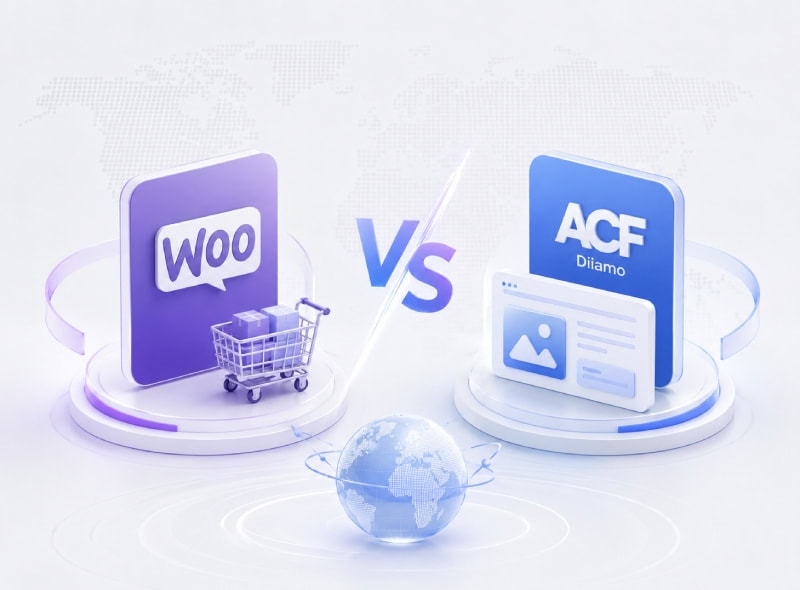
Previously, when developing product management solutions for B2B e-commerce websites, the WooCommerce plugin (commonly referred to as Woo) was predominantly used to implement product uploads, management, and the creation of product detail pages. It offers mature and stable functionality, robust compatibility, and convenience. Its only drawback is that its extensive B2C features can slightly impact speed and performance.
Over the past two years, numerous WeChat public account articles and group chats have recommended using the ACF plugin to create custom post types (product categories) and product custom fields. This enables product uploads, management, and the creation of product detail pages (which can be built using plugins like Elementor), offering significantly better performance and speed. As a result, many have abandoned the WooCommerce plugin.
This is indeed a great solution, significantly boosting speed and performance. Many domestic theme developers have adopted this approach for creating theme detail page templates/sections, and numerous users building B2B e-commerce websites no longer rely on WooCommerce.
To be honest, https://www.diiamo.cn had also considered abandoning WooCommerce. After some time of reflection and observation, we realized that WooCommerce is better suited to our business situation and cannot be replaced.
Most beginners lack experience and uncertainty about the path ahead, making them prone to making the wrong choices. It's not that the ACF solution is bad, but WooCommerce is simply better suited for building various high-end, complex websites. It boasts a complete ecosystem and an unshakable dominant position. Below, Xiao Di will analyze the benefits of WooCommerce to help you decide whether to choose it.
First, the conclusion.For simple, purely showcase-type websites with a limited number of products, low requirements, and no need for advanced display effects or functionality, we recommend using the ACF plugin solution or a third-party plugin solution.
For high-end, complex websites with demanding visual and functional requirements, WooCommerce is the top choice. Simply optimize its speed and performance following the tutorial below.
At Diiamo, we exclusively use Elementor + WooCommerce to build e-commerce websites for international trade, and the speed and performance are excellent! While many companies in China use WordPress + Elementor to build websites, Diiamo ranks among the top in terms of speed and performance.
Advantages of Woo's Product Management Solution for E-commerce Websites
WooCommerce has established itself as the dominant player through years of development, boasting a complete ecosystem with a wide array of complementary plugins. It remains the top priority for plugin and theme developers to support, offering numerous advantages that make it difficult to replace.
Can be integrated with an ERP system
Some large clients have their own ERP systems and require that the website integrate with those systems so that inquiries and similar data are automatically forwarded to the ERP. The clients then use their ERP systems to assign inquiries to sales representatives and track the status of those inquiries.
WooCommerce itself can integrate with many ERP systems, which makes development much easier. If you were to implement this using the ACF plugin, you’d have to build it from scratch, which is quite a hassle and results in poorer compatibility.
Convenient and easy to use
WooCommerce offers most of the essential features needed for product management on e-commerce sites. There's no need to rebuild or reconfigure anything—it's ready to use right out of the box. Plus, all its functions are straightforward and easy to use.
If using the ACF solution, you need to create custom post types, establish product categories and tag functionality, and handle URL structures to comply with SEO optimization. Additionally, you must create custom fields for main images, thumbnails, product details, and other elements.
These operations are simple for technicians and can likely be completed in under ten minutes. However, for newcomers, the learning curve and trial-and-error costs are not insignificant.
Woo includes a wide range of practical Elementor widgets↓, and below is just a small selection. It significantly boosts both the efficiency and visual appeal of website development.

Powerful and suitable for building complex, high-end websites
Over the years, WooCommerce has developed a vast ecosystem, with numerous developers creating a wide variety of plugins that enable a multitude of practical features. For example: bulk product export/import, paid content and downloads (with payment options including Alipay, WeChat Pay, and PayPal), automatic posting of articles to social media platforms like Facebook, wishlists, and:
Product Filter↓

Display multiple attributes/parameters/specifications ↓, and you can add selected rules to the inquiry (car) ↓ (you can also add selected parameters to the inquiry email/record when you send the inquiry).

The red box in the figure below specifies that the function is selected for useWooCommerce Extra Product Options The +Woo plugin makes it easy to automatically add specification selections to each product, or customize which specifications are displayed for each product to choose from. You can also add the selected parameters to the inquiry email/record when sending inquiry, very useful.

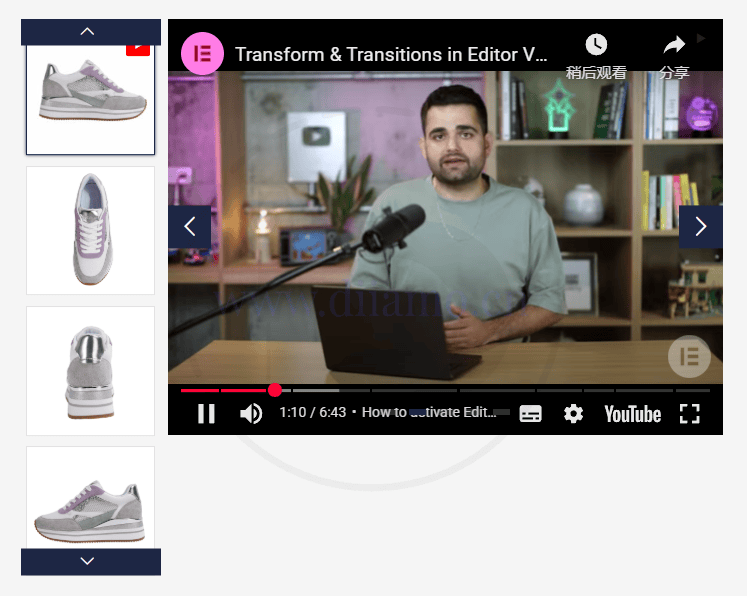
Insert video into product detail slide show↓
Stylish and Powerful Product Thumbnail Lightbox↓

Inquiry Cart Feature (Select multiple products to send inquiries together)↓

The detail page displays related products and upsell features↓. You can also manually select specific products to display as related items in the product upload interface. Additionally, you can easily insert specific products into article/case/solution content using the shortcode [products ids="xxx, xxx, xxx, xxx" columns="3"].

Product table showing different specifications of the same product↓

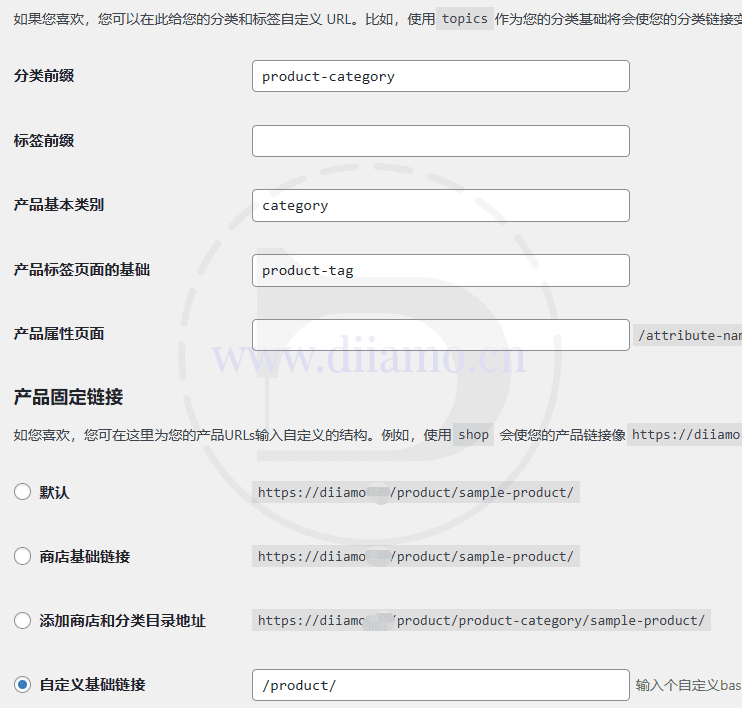
Woo's URL structure is more versatile and offers greater customization options↓
ACF's custom product type URLs are fixed and offer less customization flexibility. WooCommerce's URL structure is more adaptable to product types and can be easily modified using plugins like Rank Math SEO to remove prefixes or category prefixes from URLs.
Some clients have strict requirements, demanding that product category URLs and detail page URLs be customized to their specifications. Woo can easily accommodate this. The product URL structure in the ACF solution is relatively fixed, offering less customization flexibility.
Woo also supports integration with CRM systems or visitor tracking plugins, automatically capturing data on which products visitors viewed and which product pages generated inquiries. It can be used to build wholesale marketplaces, online courses, and more.
The features mentioned above, which Woo can easily implement, are difficult—or even impossible—to achieve using the ACF solution. This is why we at Diiamo insist on using the Woo plugin when building e-commerce websites: it offers greater flexibility, higher efficiency, and better results. It’s ideal for creating all kinds of complex and high-end websites and meets even the most demanding client requirements.
If you're building a purely showcase-style website with minimal requirements that don't necessitate the features mentioned above, you might consider using solutions like ACF.
There are many supporting templates/features
Almost all WordPress templates sold on the market are based on Woo, the use of Woo can easily import and use many templates, greatly enhancing the efficiency of the station. If you use the ACF program, you can only manually build from scratch.
Woo e-commerce features are mature
Xiao Di realized that to make a website perform well and achieve high conversion rates, it's still necessary to add some e-commerce features. Many B2B website clients request B2C functionalities, such as the aforementioned product filtering capabilities, displaying multi-attribute/parameter/specification options, inquiry cart features, and paid download/reading functions. These are essentially e-commerce website functionalities, and Woo's e-commerce attributes can easily fulfill all these requirements.
Xiao Di has also encountered clients who suddenly demand adding payment processing and order management features to their B2B websites, essentially transforming them into e-commerce platforms... Woo can handle this conversion effortlessly, whereas other plugins would likely require starting from scratch.
Woocommerce Disadvantages
Nothing in this world is perfect, and this is especially true in the web development industry. Numerous advantages often come with significant drawbacks. Yes,Woocommerce's main drawback is its bloated nature! Too many unnecessary features lead to poor speed and performance..
WooCommerce is essentially an e-commerce plugin designed for e-commerce websites, so it comes with a wide array of e-commerce features such as online payments, order management, marketing tools, coupon functionality, user registration and login capabilities, and more, resulting in complex code. Running both Elementor and WooCommerce simultaneously on a low-spec server will lead to subpar website performance, speed, and concurrency handling without additional optimization.
But, but, but every problem has a solution—the shortcomings of the WooCommerce plugin on 2B websites can be completely resolved! And the method isn't complicated; just follow the suggestions below.
Woo Performance and Speed Optimization Methods
WooCommerce performance and speed can be optimized. Simply put, this involves disabling unnecessary features, removing redundant code, and customizing the hiding of certain sections, content, or menus.
Disable unnecessary features
For B2B websites, WooCommerce has many unnecessary e-commerce features that can simply be disabled, significantly improving performance and speed. Diamore offers sales.Disable Bloat Pro pluginWith just a few clicks, easily disable unnecessary Woo features to significantly boost performance and speed.
With Disable Bloat Pro, you will:
Disable WOOCOMMERCE expansion
Disable WooCommerce Admin, which will make your backend heavy. Disable all WooCommerce promotions that appear in different places in the admin panel. Reduce the size of CSS and javascript scripts loaded on the front-end and back-end of your site.
WOOCOMMERCE Administrator
The functionality of WooCommerce Admin continues to be increasingly integrated into the WooCommerce merchant experience. You can effectively disable WooCommerce Admin, analytics, home screens and other features that slow down your admin panel using the following options.
Disable WooCommerce Administrator
Disable marketing center
WOOCOMMERCE Promotion
WooCommerce constantly tries to promote and advertise add-ons by adding nags to your admin panel. Now you can turn them off or hide them at.
Disable WooCommerce.com notifications
Disable WooCommerce marketplace suggestions
Disable the recommended shipping solution metabox
Disable the recommended payment plugin metabox
WOOCOMMERCE back-end script
Accelerate your site by turning off unwanted scripts loaded in the background of the admin panel.
Disable the WooCommerce status meta box
Disable the WooCommerce Dashboard Settings widget
Disable WooCommerce Blocks (Backend) on Your Store's Frontend
By default, browsing the store front-end will automatically load a considerable amount of scripts and styles. Use the following options to disable them.
Disable the WooCommerce widget
Disable WooCommerce scripts and styles
Disable WooCommerce shopping cart snippet
Disable WooCommerce Blocks (Frontend) Disable Unnecessary Stripe Scripts
Wait a minute...
Disable redundant code
The above method disables redundant features, primarily targeting the backend. However, the frontend may still inject unnecessary code, such as online payment scripts and "Add to Cart" functionality. Diamore offers sales.Perfmatters PluginYou can easily disable unnecessary front-end code, significantly boosting performance and speed.
The Perfmatters plugin has a bit of a learning curve, so beginners should not attempt it lightly. Diyao wrote an article titled "Ultra-Detailed and Comprehensive Perfmatters Setup and Usage Guide》Article to help everyone make the most of the Perfmatters plugin.
Using these two plugins can significantly reduce WooCommerce's bloat, minimizing its impact on speed and performance. Building B2B e-commerce websites with WooCommerce no longer requires worrying about performance and speed issues.
Disable certain sections/menus in the backend
Although the Disable Bloat Pro plugin disables unnecessary features, the admin panel still displays redundant sections/categories/menus. For example, WooCommerce's submenu shows an “Orders” menu with a “Payments” section menu below it. While this has minimal impact, it's simply unacceptable for those with OCD tendencies.
Free installation availableAdvanced Access Manager Plugin (AAM) Disable these sections/columns/menus. It's very convenient and easy to understand at a glance. There are plenty of tutorials on Google.
The AAM plugin is powerful and user-friendly, and has been listed by Diamore asEssential Plugins for WordPress WebsitesYou can disable sections/columns/menus in the WordPress admin panel and other plugins. You can also disable user permissions to manage account access rights.
Advantages of the ACF Foreign Trade Website Product Management Solution
The advantages of using ACF for B2B product management are speed and performance—nothing else.
Drawbacks of the ACF Foreign Trade Website Product Management Solution
First, the conclusion.Lacking in functionality, with poor extensibility and compatibility, making it difficult to achieve certain effects and features. For example, the above “Powerful and suitable for building complex, high-end websites”The functionality mentioned in the chapter is difficult to implement using the ACF plugin solution.
To create custom post types, establish product categories and tags, and handle URL structures optimized for SEO. Additionally, create custom fields for main images, thumbnails, product details, and more. These tasks are straightforward for technical personnel, often taking less than ten minutes to complete. However, for beginners, the learning curve and trial-and-error costs can be significant.
difficult to achieve: TheVariable product multi-attribute display (and add selected product attributes to inquiry), batch product import/export function, inquiry cart function (multi-product inquiry), automatically publish products as posts to social media such as Facebook, powerful product thumbnail slider and lightbox display function, product structure and SEO optimization, multi-supplier function, display different products/prices according to different countries, etc.
The standard approach for ACF solutions involves using the ACF plugin to create custom post types (product categories). This adds a “Products” section to the backend, enabling operations such as uploading products, deleting products, and modifying URLs. Its core functionality mirrors that of the “Products” section created by the WooCommerce plugin.
Then use the ACF plugin to create custom product fields, such as product images and detailed descriptions. Next, use plugins like Elementor to build product detail pages, retrieving these field contents for display on the frontend. The speed and performance are excellent, with no unnecessary features, and the ACF plugin itself is sufficiently lightweight and reliable.
The product management features produced by the aforementioned method are limited and far less robust and comprehensive than those offered by WooCommerce. Furthermore, the lack of compatible plugins means many functionalities cannot be implemented.
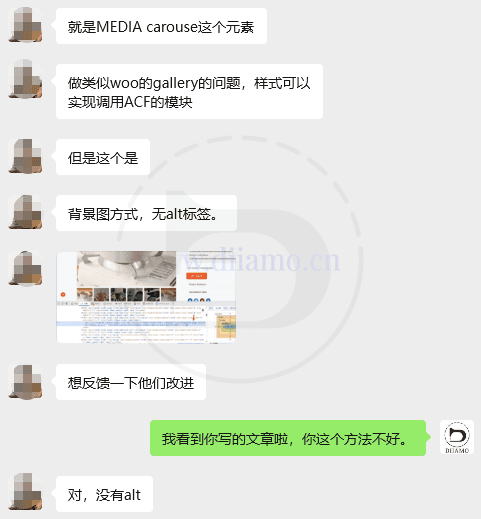
Case Description:The image below shows a competitor using the ACF solution to create a product detail page with Elementor Pro.Media Carousel WidgetRetrieve multiple image fields from ACF to create a product image slideshow.
The displayed images appear as background images without alt attributes, which weakens SEO effectiveness and slows down loading speeds. He contacted Elementor's official support and was advised to switch to<img>Add alt text to images. Anyone who's dealt with Elementor's customer service knows how terrible their AI support is—they're also resistant to suggestions, often taking years to implement GitHub recommendations for optimizing minor details.
This approach has many limitations, such as only allowing a fixed number of thumbnails to be uploaded and not supporting video insertion. Furthermore, I suspect the Media Carousel widget itself has bugs, as it sometimes malfunctions and displays errors.
ACF made product detail page image slideshow ↓, (Di screenshot removed part of the height).

Elementor Customer Service Feedback ↓, does not adopt adjustment suggestions.

Other Product Management Solutions
In fact, there are specifically for the 2B foreign trade website product management plug-ins, functionality and ease of use than the ACF program is good, performance and speed is also good, such as the following Naibabiji B2B Product Showcase. there are other plug-ins can be achieved with the same effect as ACF, more beautiful and powerful.
Naibabiji B2B Product Showcase
Naibabiji B2B Product ShowcaseIt is a B2B product management display plug-in made by Xiaodi's friend “Milkman Station Notes”, lightweight, good performance, easy to use, and support the inquiry car function.
The downside is the poor level of customization and the inability to modify the layout layout of the product detail page. The author says this plugin is for newbies who are not demanding and simplicity is the main focus.

Jet Engine
Jet Engine PluginSimilar to the ACF plugin, you can create custom post types and custom fields. Both serve the same purpose and are interchangeable. The difference is that the ACF solution is more streamlined, offering better performance and speed, but it lacks visual appeal and has slightly less customization options.
Jet Engine plugin is a bit more beautiful and powerful, and comes with a product thumbnail slideshow widget (๑-̀ㅂ-́)و✧. The downside is that the speed and performance is not as good as the ACF solution, but it is better than Woocommerce, which is in the middle of the 2.
And Jet Engine has a lot of matchingJet Series Plug-insAvailable, with many third-party plugins also compatible with them, offering a robust ecosystem.
2B foreign trade website product management program in-depth comparative analysis ends here, after reading, 2B foreign trade website product management choose Woocommerce or ACF plug-in I believe we have been able to make a judgment. Any other questions or suggestions are welcome to leave a message below.