Rocket跟Kinsta同属第一梯队的高端托管主机,速度非常快,是主机界的速度领先者。和Wp Rocket pluginBelonging to 2 different companies that have a partnership, Rocket Hosting offers free genuine Wp Rocket to its users.
Rocket hosting is very hot in foreign countries, talking about high-end hosting many people choose it. Domestic server message slower, but now many people in China began to use it to build high-end e-commerce sites and foreign trade sites. Diiamo has used Rocket host to help several customers build 5 large and complex websites, with excellent speed performance and good advertising results.
This Rocket hosting purchase tutorial is written to introduce the Rocket hosting advantages, why it is faster, and to help you sign up for the purchase smoothly. Attention:Don't use this host if you're new to building websites or if you're in the mindset of playing around a bit!.
Tip: Rocket hosting with Imunify 360 antivirus will automatically disable the GPL version of the Elementor Pro plugin, the original version is required. If you buy through our invitation link, we will help you activate it for free for 1 year if we get the commission.Genuine Elementor ProThe second year of activation starts at half price ($35/year) for sites on the same host.
Rocket hosting cares a lot about the quality of the website and customers, will keep an eye on the website situation, and likes websites that are on the high end/built with care, and long term renewal customers. If you have a real business, good hosting results will be renewed for a long time, high requirements for website design/speed, etc., then that is Rocket's target customers, welcome to use.
RocketGreat for asset-heavy/cumbersome sitesIn particular, theLarge e-commerce sites.. Diiamo (www.diiamo.cn) has a fee-based optimization service for WP site speeds, having optimized an asset-heavy, ultra-complicated e-commerce site.Website Status:Built with Kinsta hosting, WoodMart theme + Elementor + Woocommerce (Snail 3-piece suite).
passably (good)plug-in (software)Plugin Implementation 1) Show different prices for different regions; 2) Show different prices for different user groups; 3) HubSpot Live Chat; 4) Block spam comments online; 5) Shipping Insurance; 6) Product Filtering; 7) Data/Ad Tracking Plugin and so on;
Linking a few hundred kilobytes to a third partyJS:谷歌广告、访客踪迹跟踪插件、脸书广告、在线聊天工具、Bing、谷歌字体、插件第三方代码、Gtranslate自动翻译等。使用GIF动图,体积200KB~3MB/张。
Di I do optimization pre-speed analysis and find the site so cumbersome that my head is spinning. The site wasn't built well enough/asset heavy, too many features, too many third party resources loaded, too many images.... If I hadn't already charged full price, I would have wanted to quit.
The only point of comfort for this site is that the client moved the site to Rocket hosting, which gave me a little confidence to continue optimizing, and after 3 days of tossing and turning, I finally optimized the speed up (below). Even such a complicated e-commerce site can be optimized to this extent, Rocket hosting is awesome.


2026.03.18: oneWebsite BuildingCustomers listen to our advice to use Rocket hosting, into the Diiamo optimized speed is very fast ↓.


If your site is in a similar situation, Rocket hosting is recommended.
本站终身VIP会员,经过我们推荐使用Rocket主机做了几个网站的反馈↓。

Sign up for thanks via the invite link
When you buy a server through our invitation link, we get a commission and as a thank you we will give you the following support.Note: Please think clearly if this hosting fits your business and budget!, don't buy it just because you have a thank you!
Note: Rocket Affiliate Audit is super, super, super strict, and referrals are often rejected for commissions. If a referral does not pass our audit, we will not be able to get commissions and will not be able to provide a thank you, so please understand.
The support below is a way for us to thank you for your trust, not to induce you to buy this hosting. Di hopes that your purchase is because this hosting is helpful to your business and will be used for a long time if it works well.
- Choose any one on our website Theme or Plugin, free gift to your account;
- bonusObject Cache Pro pluginThis can further enhance the effectiveness of the website;
- Relocate 1 website for free;
- Within 30 days of purchase, usethis hostBuild a website encountered any problems, free one-on-one manual professional answers;
- Free speed audit, slow speed after using this host contact our microsoft customer service, help you analyze the reasons to give advice;
Cooperative Extension:把我们的邀请链接 (https://www.diiamo.cn/go/rocket) 发给朋友。成功注册购买后,你和你朋友都可以免费获得上面提到的感谢。详情联系微信客服(页脚有码)。
注意:购买完成后申请退款/退机,再重新购买新主机的话,商家不计算我们的佣金。只有第一次购买付款才有佣金,这种情况下需要注册新账号重新购买才有佣金。
注意:如果添加到购物车后,没有付款,然后新购第二个主机并且完成付款,只有付款购买第一个主机才算佣金,第二个不算。第一个主机不付款的话,没有佣金。
Note: If you pay monthly and only buy 1 month, no commission is calculated either. Hosting customer service said: they want quality customers, those who spend 1 dollar for a month most likely won't renew, so they don't give commission. Yes, Rocket commission is so hard to get, Di is helpless too. Basically, you have to buy more than half a year at one time before you can get a commission.
注意:购买服务器后一周内没有做好网站初稿,或者网站搭建得很差劲,并且网站没有公司介绍之类,容易被主机商家判定为低质量网站。这种情况不会给我们佣金。对,Rocket就爱这么玩,故意的,沟通无果,我也很无语。
Rocket Hosting Benefits, Why Choose It?
Tip: Only Business and above packages can use the genuine Object Cache Pro plugin for free. For websites with less than 5k daily visits, the effect of using the free Object Cache plugin is almost the same. You can also contact our customer service to get the GPL version of Object Cache Pro plugin for free.
In addition to the very good value for money mentioned above, there are also the following advantages.
- Host configuration: 32 cores (4G Hz), 128G RAM, LiteSpeed PHP, NVMe storage;
- Renewals are the same price, no hidden fees, no upsells (secretly Diss Kinsta), and only one payment;
- Deeply optimized/integrated Woocommerce, better site speed and CDN caching than other hosts in the same class;
- Very simple and easy to use, no additional configuration optimization, buy and use, immediately enjoy high speed, very suitable for white users;
- 免费提供全功能CloudFlare Enterprise CDN、正版Object Cache Pro、WP Rocket;
- CDN is fast! Full page caching and pre-programmed to bypass the appropriate cookies, pages, and resources for newbies right out of the box;
- Online customer service responds quickly and really solves the problem, very hassle free and worry free;
- Powerful WAF firewall + efficient CDN firewall, very high security;
- Free email, relocation website services, and more come standard with a 30-day no-questions-asked refund;
Tip:There is no limit on the number of visitors, but there is a limit on total bandwidth usage. A website typically uses about 50 GB of bandwidth per month, which is sufficient.The excess amount is charged at a rate of $0.08/GB, which means an excess of 100 GB costs $8—a reasonable price.
Excellent value for money
Rocket Hostyearlypaid Package Price (2025.04.19)↓, additional 2 months of free hours, buy a year can use 14 months.
We recommend paying annually; you can get a full refund within 30 days with no questions asked. If you pay monthly and later switch to an annual plan, you will not receive the discount or the two-month bonus period.

Rocket Hostper mensempaid Package Price (2025.02.26) ↓, more expensive, no complimentary hours.

Diiamo pro-tested feel better than Kinsta, CloudWays effect, more cost-effective.Rocket hosting free offer: CloudFlare Enterprise CDN, genuine Object Cache Pro and genuine Wp Rocket plugin. The online customer service is fast, really solve the problem, will not shirk.
Some members have given feedback that Rocket hosting is overpriced, so let's do the math:30 USDThe Enterprise CDN and Enterprise Firewall included in the /Monthly Starter package is already worth $20 a month, plus online human services, automatic backup features, high-speed servers, and a complimentary genuine Object Cache Pro, Wp Rocket plugin, and unlimited performance and total visitors.
If you rent Business package for $100/month, put 10 websites, each website costs $10/month, you can use CloudFlare Enterprise CDN, genuine Object Cache Pro and genuine Wp Rocket plugin and enterprise level firewall, just these packages are worth more than $20/month! It's the equivalent of getting a server for nothing.
在我们懂行人眼里,这简直是做慈善!小迪对比主机,找了一大圈没发现有性价比一样高,同时都提供上述东西,速度又快的主机。其它同档次主机要么价格翻几倍,要么速度不行,要么难用。
要达到Rocket主机相同速度、安全性、稳定性的情况下,用CloudWays至少要100 USD/month, Kinsta is going to be at least160 USD/month (using object caching) and also have to be very knowledgeable about optimization and configuration.
If you rent Vultr hosting to optimize at least 4H8G, then buy a paid panel with advanced firewall, paid CDN, Object Cache Pro, Wp Rocket plugin, add up to over70 USD/Month, even with this configuration it would take a highly skilled person to optimize to that speed for Rocket hosting.
If it is a large e-commerce site, the profit of an order or the daily waste of advertising costs are more than 30 dollars, change a better server to save advertising costs, new orders profit is super substantial.
All in all, to realize the high-speed and stable effect of heavy assets/busy websites, Rocket hosting can be said to be one of the most cost-effective, effective, fastest and easiest solutions, which is worth every penny!

相比之下,Kinsta给的配置少些,价格却更高,限制也多,啥都要加钱。Rocket限制很少,性能足,没有隐形费用,不需要额外购买啥东西。

Reject lag without limiting performance and speed
Rocket provides sufficient configuration and has no limitations on performance or speed, so sites rarely get stuck due to configuration/performance issues. If a site gets stuck, it's because the site itself is stuck, e.g. too much code is loaded, the page size is too big, etc. It has nothing to do with the server or the network.
Kinsta, CloudWays and other hosts have limited configurations and performance, and they have to add money for overage, which is how they make money. So these 2 servers are easy to get stuck, the speed will not be very fast.Rocket is relying on limiting the hard disk space, the total broadband traffic and the number of websites which is the most important thing to make money.3 samplesStuff makes money, overages require package upgrades.
The Rocket package gives you enough credit for most websites, so you don't have to worry about it. And it has no hidden costs, do not need to spend extra money to upgrade or buy anything, we have a few customers site with Rocket a few years, in addition to the fixed cost of the package did not spend a penny extra. Special Note.Rocket packages do not limit the total number of visitors! Kinsta and such limitations!
如果超额证明你的网站效果好,收益不错,升级套餐你也乐意,毕竟主机商家也要赚钱。
Super fast.
The following factors are some of the reasons why Rocket hosting is so fast.
Deeply optimize Woocommerce:
This is important to further improve Woocommerce website speed and compatibility. On one hand, Redis Cache willdirectionGround caches some dynamic data/transients of Woocommerce, such as shopping cart data, checkout page data, etc., and sets the appropriate auto expiration time.
The other side of the coin is that CDNs implement full-page caching (caching all content, including html), and at the same time willaccurateBypassing Woocommerce's corresponding cookies, some data, transients, etc. improves speed without causing errors. To summarize, the speed of customers visiting the Woo website and the speed of checkout and payment will be much faster without errors.
Few other hosts are so deeply integrated and optimized so meticulously, the setup is not even Woo optimized, so the speed of the Woocommerce site is greatly reduced. In such a comparison, Rocket hosting is much more professional.
Full CloudFlare Enterprise CDN functionality:
Although hosts such as Cloudways and Kinsta also offer CloudFlare Enterprise CDN, they are "castrated" versions, which are not fully functional and less effective. The CloudFlare Enterprise CDN provided by Rocket is the full version, which is much more effective!
Rocket's CDN is full page caching, caching all content (including html)! and saves it in multiple edge nodes for delivery close by. Only the html of the shopping cart page and checkout page and the personal center page can't be cached, and Redis happens to cache this part of the data and can deliver it at high speed. So the visitor side can load the page resources extremely fast and quickly!
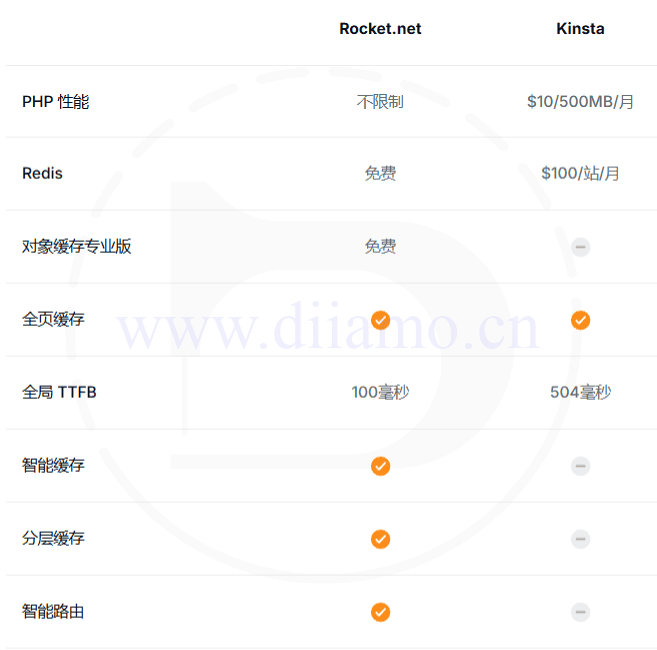
Rocket's CDN has faster TTFB, intelligent routing, hierarchical caching, and high efficiency Edge Cache to fully utilize the CloudFlare Enterprise CDN. Although some hosting providers also offer CloudFlare Enterprise CDN, they can only use some of the features, which is much less effective.
发挥Object Cache最大效果:
The genuine Object Cache Pro plugin provided by Cloudways and other hosts is also not able to deliver the full performance.Object Cache needs to be configured on the host's side and opened up accordingly in order to maximize its performance. Because of the cost or technical reasons, the Object Cache Pro plugin from Cloudways and other hosts can't be fully effective.
而Rocket主机可以发挥Object Cache插件最大效果,这对于Woocommerce电商网站有非常大的帮助。它可以缓存购物车内容、订单相关的瞬态、控制合适过期时间等,客户结账速度很顺畅。
The above, combined with a strong base hardware configuration is the Rocket Speedlead by a wide marginThe main reason for other hosts.
It's very safe.
It's firewall is awesome, my clients haven't had security issues with this host for a couple years, and the sites are fine without the firewall plugin installed. One of my clients' website doesn't have the firewall plugin installed.Spam comment blocker pluginI have received only one spam message a year, compared to other hosts who receive spam every week if they don't install the blocking plugin.
Security and insurance, usually may not care too much, out of the problem only to know that it is very important. 2B website is the most important inquiry information, some people will specialize in stealing the website inquiry data. E-commerce site security is even more important: payment security, fraud interception, theft interception, order data theft/tampering.
If your website handles or stores sensitive information (credit cards, PII, etc.), it is extremely important that it meets the necessary security requirements and standards such as PCI, whose primary requirement is to "install and maintain a firewall configuration for the protection of cardholder data." The Rocket Firewall meets this requirement without any configuration or Rocket Firewall meets this requirement without the need for any configuration or plug-ins.
Site security is far more important than we thought, Rocket uses CloudFlare Enterprise Firewall as well as Imunify360 Firewall (real-time scanning) that has been fine-tuned and optimized for WordPress and WooCoomerce and will not be blocked by mistake.

The corresponding report can be viewed in the background ↓.

Meet e-commerce website security requirements and PCI standards↓.

Eliminate malware and relocate/clean malware for free.
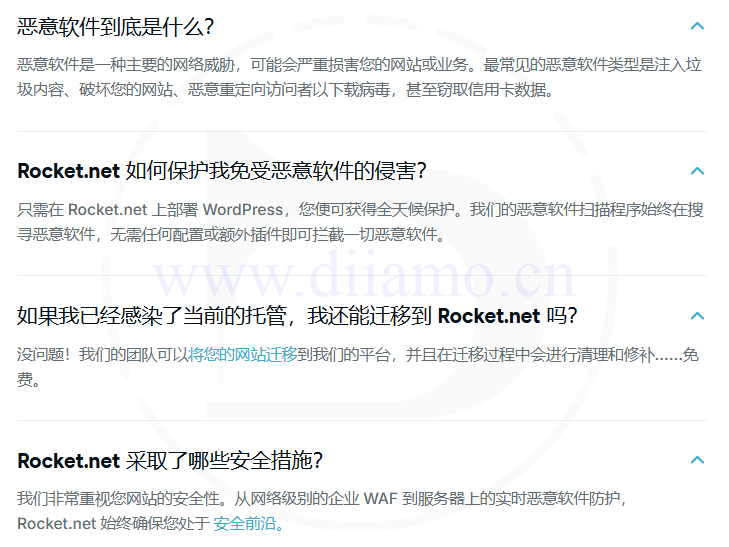
Image auto-compression, WebP/Avif conversion
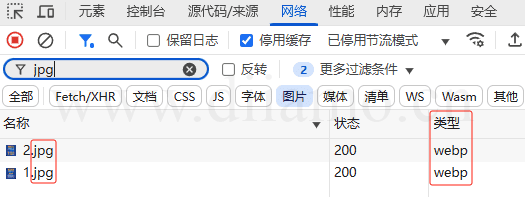
Hosting comes with CloudFlare Enterprise CDN with CloudFlare officialPolishfunction, will automatically compress the image, turnWebP and Avif formatsIn other words, you can upload JPGs (the best format) directly to the media library. This means that you can upload a JPG (this is the best format) image of the right size directly to the media library, and the CDN will optimize the image and provide it to the visitor in WebP/Avif format.
No need to install any more image optimization/compression plugins for your website, and no need to manually convert to WebP before uploading. Save money, no need to buyShortPixeland other plug-ins. Can also greatly save hard disk space, because the CDN to turn the WebP/Avif images stored online, does not take up host hard disk space, if it is to install plug-ins to turn will be stored in the host hard disk.
注意:CloudFlare官方说它们的WebP格式和Avif格式体积差不多,所以很多时候是显示WebP格式不是Avif。图片网址以后后缀依然显示Jpg/Png,需要在浏览器开发者工具,“网络”板块查看图片格式才准↓。也可以通过判断图片大小的变化来判断是否已压缩。
省心、省事、即享高速
Diarmo has been researching on optimizing speed for many years, with a little knowledge and love of tossing and turning. I have optimized many websites with different hosts, so Di knows the difficulty and steps to optimize different servers.Rocket Hosting is the host that saves me the most effort, trouble and gives me the best results.
Rocket has directly integrated the optimization solution into the host, no need for us to optimize, directly build the site can reach very fast speed! No need to mess with panels, firewalls, CDNs, object caching, image compression and other stuff, and most importantly no need to mess with caching features as well as bypassing caching, which saves a lot of time!
Simply and easily, you can increase the speed of your website a lot, which is very suitable for non-tech savvy website builders. You don't need to worry about website problems with Rocket hosting. If your website is still stuck, read our Speed Optimization article and follow the steps to be basically satisfied.
Rocket vs Kinsta, a comparison of 2 hosts
Xiaodi I have done many years of foreign trade salesman, learned a little something, to judge the quality of the same, the fastest, most intuitive method is one of the contrast. Take low, medium and high-grade products to compare all aspects, you know where things are good, the difference is what.
The biggest name and seller in high-end hosting would be the KinstaKista was formerly a marketing company, and the company's name is Kista, and the company's name is Kista.The internet is awash with articles praising it.
上面说那么多Rocket的优点,可能有人觉得是迪亚莫(www.diiamo.cn)的个人观点,不一定客观、可靠。咋们拿 Kinsta 和 Rocket 对比一下。
Rockt官方有个Kinsta对比页面,查看👉Rocket Hosting vs Kinsta Hosting
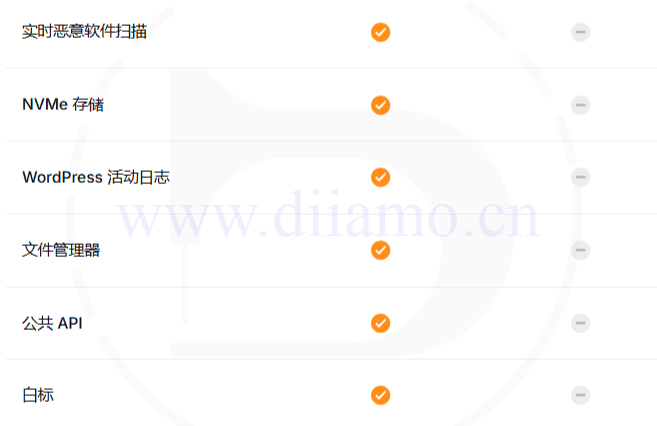
可能有人觉得参数不代表啥,Kinsta虽然价格高可是人家能接受就行,实际速度才有说服力,那咋们拿Kinsta用户真实反馈说话↓。
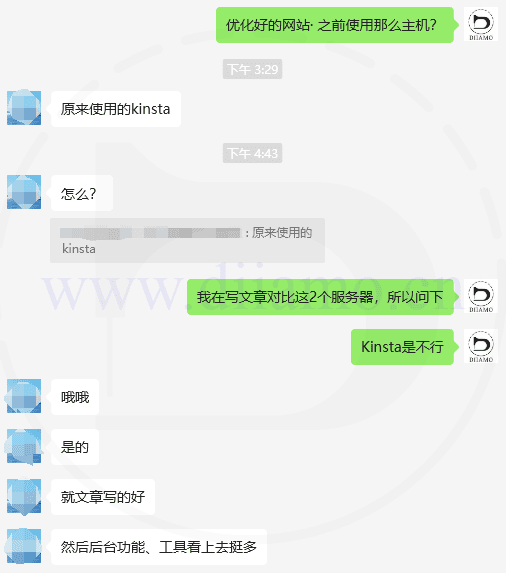
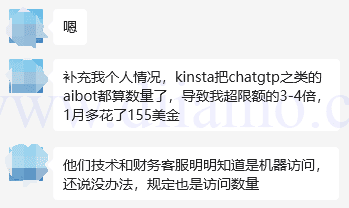
Kinsta's visitor count count counts the crawlers, resulting in an overage of total visitors, costing an additional $155. Crawlers can't be controlled, and a DDOS could cost thousands or tens of thousands of dollars extra!
Later relocated to Rocket hosting, after we optimize the speed (Diiamo provides fee optimization speed service) much faster, the order volume back to normal ↓, and Rocket hosting does not limit the total number of visitors!

Here's a Google mobile speed test result for a Kinsta hosting site, and it's safe to say it's pretty bad.

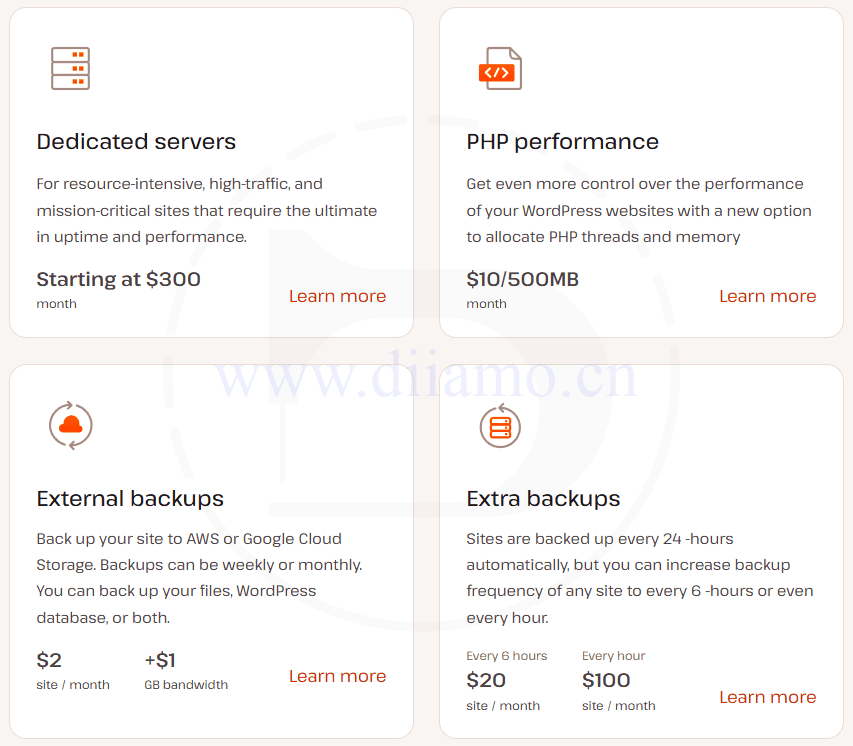
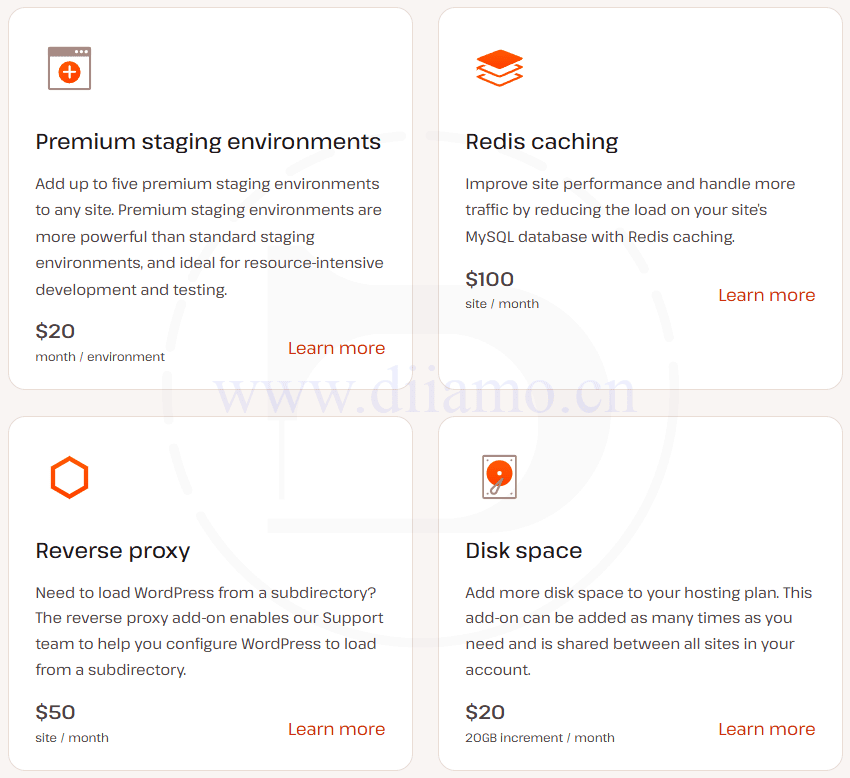
The following are some of Kinsta's extra charge items ↓, in fact, these are equivalent to restrictions, can't be used without paying money. Except for Dedicated servers (upgrading to independent hosting), Disk space (upgrading hard disk space), WordPress sites (increasing the number of sites), all other Rocket are provided for free.

No coupons, direct purchase via invitation link
Don't believe the coupons on top of Google! Online coupons are fake and do not lower the price, they only credit the referral (commission) to the coupon issuer for the purpose of stealing the commission.Just purchase directly through our invitation link—it’s already the best price available, so there’s no need to enter a coupon code.
小迪测试过网络上的优惠券,主要是链接的形式,其实就是邀请链接。点击后,你就算作对方推荐了,实际购买价格跟通过我们的邀请链接购买是一样的。还有一种输入优惠码,输入后价格没变,只是记入对方推荐,都是套路。
有个用户通过我们的邀请链接购买,然后自己网上找了个优惠券购买,价格反而更高,又没记入我们的推荐。最后,他注册了一个新账号,重新使用我们的Invitation Links购买,价格才降低,并且获得了我们上述的感谢。
Rocket Hosting Purchase Tutorial
先点击下方的大按钮进入Rocket官网,成功注册购买后可以获得我们承诺的福利反馈。
Click on the menu in the upper right corner of the "Pricing" Go to the Price Packages page.

1- Choose the host type first, it is recommended to choose "Managed Hosting”,这个才是常规搭建网站。“Agent Hosting” 给代理商用,最低套餐100美金/月,用来转租给别人。“Enterprise” 给超大项目用,最低套餐649美金/月。
2- Choose the right plan,The performance of hosting is the same for different packages, The main differences are the number of websites that can be hosted, as well as the disk space and total bandwidth allowances.If you're only hosting one website, just select the “Starter” plan; you can upgrade later.
3- Click below the selected package "Get Started" button to start the purchase.

You need to create an account first ↓, enter your email address (refrain from使用QQ邮箱!!!),设置个密码,点 CONTINUE.
Tip: You don't need to use QQ mailbox! QQ email is often used to do bad things, so many foreign companies (including Rocket.net) list QQ email accounts as risky!
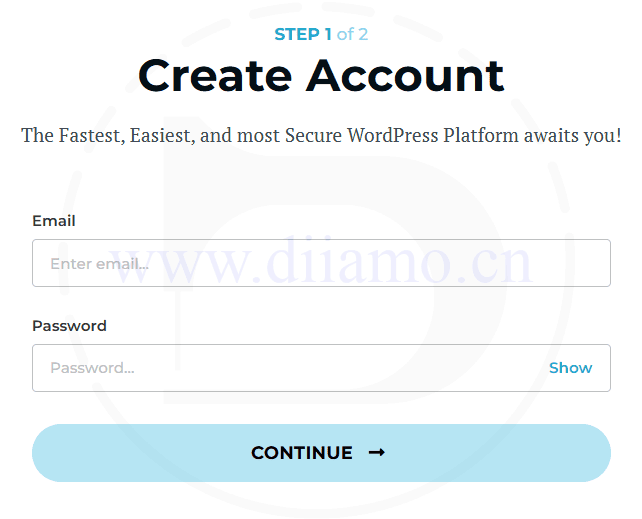
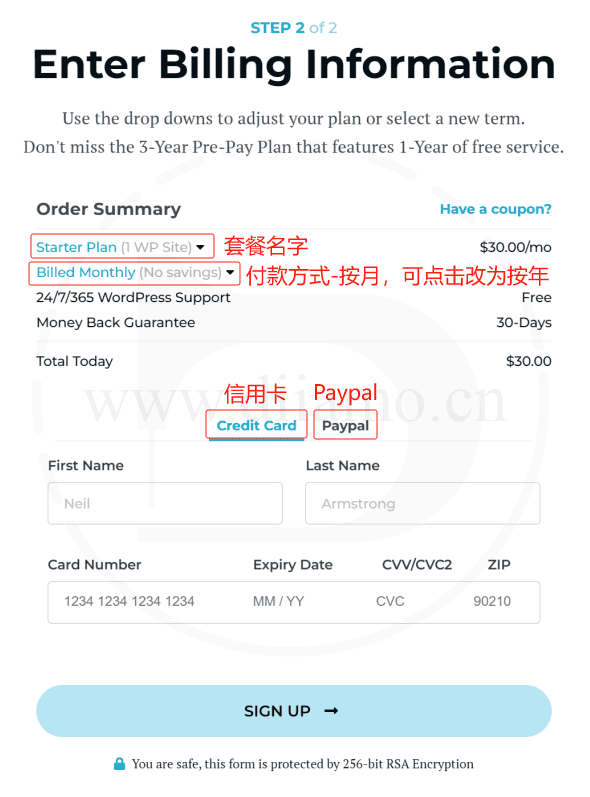
Bind/Enter payment details, click SIGN UP Create an account.
Optional credit card or Paypal.It is recommended to go for the yearly payment, which is cheaper and gives you 2 extra months.(This offer may be canceled at a later date.) It is refundable within 30 days for no reason and costs $1 for the first month if rented for a month.
Tip: Only support Paypla and credit card payment, if you don't have these payment tools you can go to Taobao to find someone to pay on behalf of you, search for Paypal or credit card payment on behalf of you. Please carefully screen Taobao store, it is recommended to look for store opening time and the number of orders.
Add/Create a Website
After creating an account by following the steps above, you will automatically be taken to the screen shown below.Backstage interfaceClick on "Creat Site" on the right hand side to add a site.

This step sets the website name and selects the hosting location, enter it as shown: 1) Enter the website name, 2) Select the location where the hosting is located, 3) Click on the Continue

This step is to create a WordPress website administrator account, enter as shown: 1) Set administrator name, 2) Set login password, 3) Bind email, 4) Click on the Continue.You have to memorize the account password and use it to log into the backend in the future.
Additional Options The column is to check the plugins to be pre-installed, if you use Woocommerce to enable it. "WP Recommended Plugins" is recommended to close, it will install several plug-ins, Xiaodi think it is not practical.

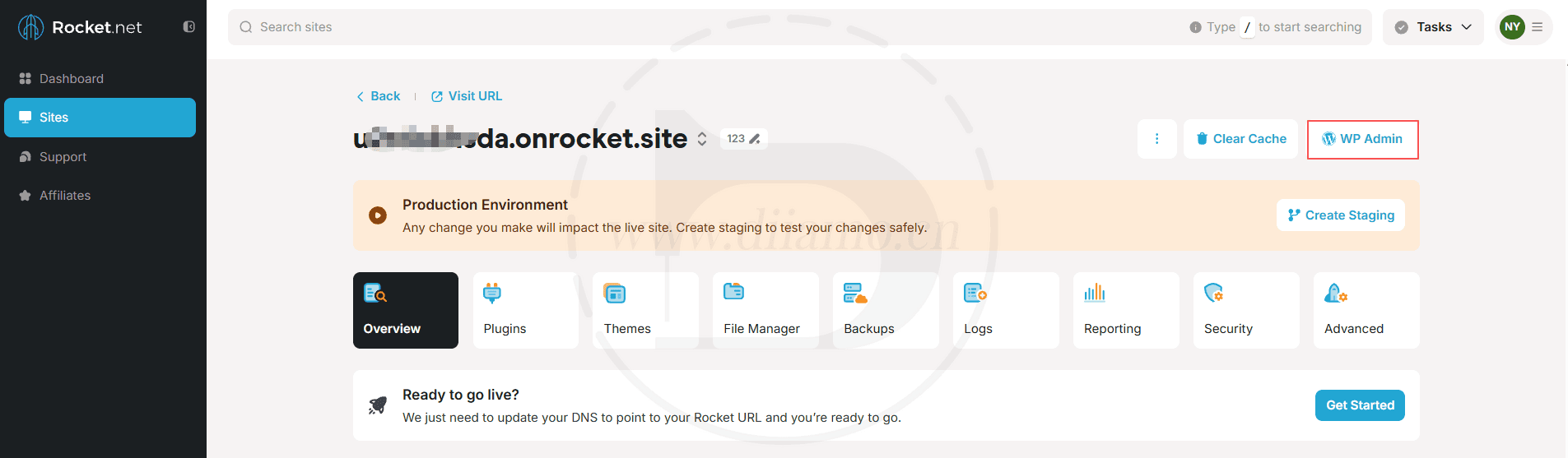
At this point the site has been created ↓, the following “WP Admin” button serves to log in to the backend of the site.
Binding Domain Name
First, go to “Dashboard”, To bind a domain name, click “Manage”↓.

Click the button in the red box in the image below Continue/ Get Started ↓

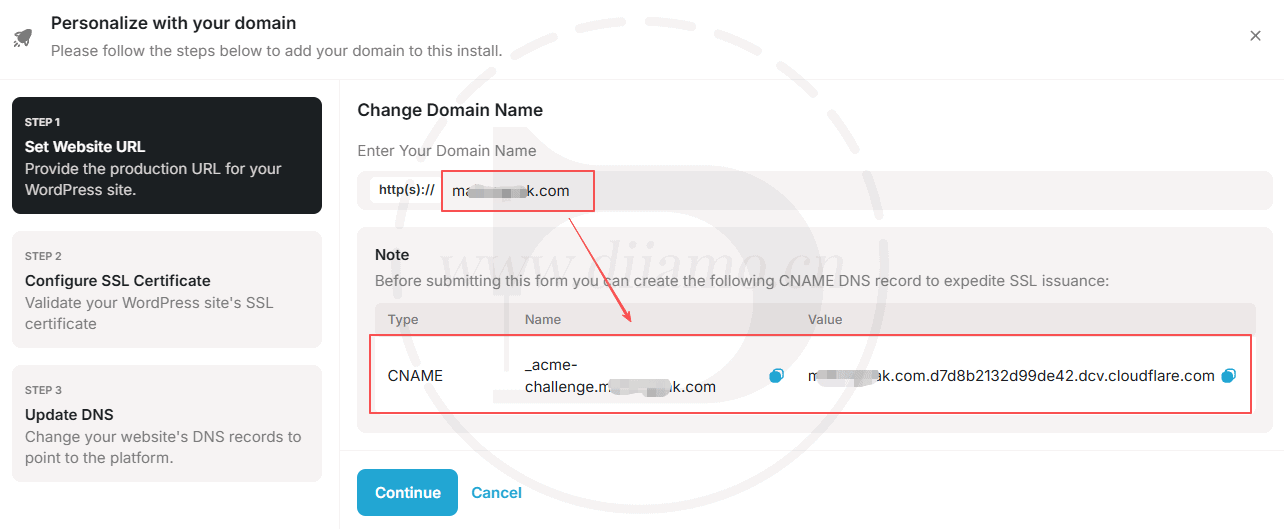
Step 1:In the first red box shown below, enter the domain name first; if you don’t want “www,” don’t include it↓. After entering the domain name, a CNAME record will be displayed; you’ll need to add this CNAME record to your domain immediately.
After adding the DNS record, click the blue “Continue” button below to proceed to Step 2. You’ll need to wait for this DNS record to take effect before the domain name resolution for Step 2 is displayed correctly. If the process fails after clicking, please wait a moment and then click the blue button again.
The purpose of this record is to speed up SSL certificate issuance. If you are using Cloudflare DNS, do not enable the orange cloud icon for this record.
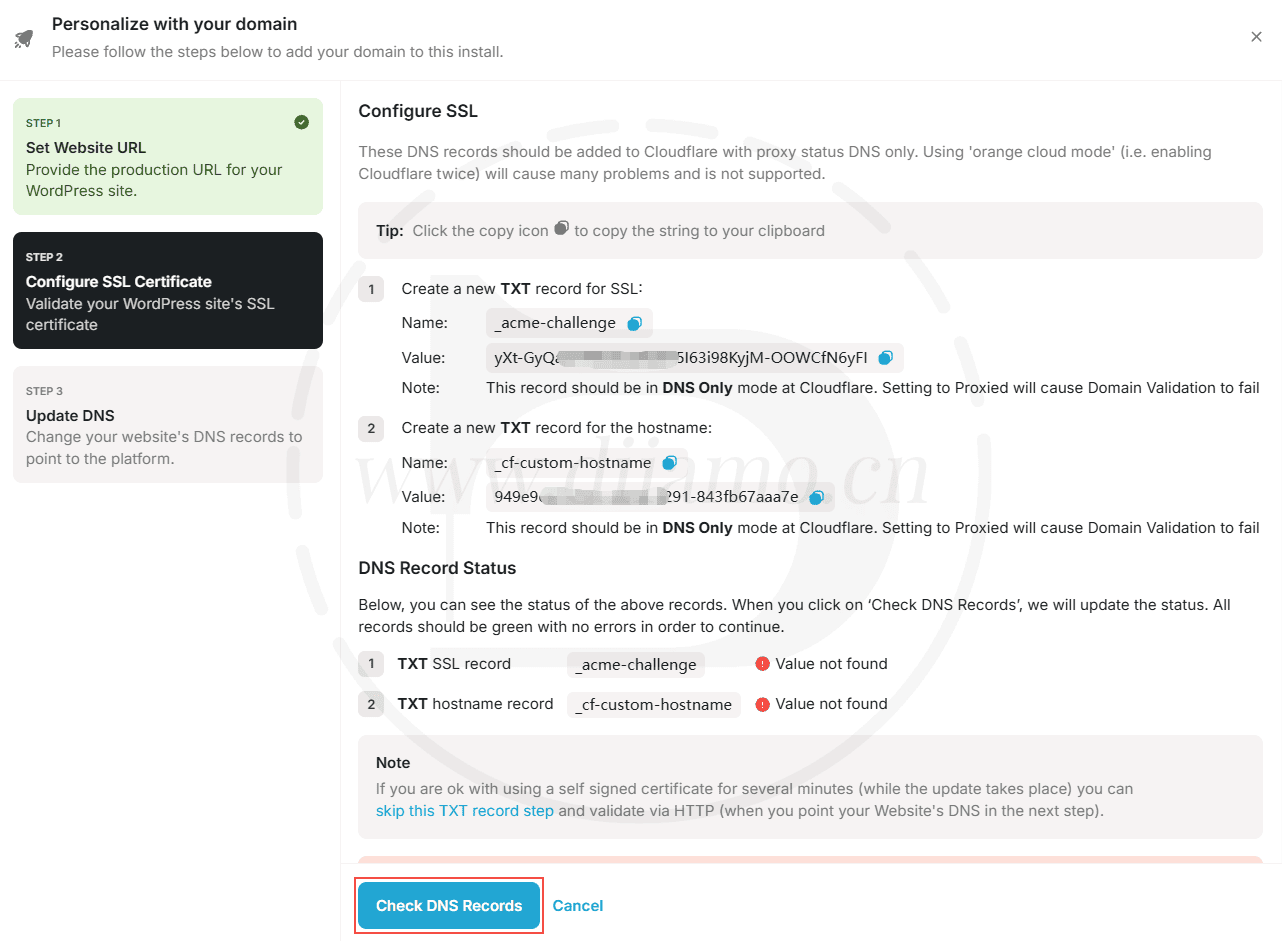
Step 2:You need to add two TXT records. After adding them, wait about two minutes, then click the blue “Check DNS Records” button below. If the domain name resolution is confirmed to be active, you will proceed to Step 3.
If the system detects that the domain name resolution hasn't taken effect yet, a message will appear. Just wait another 1–2 minutes, then click the blue “Check DNS Records” button until you successfully proceed to Step 3.
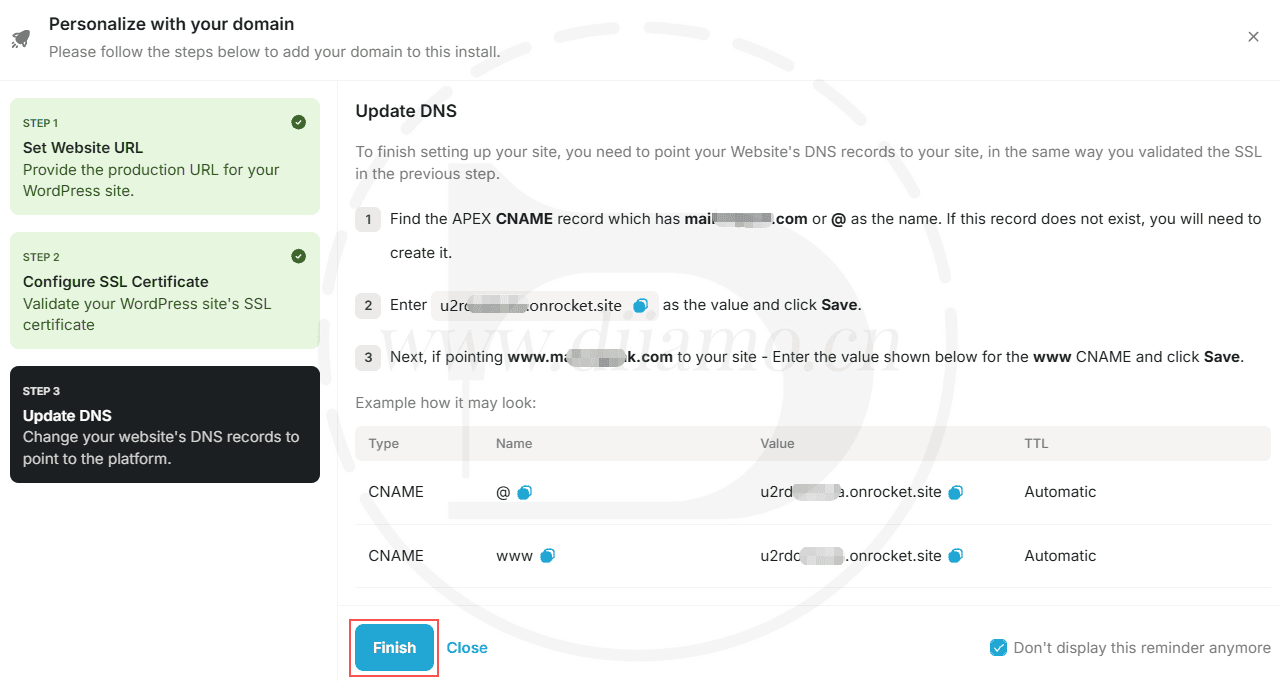
Step 3:Follow the instructions in the image below to add two CNAME records: one for @ and the other for www. Once you’ve added them, click the “Finish” button at the bottom. If the changes don’t take effect, wait a few minutes and click it again.
Note: If your domain is resolved through Cloudflare, be sure to disable the orange cloud icon.
If the verification is successful, you will be redirected to the screen shown below ↓, indicating that the domain has been successfully linked. You may be unable to access the website via the domain for a short time, as it takes a while for the DNS changes to propagate. Please wait 5–10 minutes before trying to access the website again; it should be accessible by then.
If the verification does not pass, the domain name resolution may not take effect, wait about 10 minutes (some small domain name providers are particularly slow, may have to wait a few hours), may also be the resolution of the wrong, or the existing resolution conflicts, compare the exclusion.

This concludes the Rocket Hosting purchase guide. Below is an introduction to the admin panel features, optimization tips, and more.Be sure to renew in a timely manner! Renewal after half a month of expiration of the Koti server will be subject to a $30 USD expiration fee!!!!It didn't just delete the server and website though, and it's still working all the time, which is pretty good.
Rocket Hosting Back Office Features
In fact, the background is very simple, at a glance to understand, commonly used functions are available. If you can not find the required functions, contact online customer service help on the line, seconds back very enthusiastic. This host basically do not need to operate the background, are preset, the function is also very little, their own pondering know what the meaning of this a few simple explanation of a few features.
After logging in by default to the dashboard screen below, click on theWP ADMINThe blue logo under the  Go to the backend of the corresponding website, also by visiting https://www.xxx.com/wp-amin Enter and putxxx.comChange to your URL.
Good news: Rocket lifted the limit of total visitors in the past few days (2025.02.17), and can accept unlimited visitors, so the following figure VISITORS It will always show 0 there, no stats.
Click on the right side of the website "Manage"Go to the site administration and the vast majority of the features you're going to use are in there.

Inside the site management, on the following chart a few features, at a glance, look down on the understanding, here but not too much explanation. Any questions contact host online customer service, or leave a message at the bottom of this article.The default PHP version is 7.4, it is recommended to change it to 8.3 for much better speed and performance.

To remove the site, go to the image above Website management > "Advanced" board, scroll down to the bottom of the page↓ and click on the Delete Button.

To relocate your website for free, just contact customer service. Just contact customer service if you have something really wrong, get back in seconds and fix it all at once. It takes time to find answers on your own, and you don't always get it right.
Customer Service Email:
support@rocket.net
hello@rocket.net
How to Create an FTP Account
Rocket Hosting has a limit on the maximum file size for uploads. If you want to upload large amounts of website data for recovery, you'll have to use FTP.
👉 Learn how to create an FTP account
👉 Learn how to use FileZilla for FTP operations
Contact customer service to increase the file upload size limit
If you don't want to use FTP and would prefer to upload files via plugins such as UpdraftPlus or Filester in your website's admin panel, you can contact Rocket's online customer service to have them adjust the size limit for you.
Just send this message to the other person (replace "xxx.com" with your URL first): My Site: xxx.com. Could you please help me change the maximum upload file size to 2 GB? I want to use the Filester plugin to upload large files to restore my site. Thank you very much.

Rocket Hosting Optimization
In fact, it has been pre-optimized, do not need to optimize, the remaining content of a little bit of advice to check. PHP version remember to check, choose 8.3 performance is much better, compatibility is also good.
Send the following copy to the host's online customer service to be processed, and note that the copy inside the xxx.com Change to your website domain name.
1- Disable WP_Cron and switch to the system Cron; this is faster and ensures that scheduled tasks run more smoothly. Update on June 30, 2025: Xiao Di found that disabling the system Cron sometimes causes issues, so it is recommended not to disable WP_Cron.
1- Install Object Cache (free version is installed by default, Business or above packages come with Pro version) to further increase the speed.
2- In the Plugins section, click Install Wp Rocket↓.

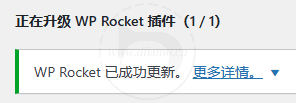
Can be updated online↓
3- Go to the “Advanced” section to change the PHP version ↓. As shown in the image below, the default PHP version is 7.4; we recommend changing it to 8.3, as it offers significantly better speed and performance. We also recommend disabling automatic updates for themes and plugins to avoid potential issues later on.
Version 8.3 currently has good compatibility; Xiao Di has used it on multiple websites without any issues. If you encounter problems on a website, switch back to version 8.2.
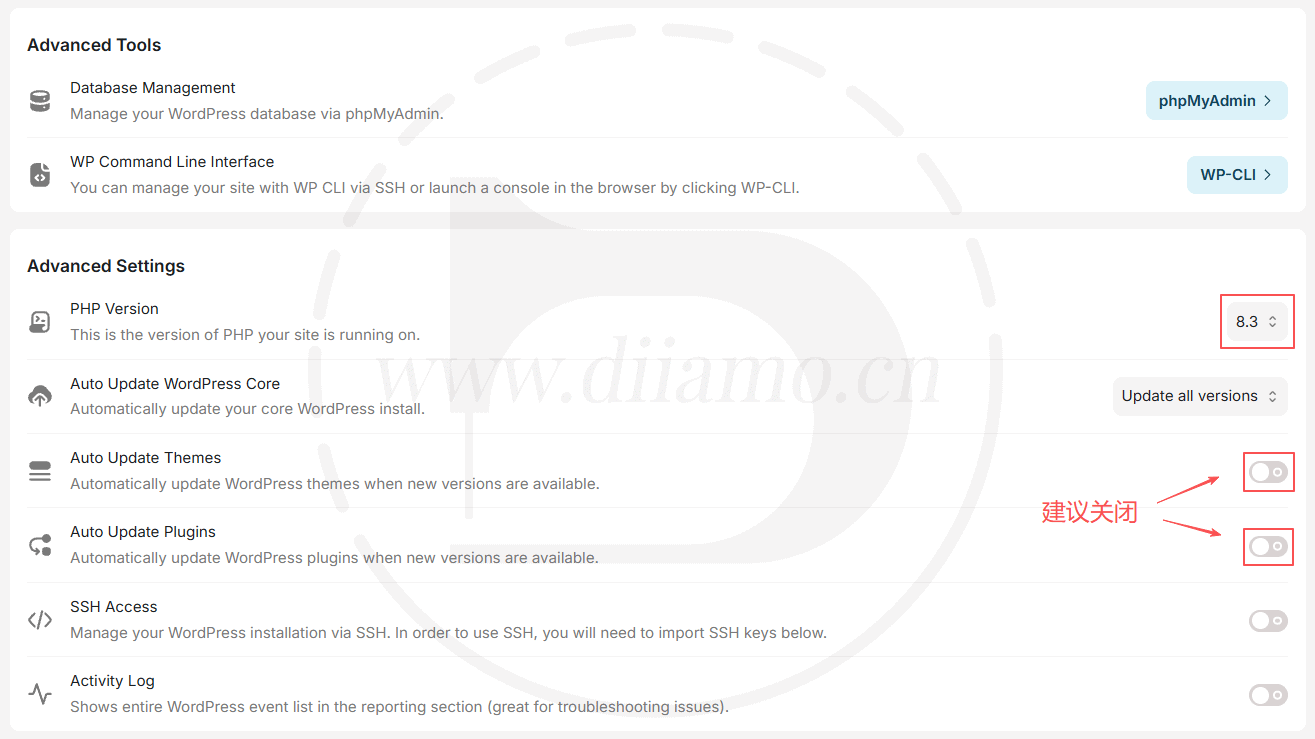
Optimization is as simple as that, go ahead and build your website without worrying about the server.
How to use Rocket Hosting CDN
This one has to stand alone because it's a little disconcerting in its simplicity and many people may not understand it. First of all the websiteautomatic application CloudFlare Enterprise CDN, no need to resolve additional domain names, no need to do anything extra.
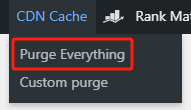
If you create a good website and enter the backend, you will see a “CDN Cache” in the top toolbar (below), which is used to clean up Rocket CDN cache, “Purge Everything” to clean up all the cache, “Custom purge” to clean up customized page cache, "Custom purge" to clean up customized page cache, and "Custom purge" to clean up customized page cache. "Custom purge" clears the custom page cache.
Tip: Relocating your website may override the CDN function, if you find that “CDN Cache” is not displayed in the top toolbar of the picture below, contact Rocket hosting customer service to reinstall the CDN plugin.
Tip: Rocket hosting automatically adds rules that will automatically clear the CDN cache when the site is modified, so the caching plugin doesn't need to be bound to the CloudFlare CDN.

Usually modify the site, will automatically clear the cache, if the display is not the latest effect, manually clean up. There may be a delay, wait a few seconds after cleaning to see.
There are fine-grained cache bypass rules in place, so content and pages that shouldn't be cached won't be cached, so don't worry. You will need to ask your host's online customer service what content will not be cached.
Diiamo runs a large and busy e-commerce site without any tweaks to the CDN or additional settings to not cache anything, and goes straight to the host's default plan. The website login, add to cart, and purchase functions are all working fine. If you want to additionally add certain pages not to be cached, contact the host's online customer service to handle it.
Cached content will not be displayed after login, so the front-end will display the latest effect after modifying the website (refresh by pressing Ctrl+F5 at the same time). If you use the browser privacy mode, the cache will be displayed when you are not logged in. f12 developer tool to look at the html file response header to know whether the page displayed is a cached version.
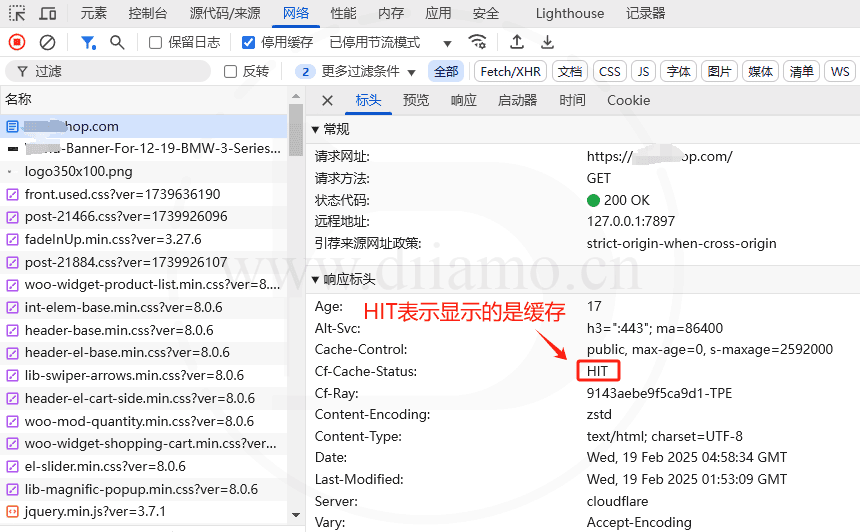
You do not need to link the CDN to the caching plugin.
When building a website, we typically need to link the CDN to a caching plugin. This way, when a page is modified or the cache is cleared via the caching plugin, the CDN will also refresh its cache, ensuring that visitors are provided with the latest content in a timely manner.
Rocket Hosting is a bit unique—they’ve added a mu-plugin that automatically clears the CF CDN cache after you modify your website or clear the cache of a caching plugin, achieving the same effect as binding a caching plugin.
Therefore, there is no need to manually configure a CDN with the caching plugin, and you must not use any other CDN or configure any CDN with the caching plugin; otherwise, serious issues will arise.
The CloudFlare CDN (Enterprise) included with Rocket Hosting is already one of the best paid CDNs on the market; it offers excellent speed, so you can just use that.
How to Manually Disable the CDN Cache on a Rocket Hosting Server
Although the CDN cache will be bypassed automatically after login, sometimes it is necessary to disable the CDN cache function manually for testing purposes and so on so that visitors can bypass the cache as well.
Edit the root directory of the .htaccess file in thetopmostJust add the code below to disable CDN caching for page caching. Once you've finished modifying or debugging your website, delete the code to restore CDN caching. If you encounter any issues, contact your hosting provider's customer service for assistance.
Adding the following code will bypass all caching ↓.
Header always set Cloudflare-CDN-Cache-Control "no-store, no-cache, must-revalidate, max-age=0, s-maxage=0"
Adding the following code only bypasses the page cache ↓, CSS, JS, images, videos, etc. will still be cached.
Header always set Cloudflare-CDN-Cache-Control "max-age=0, smax-age=0" "expr=%{CONTENT_TYPE} == 'text/html; charset=UTF-8'"
Header always set x-rocket "0"
Here's what it looks like after adding the code↓

After adding the code, the non-address state entity F12 developer tools to view found that the page cache state into the following figure EXPIRED, every time will be directly back to the source to get the latest page version.

Any problems contact the host customer service on the line, the other side will help you deal with it in a few seconds, newbies try not to fool around on their own.
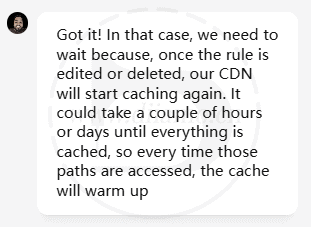
Tip: In .htaccess After the file deletion code restores the CDN cache, some JS, CSS, images and other resources may keep showing cf-cache-status: BYPASS, which means they are not cached by the CDN.
Host customer service said that you need to wait a few hours or even a few days time, CDN will cache those resources, and so on. In fact, 90% or more resources are cached, at this time has been very fast, even if a small part of the cache did not take effect did not have much impact.
Which caching plugin should I use for Rocket hosting?
In fact, an automated CDN caches HTML, and Redis caches data, so caching plugins are often unnecessary. However, in rare cases where page caches cannot be retrieved from the CDN, a caching plugin can serve as a fallback cache; it doesn’t really matter which one you use.
Updated May 23, 2025: A client’s website was using FlyingPress, which appeared to be incompatible with Rocket’s CDN; the cache could not be cleared properly, and the front end continued to display old images. The issue was resolved after switching to WP Rocket. Rocket hosting is incompatible with any other CDN; you can only use the built-in Enterprise CloudFlare CDN.
Note: You do not need to link the CDN to the caching plugin; doing so may cause issues. Rocket Hosting uses a mu-plugin file to automatically clear the CDN cache after website updates, so there is no need for additional manual linking.
Because Rocket offers freeGenuineWP Rocket cache plugin, so Di suggests that we use it ↓, the effect is very good. Enter the site management, in the "Plugins” board and tap the blue Install button on the right.
Online updates available!
Rocket Hosting Common Problems and Solutions
Below is a small Di encountered or member feedback problems, if you encounter other problems please leave a message, we will have someone to reply in time. If you pass our invitation link enough, directly contact WeChat customer service feedback problems, we all help you deal with.
Can't find the hosting online customer service button
Some users reported that they could not find the host's online customer service button in the picture below. In fact, many hosts, including Rocket, have customer service buttons that are only available on certain pages.lower rightDisplayed, not all pages are displayed. Please go toDashboardpage, contact the host online customer service.

By the way to analyze the chat with online customer service skills, 1- take a screenshot of the problem page, Ctrl + V paste in the chat window, point to send. Pictures convey information better than a thousand words; 2- Send the URL of the problem to the customer service, so that it is convenient to quickly locate and solve the problem; 3- Describe the problem briefly, do not need to talk about so many details, the customer service would like to know what will take the initiative to ask. If you don't know English, you can simply translate it;
The front-end still shows the old content after the modification, and clearing the cache is useless
Some users feedback using Rocket host, modify the content after clicking the top "Purge Everything"↓ button to clean up the cache, refresh the front-end still shows the old content. I've also encountered this problem.
Rocket is using Cloudflare CDN, the default setting is that after logging in, the html will show the non-cached version (cf-cache-status:DYNAMIC), but JS, CSS, images and fonts will still show the cached version.
When you click the "Purge Everything" ↑ button at the top of the backend to purge the cache, the server sends a command to Cloudflare to purge/update the JS, CSS, etc. cache. There is a time lag between clicking Purge Cache and clearing/updating the cache, which can take a few minutes.
This is a common situation, Xiaodi with other hosts and CDN will also be encountered. CDN or caching plug-ins will generally be set to modify the content and wait a certain amount of time (10 ~ 120 seconds) before caching, you can avoid congestion and errors, clean up so many CDN nodes cache also need time.
Sometimes Diiamo test need to click "Purge Everything" button 2 times and wait 1~2 minutes, front end press Ctrl+ F5 at the same time to refresh to show the latest content successfully.
Try temporarily disabling the CDN cache if you change it frequently.: The
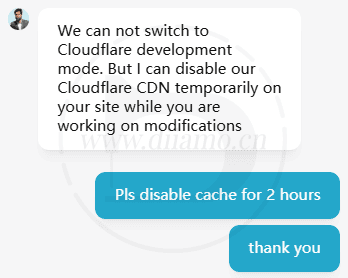
You can also let the customer service to help you disable Cloudflare CDN cache for 2 hours (the specific time depends on your needs), after the modification remember to let the host customer service to help you open the CDN cache;
Or you can disable it yourself, by editing the root directory of the .htaccess file, just add a bit of code at the top that will bypass all caching. See above for how to do this.“Disabling the Rocket Host CDN Cache”Chapters.
Wishlist page display error, dynamic content display abnormality
Feedback from a user who purchased hosting through our invitation link that the WCBoost - Wishlist Wishlist plugin's Favorite Products page is displaying abnormally, and refreshing the page with the favorite products will disappear.
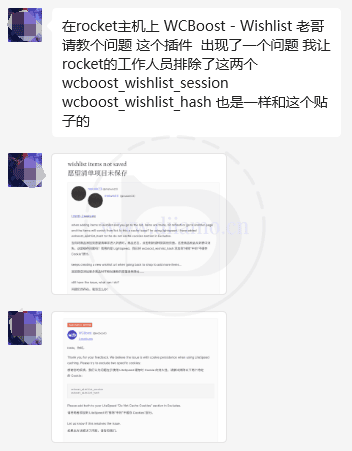
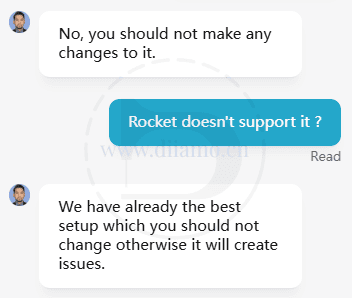
The hosting customer service told him to contact the plugin author, the plugin author told him to contact the hosting customer service, and both sides felt that the problem was not theirs. Disabling the caching plugin and adding cookies to exclude caching didn't work either. After listening to Diiamo's suggestion to switch to Ti wishlist plugin, the problem was solved.
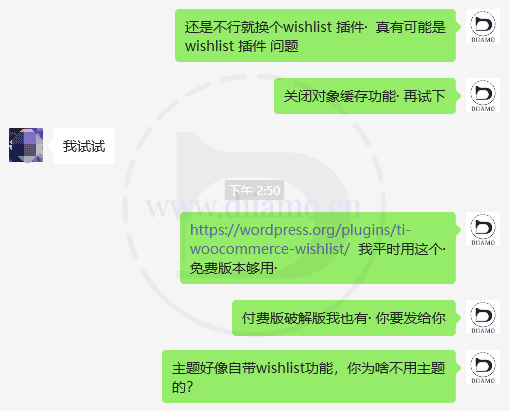
This problem may be caused by a plugin or incompatibility with the theme (Ecomus). If you encounter similar problems, try to change the theme or plugin to check, or fail to contact the hosting customer service, let it help you to check and fix the problem.
"Error establishing a Redis connection" after installing Object Cache Pro plugin
Contact the hosting customer service, send the following text to each other, he will help you to fix it and configure the plugin within 2 minutes.
Hi, I install redis object cache pro plugin, and add some configuration Code into wp-config.php.
Now is says"Error establishing a Redis connection".
Can you plese help me fix it and setup object cache pro plugin?
Thank you very much.
This problem occurs because some configurations in your configuration code conflict with the host. If you want to solve the problem yourself, just use the following configuration code.
Note: The token in the third line is specific to our Object Cache Pro plugin, if your plugin was purchased elsewhere, please use the appropriate token.
//Config added by Object Cache Pro
define('WP_REDIS_CONFIG', [
'token' => 'e279430effe043b8c17d3f3c751c4c0846bc70c97f0eaaea766b4079001c',
'host' => '/home/kqzwuwn/redis/redis.sock',
'database' => 0,
'maxttl' => 3600 * 24 * 7,
'timeout' => 1.0,
'read_timeout' => 1.0,
'split_alloptions' => false,
'debug' => false,
]);
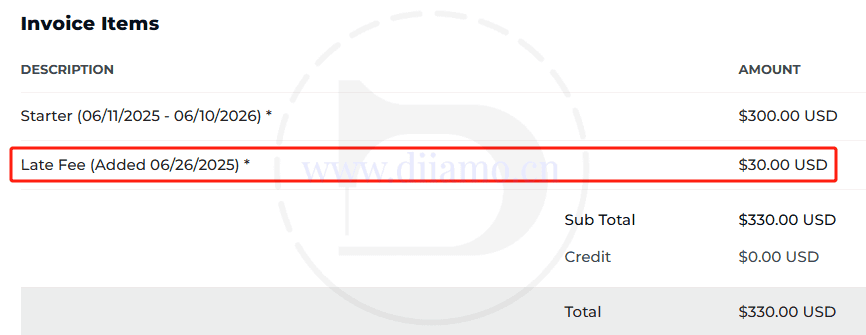
Late renewal for an additional $30
If you renew your server half a month after the expiration date, you have to pay an extra $30 Late Fee, so you can't cry. Remember to renew your membership in time and pay attention to the emails! You will be notified by email before the expiration date.
Sorry, you have been blocked.
Xiaodi in the background to modify a plug-in settings, save the settings were intercepted ↓. The background can still be accessed normally, the browser point to return to the previous page, or enter the background of other pages can be opened normally.
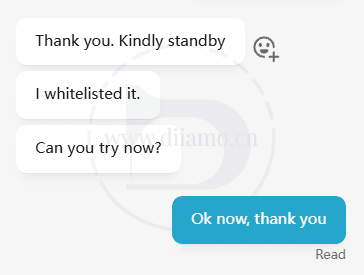
Rocket host has an additional firewall for higher security, very few plugins are mistakenly intercepted when saved. Contact the host's online customer service to deal with this, they will add the corresponding URL to the whitelist and will not block it again.

After customer service adjusted the blocking rules, the site returned to normal.
How to View Website Error Logs
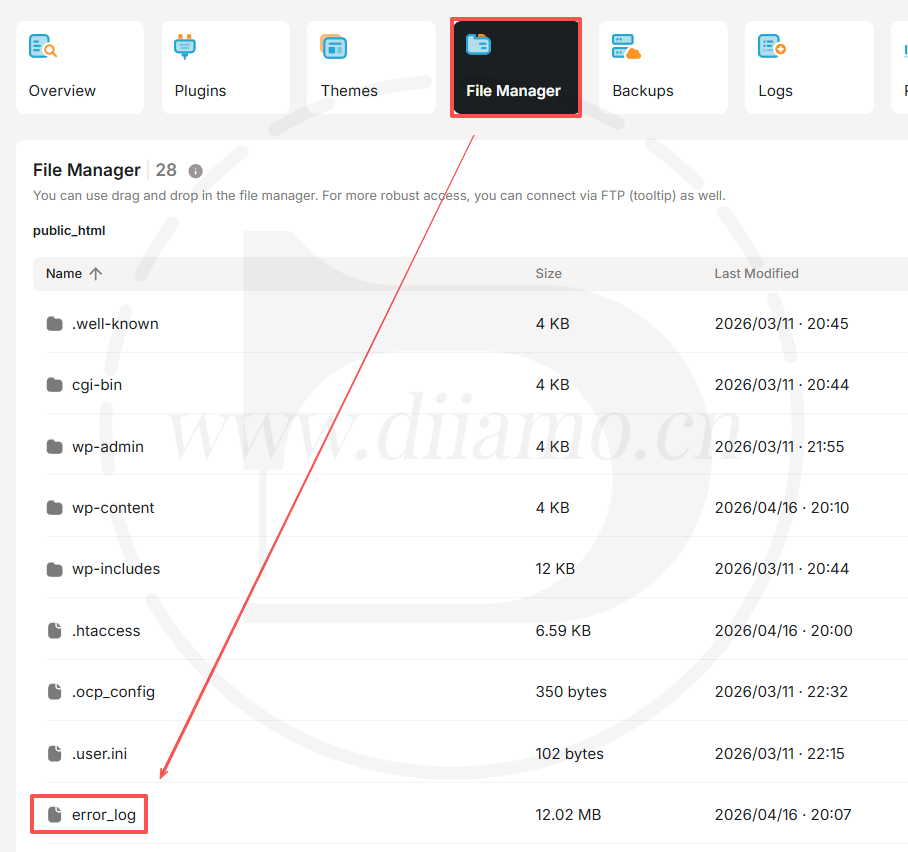
In the image below, “File Manager” locates and opens the error_log file, which contains the error log. It is useful to see the errors to locate and fix problems.
Imunify 360 automatically disables GPL version of Elementor Pro plugin
If the site usesGPL version of Elementor ProBuild, suddenly some front-end boards are missing, go look at the backend to see if the Elementor Pro plugin is disabled or removed.
server-containedImunify 360Antivirus software marks the GPL version of Elementor Pro as “backdoor”, “toxic”, and then automatically disables the plugin↓. This is because they feel that the GPL version of Elementor Pro has aa safety hazard, would rather kill than let go.

Di talked to Rocket hosting customer service about this issue, and the other party said that Rocket hosting does not allow the use of GPL type plug-ins, and only allows the use of genuine plug-ins. The only way is to buyGenuine Elementor ProDiarmo has to offer.Genuine Elementor Pro Activation Service.
If you buy hosting through our invitation link and we get a commission, you get 1 year activation for free, and from the second year onwards you can activate your website with the same hosting at half price ($35/year). If you don't get a commission, you get the activation at the original price.

Unable to upload PHP files
Due to security restrictions, the hosting provider does not allow PHP files to be uploaded via the file manager or other hosting file management systems; they can only be uploaded via FTP. Instructions on how to use FTP are provided above.
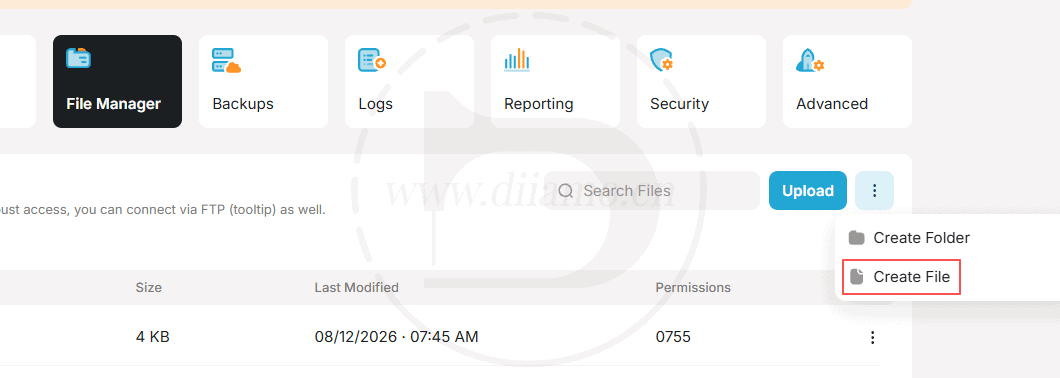
Alternatively, you can create a new PHP file on the host file management page shown below, edit the file, manually paste the code into it, and then save it. Xiao Di has personally tested this method and confirmed it works.
Changed hosting site speed or not?
If the server is stuck, the website speed must be slow, but a fast server does not mean that the website speed must be fast. The actual access speed of the website is affected by many factors: page size, image size, third-party resource size, resource loading order/efficiency and so on.
After switching to Rocket hosting, Di believes that the speed of your website must have been improved, maybe the improvement is not as expected. Need to analyze and optimize the website, we recommend checking out Diarmo'sThe Ultimate WordPress Speed Optimization Tutorial, optimized in steps.
Diiamo provides speed optimization server and Google SEO optimization service, buy Rocket hosting through our invitation link, speed optimization service can enjoy 60% off, please contact microsoft customer service if you need.