Tip: Importing templates sometimes fails because of server limitations, network and various other reasons.It's the same situation with the official version. Google has many solutions, just follow the prompts. No refund for unsuccessful template import, no after-sales.
Tip: This theme is complicated to use, pure newbies don't buy it!!!! The first time you use WordPress to build a website don't buy!!!! Problems with the use of the process is because do not understand Wordpres, the theme is not a problem, we will not guide how to operate WP.
Latest WoodMart downloads.WoodMartIs a very popular Woocommerce premium theme , you can quickly build a very powerful , beautiful online product mall , especially suitable for use to build a multi-category merchandise store . Contains a powerful super menu , including about 90 sets ofBeautifully designed templates.
If you can't import the template, see belowTemplate Import Tutorial. If the operation according to the tutorial still can not import the template, this may be a server conflict, I have no way to deal with. The official version of the same problem, the official forum many users feedback, mind do not shoot.
Note: This theme is a little slow, slightly complex to use, white novice caution. We generally do not recommend the use of this type of bulky theme, but it is fully functional, beautiful templates, many customers ask so we sell on the shelves.
It's slower, but it can be optimized. We took an order for speed optimization of an auto parts e-commerce site, using the WoodMart theme thatRocket HostThe website is cumbersome and the amount of orders in a month is more than 1 million RMB.
Xiaodi optimized Google test mobile 92 points, 2.0 seconds to finish loading ↓. Speed is not a problem, if you have the technology to optimize, as well as willing to spend money to buy a good host, site speed can be very fast.

What is GPL plugin
This theme is a GPL licensed product and is safe and legal. Click to learn whatGPL AgreementClick to learnWordPress official website about GPL. Simply put using the GPL license plugin/theme source code open source sharing, can be legally free to change, use, distribution.
The company that owns the plugin/theme mentioned in the title of this item is not affiliated with us in any way, and the company has not licensed its products or brands to us. This product is a distribution of the plugin/theme mentioned in the title, created by a third party company/developer and redistributed by us under the terms of the General Public License (GPL).
We use the plugin/theme name for the sole purpose of identifying the plugin/theme on which this product is based, with the intention of helping users better understand the functionality and possible application scenarios of our product, and in no way to impersonate or mislead. This product is sold under and respects the terms of the GPL license agreement and ensures that users are aware that they are acquiring a distribution of the plugin/theme based on an open source license. They are allowed to view, modify and redistribute the software to promote its free use and development.
Verified by Security Antivirus
Directly from foreign formal channels to buy, do not modify the source code. All plug-ins we use to build their own sites, used in a number of sites, safe, stable and reliable.Are you worried that the plugin is not secure? Check this articel:Is WordPress Cracked Plugins/Themes (Green, GPL, Nulled) Safe?.
- ByVirustotal Antivirus Verification;.
- ByWordfenceSource code review.
- BySucuriSecurity antivirus scan.

Changelog/ Update Method
Generally new version out within 24 hours of this site will be updated, then please visit this page directly to download the new version of the installation package upload updates, the product title will be written on the latest version number. Can only be updated by uploading the installation package, do not mind, if you want to update online can only go to the plug-in website to buy the original version.
Click to view the update history of this plugin (Changelog).
WoodMart Download Terms of Purchase
This site plug-in purchased from foreign sites, the purchase price is4.99 USD/pcIt is valid for 2 years. Diiamo spent a great deal of effort to produce the use of tutorials also provide manual Q&A service, absolutely value for money. Plug-ins for learning and communication research use only, virtual products with reproducibility, once sold, no refunds, details please move!Terms of Service.
Diiamo for the purchase of users to provide after-sales service, plug-in use any questions please leave a message in the comments below, there will be answers to questions.
WoodMart Theme Installation
After downloading the installer, first look at the size of the installer to decide how to install it, please look carefully.
If the size of the downloaded installation package exceeds 40MB, you need to unzip it first ↓:
First take the downloaded Zip archiveUnzip it.Instead, go to the WoodMart Theme folder, inside thewoodmart.zipIt's a theme installer, the size of 30MB (usually more than 20MB) or so, according to the following tutorial uploadingwoodmart.zipInstallation.
If the size of the downloaded installation package不More than 35MB, then it is a direct theme installer, no need to unzip, directly follow the tutorial below to upload the installer to install.
Upload the installer installation tutorial ↓:
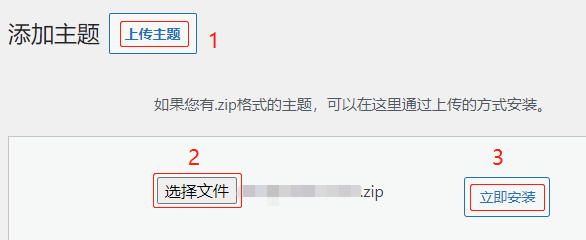
On the theme installation interface, click 1- “Upload Theme”, 2- upload the installation package, then click 3- “Install Now”. After installation, simply activate it.
Tip: The theme installation package is large, uploading and installing will sometimes fail. Mainly network problems, or server lag and so on can not be dealt with. Refresh the page, change the line of the ladder or disconnect the ladder and retry. Or upload woodmart.zip archive to the themes folder in the pagoda and other panels and unzip it.
The child theme is automatically installed during the setup process again, as described in the tutorial below. You can also manually downloadWoodMart subtheme, upload and install.
How to update WoodMart theme
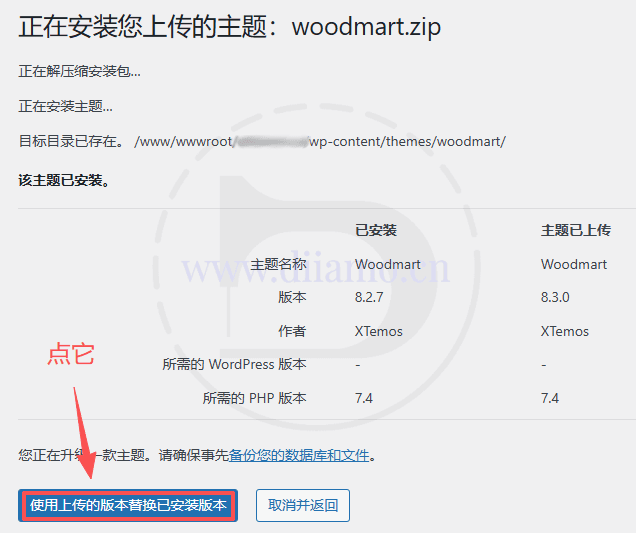
If you are prompted to update the theme, visit this page to re-download the new version of the theme zip installer, and re-upload and install it again according to the above method (in theThemeThe installation interface uploads the installation, not on the plugin page!) .
No need to disable or uninstall the old version first, just upload and install it directly, it will overwrite the old version, all the data is there and won't be lost.
Update the theme via FTP/panel:
Tip: The theme installation package size is close to 30MB, some hosts with poor quality will fail to upload and install such a large file size. You can choose to upload the installation package directly to the appropriate directory through FTP/panel, etc. Unzip it to overwrite the old files, and use this method to update.
After downloading the installer, first look at the size of the installer to decide how to install it, please look carefully.
If the size of the downloaded installation package exceeds 40MB, you need to unzip it first ↓:
First take the downloaded Zip archiveUnzip it.Instead, go to the WoodMart Theme folder, inside thewoodmart.zipYesTheme InstallerIf you want to install it, follow the tutorial below.
If the size of the downloaded installation package不More than 35MB, then it's a directTheme InstallerYou don't need to unzip it, just follow the tutorial below to install it.
Tip: Backup before operationThemeFiles! Restore the data if you have problems, just backup the theme files.
classifier for objects with a handleTheme InstallerUpload to the /wp-content/themes/woodmart folder↓, then simply extract the contents. This will overwrite the files in the existing woodmart folder, completing the upgrade.

After upgrading into the background of the site to view, clean up all the cache, the current theme version should be displayed as the latest version. If the background also prompts online upgrade, is caused by cache, directly point to the online upgrade, prompted by the inability to upgrade after refreshing the page, upgrade prompts disappear.
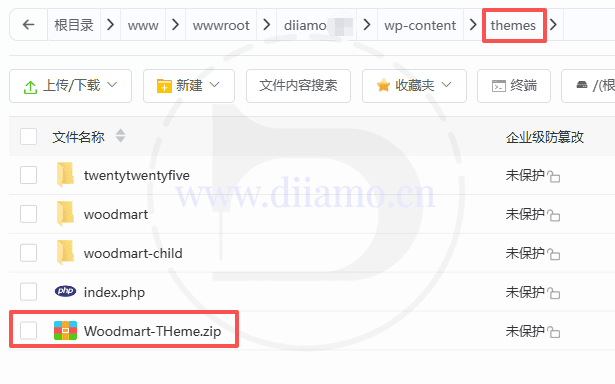
If the background still shows the old version, maybe the above step file installer upload location is not right, because the upstream Woodmart theme installer file path is often changed, resulting in the upload location should also be changed to work. Change it to upload to the “themes” directory in the picture below and unzip it.
The first time to check whether the site display is normal. There are abnormalities may be the folder directory is wrong, restore the file. Then contact Diiamo WeChat customer service (QR code at the bottom of the page) to learn how to operate the upgrade.
After updating the theme, it is recommended to enter the following Patcher patch interface ↓, if prompted by the patch (Bug Fix), it is recommended that all installed on the installation failure to see the following tutorial. If prompted by the need to update Woodmart Core plug-ins, then update.

WoodMart Setup and Template Import Tutorial
Tip: Importing templates sometimes fails because of server limitations, network and various other reasons.It's the same situation with the official version. Google has many solutions, just follow the prompts. No refund for unsuccessful template import, no after-sales.
After enabling the theme, you will automatically enter the setting interface as below, if not, click "WoodMart" menu bar on the left side to enter. Click "Let's start >" to start setting the theme.
If you exit the setup interface and want to re-enter it, go to the "Appearance" section and change the theme to the default theme, and then switch to the WoodMart theme, it will automatically re-enter the setup process as shown below.

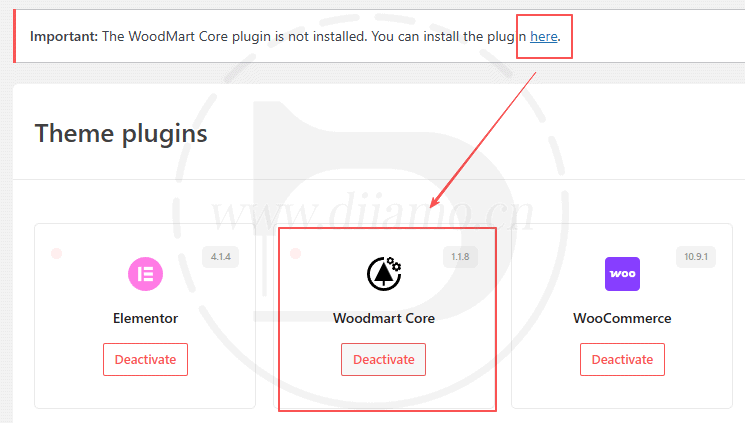
If you see the message “Important: The WoodMart Core plugin is not installed. You can install the plugin here,” click the blue “here" at the end of the message. This will take you to the screen shown below, where you should click the plugin highlighted in the red box to install it.
Go to the “Appearance” section, change the theme to the default theme, and then switch to the WoodMart (child) theme; this will automatically take you back to the setup process shown in the image below.
Click "Continue" when prompted that the license has been activated.

Click "Install child theme" to install the child theme.It can also be downloaded manuallyWoodMart subtheme, upload and install.

Below is the picture after installation, click "Continue".

Some people responded that the error after clicking “Continue” in the above step is because they have set up some permissions/URL blocking and so on, which prevented them from entering the following step. Please check and adjust the security settings by yourself.
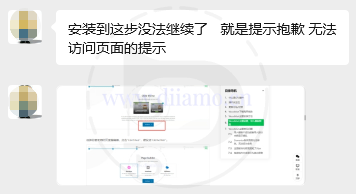
Select the page editor you want to use, click on "Continue", it is recommended to select "Elementor".

The following picture is the interface of installing plug-ins, directly click "Install & activate all", it will automatically install and activate all plug-ins.
There."Required"The plugins that are not installed will show "Install" next to them, so it is recommended to install them as well. Importing WoodMart templates requiresInstall all plug-ins, as the template may be used. If you are experienced and familiar with certain plugins and know how to fix them, you can leave them uninstalled.
Refresh the page if the installation doesn't move for too long. Failed installations can be found by going to the Themes menu under“Plugin” sectionInstall it manually. If activation fails, you can go to the plugin list page and click activate manually, then go back to the following interface to refresh it.
Click "Continue" after installation.

Click the "Continue" button after installation.

The following figure is the interface of importing template, choose your favorite template and click "Import" to import it. Click to viewList of all WoodMart templatesClick on the black square "DEMOS" button on the right to bring up the list of templates, click on the template to preview the template effect.
If you don't want to import the template at the moment, just click "Skip this step", you can import the template later.

If the above steps to install plug-ins some plug-ins are not installed, it will prompt the following picture. At this point, you can point "OK" to ignore, continue to import the template, you can also point to cancel and then return to the above steps to install plug-ins, install the appropriate plug-ins.
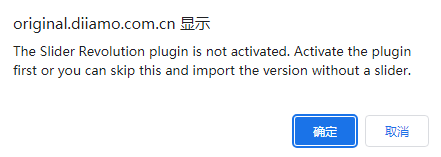
Point "OK" after the start of the import template, about a few minutes to import finished.

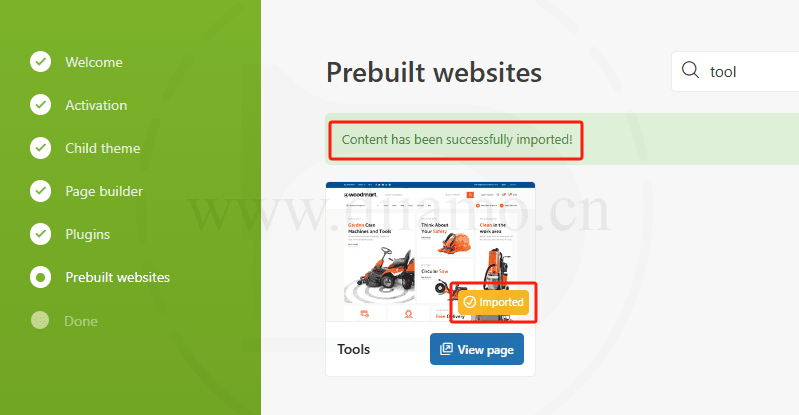
The following picture is imported successfully ↓, Di is the use of this page to buy and download this theme personally imported, no problem at all. If you fail to import the following method of operation, or not is the host or network problems, I can not help.
If the import fails, the following picture will be prompted. Follow the instructions to disable all plug-ins except the theme will be used, while disabling all cache functions, the site needs to install the SSL certificate.

Click on "Status" in the image below to check the status.
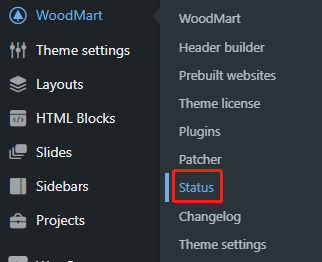
Those marked in red indicate a problem, fix it.
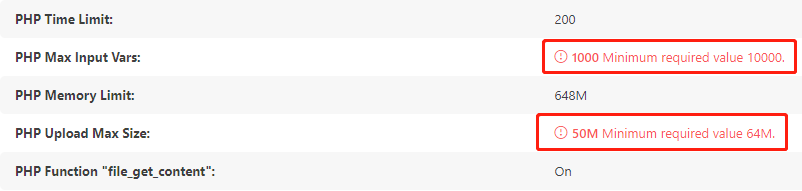
Fixed ↓.
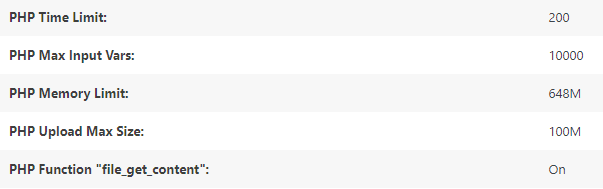
Xiaodi personally tested and successfully imported the template! This theme settings to modify the complexity of some of the content to modify the location may be more strange, you need to learn, it is recommended to go to see!Official Tutorial.
After importing the template, some places are displayed incorrectly? Can't match the template? See the following FAQs.
The following screen may be displayed after completion ↓.

WoodMart Theme FAQ
Below are some of the more commonly encountered problems, if you can't find the promise please move to Google search orOfficial Documents. We don't make money selling this stuff, labor costs are very expensive, so we won't offer labor unless the plugin has quality issues, mind, please buy elsewhere.
Bought because they do not know how to use the problems encountered (especially the first time to use WordPress to build a website), has been asking us how to deal with, all do not answer, mind you can apply for a refund. This theme is complex, please change to other simple themes for novices, do not make it difficult for themselves.
Import templates unsuccessful or import part of the content display is messy
As mentioned above, the import template unsuccessful probability is a network problem, may also be an operational problem (according to the above tutorial operation), and may even be the template itself. We can't solve it, contact WeChat customer service for a refund if you care, you need to send a screenshot of the order record and the actual payment amount.
If after successfully importing the template, part of the content is displayed incorrectly or only shows the source code, you may not have installed the corresponding plug-in so import the plug-in related content fails, the plug-in version is not the same may also have this problem. Install all the plug-ins to re-import again.
Some templates themselves have this problem, part of the content import is not successful, some templates are not a problem, do not move to say that the theme has problems. This is the official problem of WoodMart, the official forum also many users who bought the original version of the feedback of the same problem.
There are parts of the template that pull data from the site, such as menus and certain sections. These data are not imported when the template is imported, and if you don't have the corresponding menus on your site, they won't be displayed after importing. It will look different from the template, these need to be handled manually.
Or delete the content that is displayed incorrectly and manually create new content yourself.
Elementor board width can not be modified, can not be set to full width
WoodMart Theme OfficialThis postThere is talk of reasons and solutions. Simply put the width of the board is controlled by the theme and Elementor can't control it.
All Elementor boardsDefaultThe width is controlled ↓ in the Theme Layout settings below.

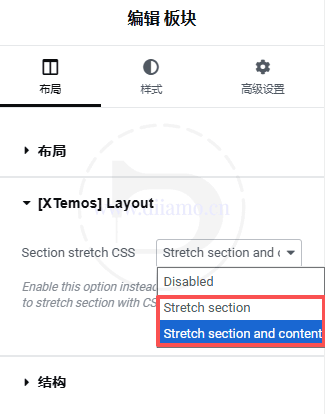
To set the board to full width, set it in the following position, Stretch section is to set only the board to full width, Stretch section and content is to set the board and the widgets inside together to full width.
Full width board content width is 30px shorter
Xiaodi built Banner and found that the content width of the full-width panel is 30px less than the width of the non-full-width panel. checking the source code found that WoodMart theme intentionally reduced it by 30px.
Add the following 1-5 lines of CSS code into the theme's "Custom CSS" > "Global" to restore normal. The other code is to fix other issues, add as needed.
In some places the text is shown in other languages
Xiaodi builds an English cross-border e-commerce website and finds that some of the text on the product list page is displayed in Chinese, such as "Add to Cart", "Filter", "Category:", etc. But on the product detail page, it is displayed normally. But in the product details page display normal. I don't know if it's because I've broken the website or it's a WoodMart bug, but I won't go into details.
The solution is to use the freeLoco TranslatePlugin, modify the Chinese translation results of Woocommerce, the front-end display of Chinese, restore the English translation results, save the translation on the line. If you encounter similar problems, you can troubleshoot from this aspect.
Installation of Patcher (patch) failed, prompting to try again later.
Under the theme menu, there is a “Patcher” section, which contains some patches, that is, the code to fix the bugs. You need to click on the upper right corner of the “Apply All” button to install all the patches, the following picture is safe to complete the look ↓.

Some of us have encountered individual websites that fail to install patches, prompting “Something went wrong during patch installation. Patch can't be applied. Please, try again later.” It lasted for more than a week, and every day the attempt failed. However, the same theme can install the patch normally on other sites, which proves that it's not the theme's problem.
Xiaodi tried to close all firewalls (including CDN and host firewalls), disable all plug-ins, the problem remains. Google for many answers, WoodMart official reply is to disable other plugins and retry.
Finally tossed a long time to find out is the previous woodmart folder inside the file permissions are not consistent, some are 755 and some are 644, so the update can not be. Generally do not have this problem, the probability is that the use of Pagoda and so on, and then manually adjusted their own file permissions.
Solution.Just change the permissions of all files (including folders) in the woodmart folder to 755. In fact, it would be better to change the permissions to 644, but the folder must have 755 permissions to write, so it is not possible to change the permissions to 644 in one click, which is a bit troublesome to modify.