LatestGreenshift Download - Animation and Page Builder. This is a powerfulGutenbergBlock Extensions and Page Builders: Extend the Gutenberg editor by adding new block types and enhancing the functionality of existing blocks.
All editing and building work is done within the Gutenberg editor interface.
Click to view 👉 All Greenshift Widgets
This plugin does not utilize predefined styles, frameworks, icon fonts, or script libraries. All resources are dynamically generated and loaded only when you use them. Additionally, the plugin features highly unique modules and animation capabilities, delivering premium animations and transition effects that will impress your visitors. Even without any coding knowledge, you can build stunning styles comparable to top-tier websites.
Exceptionally high performance optimization (core advantage)
On-demand resource loading: The plugin does not utilize predefined styles, frameworks, or icon fonts. All resources (CSS, JS) are “on-demand generated,” meaning only the styles and scripts corresponding to the actual blocks used on the page are loaded.
No jQuery dependency: The dynamic library does not rely on jQuery, making it lighter and more modern.
Inline critical styles: Stylesheets are embedded within HTML's section, helping reduce render-blocking and prevent CLS (Cumulative Layout Shift).
Guaranteed High Scores: The plugin's developers claim it enables the creation of complex pages while still achieving a perfect 100 on Google's PageSpeed Insights mobile score (provided the theme and hosting are also well-optimized).
Powerful animation and interactive capabilities
CSS Scroll Animations and Hover Transitions: Achieve Them Without External Libraries.
Interaction Layer: Enables the addition of triggers, conditions, and actions to blocks, facilitating the creation of complex interactive effects.
Dynamic Properties and Motion: Create animation chains and connect them to dynamic data.
Animation Plugin: Powerful functionality, with an additional premium animation plugin based on the GSAP library offering advanced parallax, scroll-triggered effects, and more.
Rich Layouts and Blocks
Advanced Containers: Supports Flexbox and CSS Grid layouts, enabling precise control over alignment, spacing, and positioning, along with responsive settings for up to four breakpoints.
Exclusive Blocks: AR/VR 3D Viewer, Spline 3D Block, Advanced Slider/Tabs, Popup Builder, Smart Scroll/Carousel, Dynamic Tables, Countdown Timer, and more.
Template Library: Provides ready-to-use modules and a comprehensive layout library, supporting full-site editing.
Outstanding responsive design
Four custom breakpoints are provided, allowing you to set different property values for various devices such as desktops, tablets, and mobile phones.
The unique “Smart Scrolling” feature converts multi-column desktop layouts into horizontally scrollable app-style designs for mobile devices.
Developer-Friendly and Integration Capabilities
Dynamic Data: Supports retrieving and displaying data from custom fields, user metadata, external APIs, and more.
Shortcode Support: Any Greenshift block or page can be converted into a shortcode for use within other page builders or theme areas.
Figma/Web Converter: Instantly convert Figma designs or any webpage into Greenshift blocks (some features require the premium version).
AI Assistant: Built-in AI tools to help generate content and code.


What is GPL plugin
This plugin is a GPL licensed product and is safe and legal. Click to learn what isGPL AgreementClick to learnWordPress official website about GPL. Simply put using the GPL license plugin/theme source code open source sharing, can be legally free to change, use, distribution.
The company that owns the plugin/theme mentioned in the title of this item is not affiliated with us in any way, and the company has not licensed its products or brands to us. This product is a distribution of the plugin/theme mentioned in the title, created by a third party company/developer and redistributed by us under the terms of the General Public License (GPL).
We use the name of the plugin/theme for the sole purpose of clarifying the plugin/theme on which this GPL item is based, with the aim of helping users to better understand the functionality and possible application scenarios of this product of ours, and in no way intended to impersonate or mislead.
This item is sold following and respecting all terms of the GPL license agreement, ensuring that users understand that they are acquiring a plugin/theme distribution based on an open source license. They are allowed to view, modify and redistribute the software to promote its free use and development.
Verified by Security Antivirus
Directly from foreign formal channels to buy, do not modify the source code. All plug-ins we use to build their own sites, used in a number of sites, safe, stable and reliable.Are you worried that the plugin is not secure? Check this articel:Is WordPress Cracked Plugins/Themes (Green, GPL, Nulled) Safe?.
- ByVirustotal Antivirus Verification;.
- ByWordfenceSource code review and comparison;
- No addition of malicious external links;
- BySucuriSecurity antivirus scan.

Changelog/ Update Method
Activation is achieved by installing the free version and entering an activation code. This allows the main plugin to update online in the background (extension plugins still require updating by uploading and overwriting the new version package). If you encounter upgrade failures or cannot use Pro features after upgrading, please contact WeChat customer service for assistance.
👉 Click to view the official update log for this plugin (Changelog).
👉 Click to view the official changelog for the add-on..
Greenshift Download Purchase Terms
This site plug-ins purchased from foreign sites, Diiamo buy back the price of4.99 USD/pcThe price of the product is lower than the purchase price. Diiamo selling price is lower than the purchase price, and spend a great deal of effort to produce the use of tutorials + provide manual Q&A service, absolutely value for money.
Plug-in for learning and research purposes only, virtual products are reproducible, once sold no refund, please move to the detailsTerms of Service. Please log in before purchasing, and refresh the page after purchase to get permission to download the plug-in.
Greenshift Installation/Activation Guide
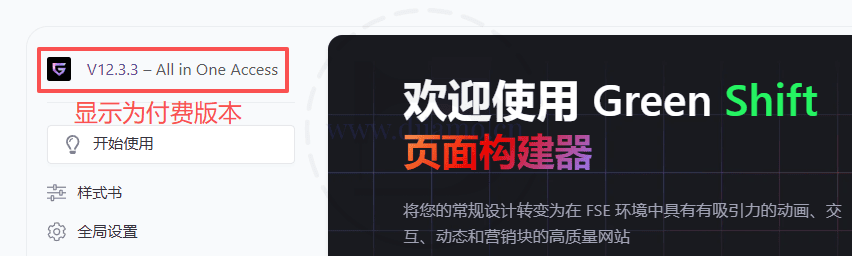
Display as paid version↓
Install the extension:At the location shown below, review the extension's description to understand its purpose before deciding whether to install it. Download and install only what you need—avoid installing unnecessary extensions, as they will only slow down your website.
Simply click the blue “Install” button in the top-right corner of the extension to install it. Once installed, go to the extensions list page to activate the plugin. Installing an extension essentially adds an extra widget, expanding the functionality.

If the online installation above fails, download the extension installation package as needed↓ and upload it for installation.
Installation method 1: Upload and install
Find and click on "Plugin">"Install Plugin" in the left menu column of the website backend, click on "Upload Plugin" in the upper left corner, upload and download the zip installation package, click on "Install Now", and then click on it after installation "Enable Plugin" Complete the installation.

Installation method 2.FTP installation
Note: Pagoda paid version of the anti-tampering, system hardening and other features may automatically delete/block the php files inside, resulting in the plug-in can not be enabled or abnormal functionality, please disable the corresponding features before uploading the plug-in.
Directly use FTP or enter the panel file management system, upload the purchased. zip compressed file directly to the plugins directory on the website (xxx. com/WP content/plugins), and extract it. Or firstUnzip the .zip archive by extracting the extracted oneFoldersUpload it to the plugins directory of the site.
Then go to the left menu column of the website backend, find and click to enter "Plugin">"Installed Plugin", find the plugin in the plugin list, and click "Enable".
Greenshift User Guide
For more information, please go toOfficial Tutorial.