LatestFacetWPDownload and add filtering filters to Woocommerce cross-border e-commerce sites and stores. This plugin is very light only more than 300kb, filtering speed is very fast, powerful with many extensions plugin, good compatibility.
Includes extensions (add-ons), on-demand installation, no need to install them.Click to view 👉Extended Plugin List and Features.
Be sure to check out the official documentation first, which includes ways to increase screening speed, compatibility issues and tutorials on how to use it.Click to view 👉Official Documents.
👉 How to use FacetWP in Elementor and what to do about it.
Note: This plugin is not compatible with Elementor's "Element Cache" feature. Widgets that use this plugin's filtering feature need to disable the "Element Cache" feature in the "Advanced Settings" of the widget. " function in the "Advanced Settings" of the widget.View Details.
FacetWP supports Elementor's Loop Grid widget, which is very useful to know that most filter plugins don't support Loop Grid widget.


Diiamo Technologies Ltd. sells several screening plug-ins at the same time:Pofily-WooCommerce Product Filters、Jet Smart Filters、FacetWP. Please compare them yourself and choose the one that's right for you.
FacetWP:Fast, most powerful, detailed and comprehensive documentation, support for Elementor's Loop Grid widget, the disadvantage is that the use of complex white people can not understand;
Pofily:Easiest to use, good in all aspects, can be used with Curcy multi-currency switching plugin, responsive on mobile, supports click popups. Suggested to use it for small people;
Jet Smart Filters:It has a moderate learning curve and offers functionality that falls between the two plugins mentioned above. Its advantages include support for filtering products on non-product pages (such as the homepage)—a feature also available in FacetWP—and support for Elementor’s Loop Grid widget;
Caution:The filtering feature of the Pofily plugin only works on WooCommerce product listing pages; it does not work on other pages, where the filter options will not be displayed. FacetWP and Jet Smart Filters can be used on any page and support filtering functionality.
The compatibility between the above filter plugin and other plugins (e.g. multi-currency switching plugin, caching plugin, etc.) is not the same, Xiaodi has not tested, please test by yourself.
What is GPL plugin
This plugin is a GPL licensed product and is safe and legal. Click to learn what isGPL AgreementClick to learnWordPress official website about GPL. Simply put using the GPL license plugin/theme source code open source sharing, can be legally free to change, use, distribution.
The company that owns the plugin/theme mentioned in the title of this item is not affiliated with us in any way, and the company has not licensed its products or brands to us. This product is a distribution of the plugin/theme mentioned in the title, created by a third party company/developer and redistributed by us under the terms of the General Public License (GPL).
We use the name of this plugin/theme solely to clarify which plugin/theme this GPL product is based on, with the aim of helping users better understand our product’s features and potential use cases; we have absolutely no intention of impersonating or misleading anyone.
This item is sold following and respecting all terms of the GPL license agreement, ensuring that users understand that they are acquiring a plugin/theme distribution based on an open source license. They are allowed to view, modify and redistribute the software to promote its free use and development.
Verified by Security Antivirus
Directly from foreign formal channels to buy, do not modify the source code. All plug-ins we use to build their own sites, used in a number of sites, safe, stable and reliable.Are you worried that the plugin is not secure? Check this articel:Is WordPress Cracked Plugins/Themes (Green, GPL, Nulled) Safe?.
- ByVirustotal Antivirus Verification;.
- ByWordfenceSource code review and comparison;
- No addition of malicious external links;
- BySucuriSecurity antivirus scan.

Changelog/ Update Method
Generally new version out within 24 hours of this site will be updated, then please visit this page directly to download the new version of the installation package upload updates, the product title will be written on the latest version number. Can only be updated by uploading the installation package, do not mind, if you want to update online can only go to the plug-in website to buy the original version.
Click to view the official update log for this plugin (Changelog)
FacetWP Download Purchase Terms
This site plug-ins purchased from foreign sites, Diiamo buy back the price of4.99 USD/pcThe price of the product is lower than the purchase price. Diiamo selling price is lower than the purchase price, and spend a great deal of effort to produce the use of tutorials + provide manual Q&A service, absolutely value for money.
Plug-in for learning and research purposes only, virtual products are reproducible, once sold no refund, please move to the detailsTerms of Service. Please log in before purchasing, and refresh the page after purchase to get permission to download the plug-in.
Installation / Activation Method
Firstdecompression (in digital technology)Download the zip archive, the first red box in the picture below is the FacetWP plugin installer, just upload and install it. The others are extension plugins, install them as needed, don't install them if you can't use them.
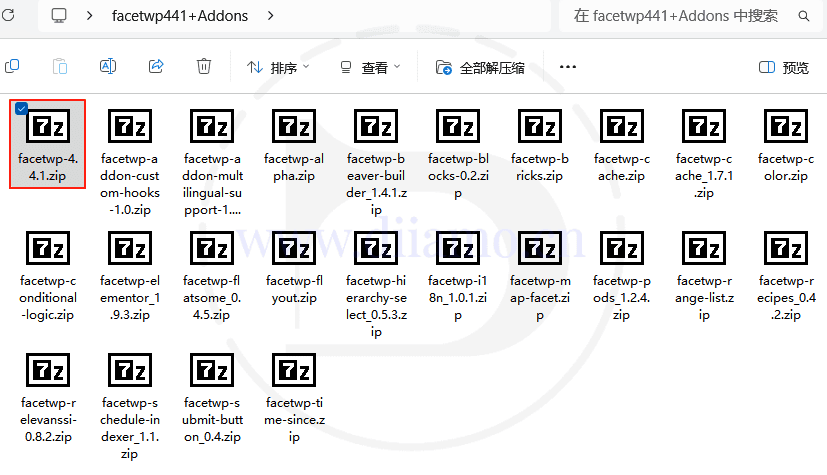

If prompted to install the corresponding extension plugin↑, locate the relevant extension plugin in the folder shown above and upload it for installation.Click to view 👉Extended Plugin List and Features.
facetwp-alpha is actuallyA-Z Listing ExtensionThe results can be filtered according to the first letter of the name. Extension plugin does not have a separate settings page after installation, works automatically or features are integrated into the main plugin.
Installation method 1: Upload and install
Find and click on "Plugin">"Install Plugin" in the left menu column of the website backend, click on "Upload Plugin" in the upper left corner, upload and download the zip installation package, click on "Install Now", and then click on it after installation "Enable Plugin" Complete the installation.

Installation method 2.FTP installation
Directly use FTP or enter the panel file management system, upload the purchased. zip compressed file directly to the plugins directory on the website (xxx. com/WP content/plugins), and extract it. Or firstUnzip the .zip archive by extracting the extracted oneFoldersUpload it to the plugins directory of the site.
Note: Pagoda paid version of the anti-tampering, system anti-fixing and other features may automatically delete/block the php file inside, resulting in the plug-in can not be enabled or abnormal function, you need to disable the corresponding protection function first.
Then go to the left menu column of the website backend, find and click to enter "Plugin">"Installed Plugin", find the plugin in the plugin list, and click "Enable".
FacetWP Tutorial
The logic of using this plugin is difficult to understand, so be sure to watch the tutorial to learn how to use it! Don't try to figure it out on your own, and don't ask Di why it doesn't work.
The official documentation is very detailed, please be sure to read the official documentation first, there are a lot of notes on the use of theClick to view 👉Official Tutorial.
Important Notes↓:The logic of this plugin is quite peculiar; you absolutely must watch the tutorial to understand how to set it up. OfficialFAQ PageThere is a very detailed FAQ section; please be sure to read it thoroughly.
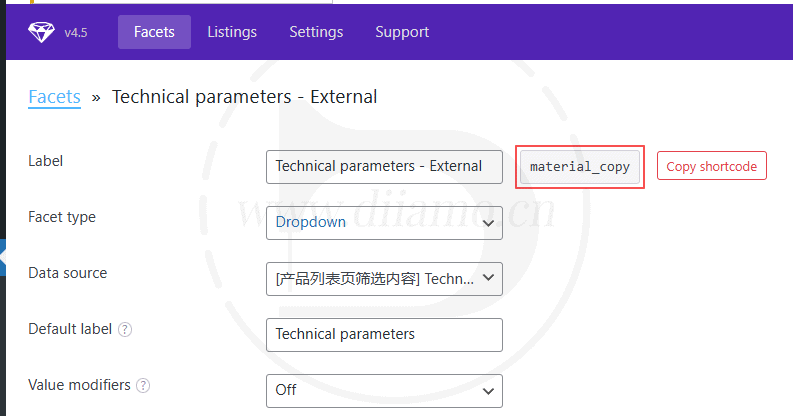
1) After copying or deleting the filtered content, you need to tap Save for it to take effect.

2) Product widgets, you must enable the “Enable FacetWP” function as shown below to display the filter box.

Additionally, you must select "Current Query" as the Source for the filter to take effect; otherwise, the products will not change after filtering.

3) If using optimization plugins like Perfmatters or Wp Rocket to defer JavaScript loading, you must enter all JavaScript files into the "Exclude from Defer Loading" section.facetwpThis will disable all JavaScript for the facetwp plugin's lazy loading. Otherwise, the filter box will not appear.
4) If the filter box still doesn't appear after trying the above methods, disable all other plugins to troubleshoot and see if it returns to normal.
(5) the default use of and logic filtering, if you want to use or logic, you need to select Checkboxes facet, fSelect facet to work.
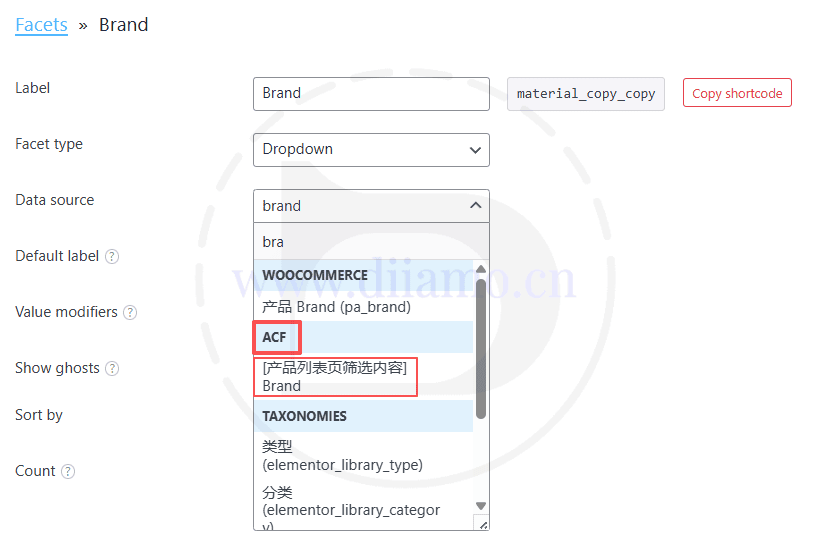
(6) the following figure Data source if you select the wrong, the front-end will display a filter box, but the filter content is empty. If it is a field created by ACF, select the content below the ACF board.
(7) Show Ghosts ↓ means that when the A filter box to select a certain A1 option, the B filter box does not have the results of the value of the option name is grayed out and can not be clicked to select.
In this case, if Show Ghosts is not enabled, option names that do not have this result value in the B filter will not be displayed.
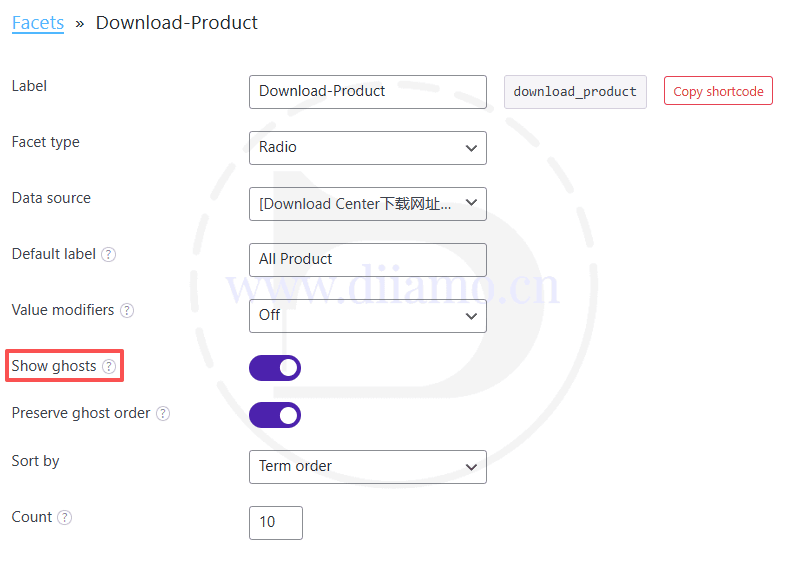
After opening, the B filter box does not have this result value inside the option name shows gray can not click to select ↓.

8) Don't edit more than one filtered content at the same time as they will overwrite each other, only one at a time!
(9) the following red box in fact, the screening results of the URL, it is very important. If you are copying other screening content to create a new screening content, then the content of the red box must be modified!