Tip: Newer versions of Elementor Pro that have larger updates generally have bugs that may cause the site to display/function abnormally after the upgrade. It is recommended to update after 7 days of the release of a larger update.
Tip:Rocket、ChemiCloudHosts like this use Imunify 360 antivirus, which disables the GPL version of the Elementor Pro plugin and is unstable. Consider us if you want stability!Genuine Elementor Pro Activation Service.
The latest Elementor Pro download, self-use for many years, safe, reliable and stable.GPL licensed version is actually a legal Pojiě version, according to the GPL agreement legal Pojiě distribution can be commercially available, the disadvantage is that it can not be updated online (you need to download the new version of the installer to manually install the update), the advantage is that the update to the latest version, you can use the latest features. The advantage is to update to the latest version, you can use the latest features.
Elementor Pro (Ele for short) is the best WordPress drag and drop page builder plugin that is easy to use and powerful with over 10 million users. This plugin allows us to quickly build beautiful responsive pages that work with almost any WordPress theme.
2023.05.10 Update: CollectionAI functionYou can use AI to generate text, code, etc. in the page editor, click to viewHow to use Elementor AI.
Some bloggers say that Elementor front-end loads too many resources and is slow not recommended. They suggest using the Gutenberg editor or hard coding CSS by hand. This is the right kind of crap, how can a white person have the skills to write CSS by hand, Gutenberg has all the drawbacks except less resources, bad functionality and ease of use and not fast.
Don't worry about using Elementor, the speed can be optimized, here is the result of Google speed test of Elementor website, use theVultr HostingElementor's convenience, ease of use, efficiency, and power are hard to replace!


Here's one.Google SEO OptimizationThe client's website Google Test Score, they built the pages themselves purely with Gutenberg, without installing a page builder like Elementor. But the speed is very slow, not as fast as Astra directly imported Elementor template.


And WordPress and Elementor are very focused on speed, they have been optimized to improve their own speed. With the network and technology to improve, I believe that in the future the site speed will not be a problem, all the site speed is flying. Elementor is the future of WordPress site building.

Update 2024.10.27: The new version 3.25 implements CSS-free startup, which means that only the CSS that is useful to the current page will be loaded, and the CSS that is not useful to the current page will not be loaded. This will greatly reduce CSS and improve speed. It is estimated that later JS is also the same loading mechanism, the future speed is no longer Ele's short board.
Update 2025.06.01: LaunchedV4 new versionDOM as well as the code volume is further smaller and faster!
With the development of the times, network speed and infrastructure quality, programming quality is getting better and better, in the future, the vast majority of websites will be "naturally" fast, do not need to worry too much about the speed of the problem.
The free version is also powerful, but has very limited functionality. With Elementor Pro you can build product/article list page and detail page templates, search page templates, and use many powerful widgets.
Domestic those charge slope jiě version of the template volume of a few G, but also to download to the local upload, very troublesome, difficult to use. And Elementor template style is not very suitable for doing foreign trade website is not in line with our aesthetics, not as good as the version we can gift to everyone.
Recommended Purchase Premium Starter Templates Advanced template plug-in, which can be imported online directly from the Elementor editing interfacePagesandBoardTemplate (below). Can also be used with Beaver Builder, Brizy, Gutenberg page builder.

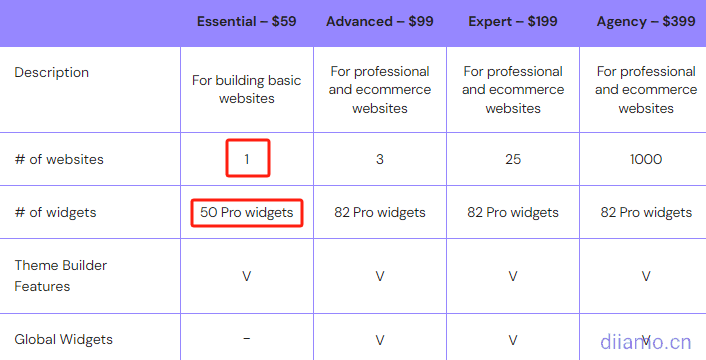
2023.11.15 Update: Not recommended!Elementor Pro Genuine, because there is basically no benefit. Now the $59 package only allows 1 domain to be bundled for use and not all Pro widgets are available. the Pro support service is AI autoresponder is crap and never solves the problem. The template design is also not aesthetically pleasing to us, might as well pay $29 for AstraTemplate Plugin.
2024.01.16 Update: Latest news, ElementorOfficialThey've started restricting the website's functionality if it isn't renewed. Once the subscription expires and isn't renewed, you won't be able to edit or modify the site, and it will be decommissioned. This is really annoying; I recommend using the GPL version.
What is GPL plugin
This product is GPL licensed, safe and legal. Click to learn whatGPL AgreementClick to learnWordPress official website about GPL. Simply put using the GPL license plugin/theme source code open source sharing, can be legally free to change, use, distribution.
The company that owns the plugin/theme mentioned in the title of this item is not affiliated with us in any way, and the company has not licensed its products or brands to us. This product is a distribution of the plugin/theme mentioned in the title, created by a third party company/developer and redistributed by us under the terms of the General Public License (GPL).
We use the plugin/theme name for the sole purpose of identifying the plugin/theme on which this product is based, with the intention of helping users better understand the functionality and possible application scenarios of our product, and in no way to impersonate or mislead. This product is sold under and respects the terms of the GPL license agreement and ensures that users are aware that they are acquiring a distribution of the plugin/theme based on an open source license. They are allowed to view, modify and redistribute the software to promote its free use and development.
Verified by Security Antivirus
Directly downloaded from foreign formal channels, without modifying the source code. Personally used, safe, stable and reliable.
- ByVirustotal Antivirus Verification;.
- ByWordfenceSource code review.
- No insertion of external links and no fear of loss of site SEO effect;
- BySucuriSecurity antivirus scan.

Elementor Pro changelog/ Way to update
Generally the new version will be updated within 24 hours, please visit this page directly to download the new version of the installation package to upload the update, the product title will be written with the latest version number.Click to view the update history of this plugin (Changelog).
Elementor Pro Download Terms
This plug-in is free, in principle, does not provide any artificial answer service. If you do not understand the place randomly Baidu / Google can solve the basic problem, really can not solve please leave a message in the comments below.
Installation / Activation Method
There are two activation methods; choose one as needed.
Type 1:Just install and activate “Elementor Pro GPL 4.1.2—no need to use Assistant,” and that’s it; it’s the simplest option. This is the older GPL version, which doesn’t require installing the Elementor Assistant activation plugin. We recommend using this version.
Type 2:Install and activate the original version of “Elementor Pro Original,” then install and activate the “Elementor Assistant” plugin (which activates automatically without requiring any configuration).
The second method is for hosts using Imunify; even if the activation code is automatically disabled, the website's display and functionalityNo exceptions. If you are not using a host with Imunify, we recommend using the first activation method listed above.
Updated on May 29, 2026; Installation and Activation Method 2 has been added:Because Imunify will detect and automatically disable the GPL version of the plugin, in order to bypass this detection (may not be effective in the long term) so change to use an additional activation plugin to activate, which is safer and more reliable.
Even if the activation plugin is subsequently disabled automatically by the firewall and Elementor Pro is left in an inactive state, the content built by Elementor Pro will still display and work normally, or at least will not result in site anomalies.
For those who have previously installed our GPL version.Not requiredUninstall and deactivate the previous plugins. Simply install and activate the new Elementor Pro and Elementor Assistant plugins to switch to the second activation method; this will automatically overwrite the old versions while preserving all your data. We recommend backing up your database before proceeding.
Note: If you encounter an error during the installation of Elementor Pro stating that a folder with the same name already exists, go to File Manager or FTP in your control panel, delete the “Elementor Pro” folder located under “wp-content” > “Plugins,” and then upload and install it again via the WordPress admin dashboard. None of your data will be lost.
Note: If you can't log in to the control panel or FTP, you can install the free plugin from the WordPress admin panel. File Manager PluginIt allows you to perform FTP-like functions directly from the WordPress admin panel, enabling you to access and edit the contents of the “Plugins” folder.
The first one, “Elementor Pro Original,” is the latest version of Elementor Pro official installer (the original official version, unmodified and unactivated), and the second is theElementor Assistant Activate the plugin (Keep it active and don't uninstall it!).
First, install and activate the Elementor Pro plugin, then install and activate the Elementor Assistant plugin to complete the activation↓. No configuration is required, and you don't need to enter an activation code or anything like that.
For future updates, simply upload and install the new version of the Elementor Pro Original plugin. If there is no new version of the Elementor Assistant plugin, you do not need to update it.
If there is no activation after activation, click the “Check license status” button to clear all caches (especially object caches) and refresh the page.

If you are prompted with the following image after installation, be sure to click “Click here to run now” to update the data, otherwise the front-end page may display abnormally!

Installation method 1: Upload and install
Find and click on "Plugins" > "Install Plugins" in the left menu bar of the website background, then click on "Upload Plugin" in the upper left corner, upload the downloaded zip installation package and click on "Install Now", after installation, click"Enable Plugin"Complete the installation.

Installation method 2.FTP installation
Note: Pagoda paid version of the anti-tampering, system hardening and other features may automatically delete/block the php file inside, resulting in the plug-in can not be enabled or abnormal function, if abnormalities occur, please disable the corresponding function before uploading the plug-in.
Directly use FTP or go to the panel file management system and upload the downloaded .zip archive directly to the plugins directory of your website (xxx.com/wp-content/plugins) and extract it. Or firstUnzip the .zip archive by extracting the extracted oneFoldersUpload it to the plugins directory of the site.
Then go to the left menu column of the website backend, find and click to enter "Plugin">"Installed Plugin", find the plugin in the plugin list, and click "Enable".

Elementor Frequently Asked Questions & Solutions
If you want to improve the loading speed of Elementor (especially for mainland websites), checkThe Ultimate Elementor Speed Optimization Tips.
Imunify 360 automatically disables GPL version of Elementor Pro plugin
The reason is the same as above. If your website was built using the GPL version of Elementor Pro and you suddenly notice that certain sections are missing from the front end, check the backend to see if the Elementor Pro plugin has been disabled or deleted.
server-containedImunify 360Antivirus software may mark the GPL version of Elementor Pro as “Backdoor”, “Toxic”, and then disable the plugin↓. This is because they think that the GPL version of Elementor Pro has aa safety hazard, would rather kill than let go.

The best solution is to add the appropriate files to the whitelist of Imunify 360 Firewall. However, you need to have permission to do so, most hosts have permission only from the hosting provider and they refuse to add them for security reasons. In this case either change hosts or changeGenuine Elementor Pro.
Diarmo is available.Genuine Elementor Pro Activation Service.
Update 2026.05.29: Changed to use the activation plugin to activate without modifying the Elementor Pro installer, so as to avoid Imunify 360 to disable the Elementor Pro plugin. You don't need to buy the original version.
After installing, you will be prompted to activate the certificate or it will not work.
If you have previously installed a version of Elementor that was downloaded elsewhere or activated with a key, installing our version may result in activation being required and some of the specialized features not being available, this is due to caching.
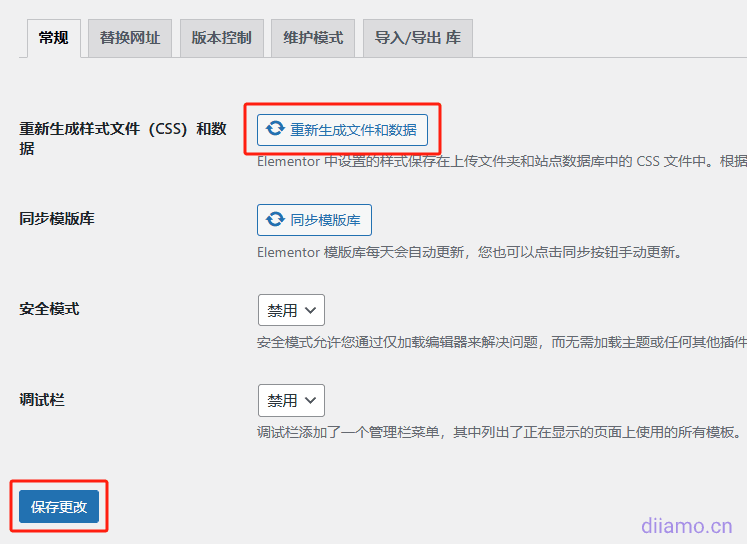
Solution: Backup your website data first, clean up your website cache, plugin cache and browser cache, and then override the installation of Elementor Free, as well as the version of Elementor pro that we downloaded here. After installation and then re-generate the CSS file (Elementor > Tools), clean up the cache and refresh on the line.
Can't load Elementor editor, it's blank!
Usually it is a network card or something like that, it is recommended to followThe Ultimate Elementor Speed Optimization TipsTry clearing the cache after optimizing the speed. Sometimes the server lag or poor network failure to load the editor, try a different time period.
It may also be a plug-in conflict, disable other plug-ins one by one to find out the problem. I've tried it before and it was incompatible with Rank Math Pro, which prevented the left widget area from loading.
Cannot save after editing prompts 4xx, 5xx errors
Errors starting with 4 are usually access-side problems, such as network cards, computer cards and so on. The errors starting with 5 are usually server/website errors, such as server cards, downtime, plug-in conflicts, etc.
Styles change or slow down after upgrading version
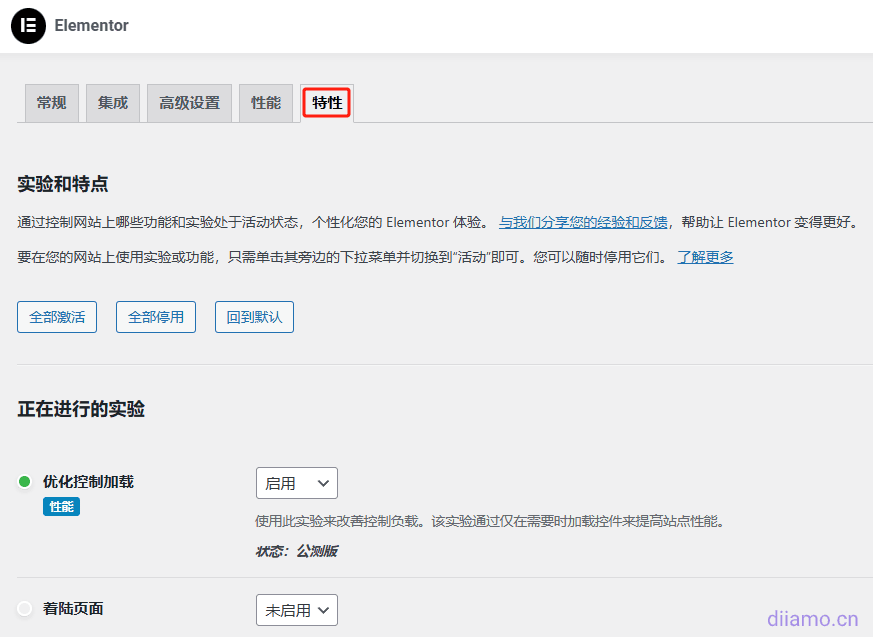
Check if the settings in Elementor > "Features" have changed. Reset the settings as before to save, regenerate the CSS, clear all caches and refresh the frontend should restore it. Some times a new version update will reset some settings, and the Ele team likes to change them.
Another reason is that updating the plugin automatically refreshes the cache, the browser privacy mode opens the page for a few refreshes to let it cache and the speed will return.
Re-generate CSS↓.
Wordfence suggests that it may contain a virus URL
Di has a couple of sites for the Wordfence plugin sent me the email pictured below saying that the Elementor Pro file may contain the virus URL http://wordpressnull.org.

Xiaodi with the upstream verification, but also with the foreign know-how of the GPL version of the user exchanges, this URL is the GPL version in order to bypass the activation of the authentication, as well as the use of online template function, there is no virus, it is a misrepresentation of the use of peace of mind.
Installing the latest version of the false positives will temporarily disappear. BuyGenuine Elementor ProIt's the only way to get it over with. Adamo's got something to offer.Genuine Elementor Pro Activation Service.
Update 2026.05.29: The activation plugin has removed this URL code, and this false positive will not occur in the future.