Click on the image below to viewExample Demo↓

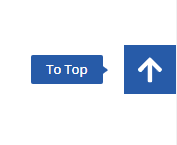
You can also delete the unwanted content and leave only the To Top button to make a click back to the top function.

After purchasing below tap the blue "Download Now" button to get the download code and enter it to unlock the download:
Sold for the use of Elementor Pro (Click to download for free) Popups Online Customer SidebarsTemplateThe sidebar is a great example of how we can help our customers to get the most out of our website, by using Elementor to import the site. Online customer service sidebar is very important, high-frequency display urges customers to contact us quickly to increase the conversion rate. With a click to return to the top function, to improve user experience, traveling at home, a must-have site!
The customer service plugins on the market are already very good, for example we sell theChaty Pro Customer Service PluginIt has been able to meet the needs of the vast majority of people. However, plug-ins also have shortcomings, 1- affect the speed, generally increase 180~300 kb code, including js affect rendering; 2- can not be customized to a high degree, the perfectionist knot.
Elementor Pro now comes with Floating ButtonFeature to import customer service sidebar panels online. Currently only the official version of Key activation can be used, the degree of customization is not high, a lot of restrictions. Support is also very little, for example, does not support WeChat QR code images. Diiamo think it is a chicken rib existence, a little help to the little white, to the perfectionist tasteless.
Di I'm OCD, plus a perfectionist, so I do it myself and only use the Elementor Pro Made a few customer service sidebar Popups that are responsive, fast, highly customizable, support WeChat QR codes, and beat Floating Button hands down.
Tips: Made with Elementor Pro + custom code only, no other plugins required. The site must be installed using Elementor Pro, otherwise the sidebar will not work. Please check if it is applicable before purchasing. Each style requires a separate download code!
Click to viewCustomer Service Sidebar ExampleThere are only a few styles for now, and they will be added later. You can use the browser F12 developer tool to view the display effect of portable, tablet and cell phone.Icons and buttons can be customized in shape, color, size, spacing, text content, and background color.
Style 1 because of design problems so microsoft customer service did not put QR code image, only hyperlink. Hyperlink column you can insert the QR code picture URL or set up a click to pop up Popup, which puts the QR code picture, please release your imagination.
About the price:
It takes a lot of time and effort to make these sidebars and to provide after-sales service to solve the problems encountered by customers.It's worth at least a couple thousand dollars at the hourly rate we take orders for!
Others also sell this thing, but the beauty, practicality, customizable degree of each aspect is not as good as us, the other party sells 38 dollars. Our price is still very conscientious, and there is a discount for VIP purchase.
Online Customer Service Sidebar Download Terms of Purchase
Virtual products are reproducible and non-refundable once sold, for more information, please go toTerms of ServicePlease log in first before purchasing. Please log in first and then purchase, which style you like to buy which, purchase to get the download code, enter the corresponding style password area click "unlock" to download.
Diiamo for the purchase of users to provide after-sales service, plug-in use any questions please leave a message in the comments below, there will be answers to questions.
Installation / Usage
You need to install theElementor ProPlugin, then in Elementor > "Settings" > "Features" to enable the 2 features shown below. Enabling them will increase the speed and effectiveness of your website, and will be enabled for all websites built by Diiamo.


Import template method:
Start by honestly importing the activated sidebar as described below so that it shows up on the front end. Then tweak it the way you want, it's more stable. If you adjust it at the beginning, it's not easy to troubleshoot if you mess up.
First unzip the downloaded zip file, the first json file is the customer service bar file, the following tutorial to upload is this file. The second TXT file inside iscomputer coding for characters (e.g. in a dictionary)The use/modification tutorials at the bottom need to be unlocked for viewing by entering this reading code.
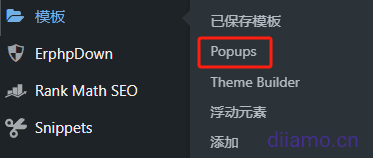
1- Go to the "Popups" section in the backend Elmentor "Templates".
2- Click the "Import Template" button at the top, select the downloaded template, upload the downloaded file and follow the steps to import it.

3- Edit the Popup template you just imported, using Elementor.
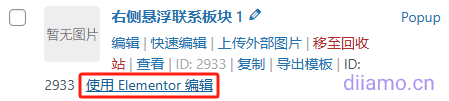
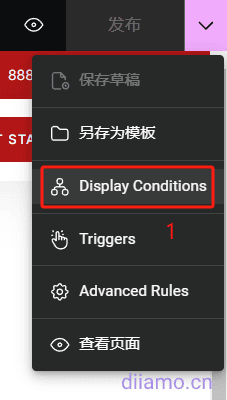
4- Click on the arrow next to the "Publish" button and click on "Display Conditions".
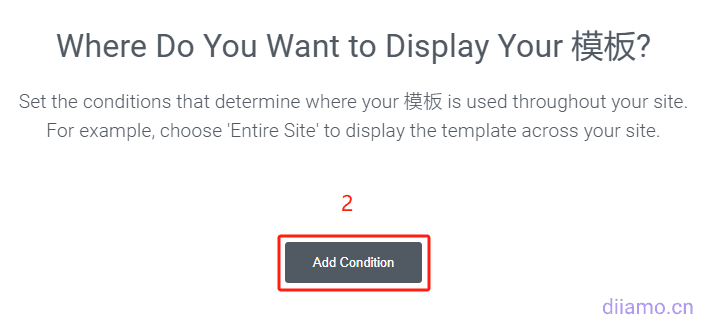
Click "Add Condition" to set the display/effective range of the customer service sidebar, this is to set which pages to display this customer service sidebar.
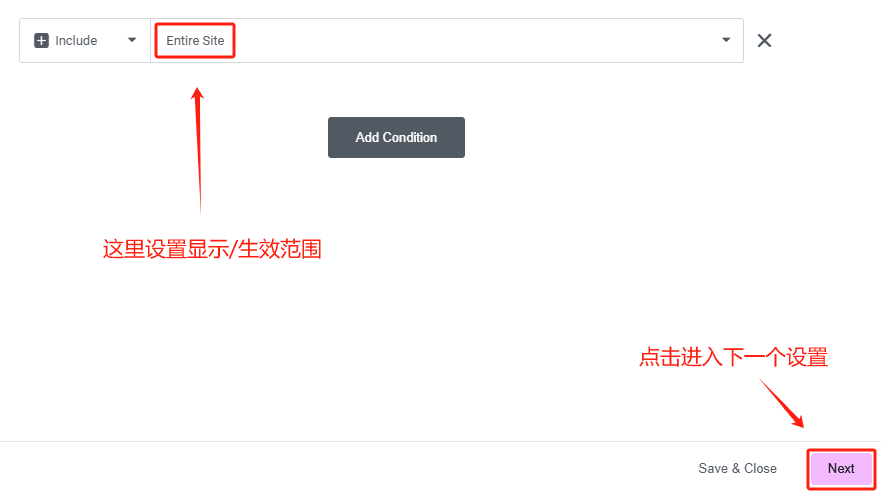
Set the effective range (on which pages the sidebar will be displayed) ↓ as desired, usually “Entir Site” is selected to be displayed on all front-end pages. Click the “Next” button to proceed to the next step.
Click the following picture to enable "On Page Load", enter 0 as the time, it will be displayed automatically at the first time when the page is loaded, you can also choose to slide down the page to a few percent before displaying it, set it according to your needs. Then click "Save & Close" button at the bottom right corner to save.

Finally clear all the cache and go to the frontend and refresh the page to see that the sidebar should already be displayed normally.To adjust the position, content, etc. see the tutorial belowThe level of customizability is very high! Be sure to check out the usage/modification tutorial below before modifying.
Online customer service sidebar use/modification tutorial
Pure use of Elementor Pro production, know Elementor know how to change, if you do not know Elementor first go to Baidu to find tutorials a few minutes to learn. Diiamo added some custom CSS, each CSS is labeled, a look at what it means to know what to change their own tune line.
Tips: Don't change some of the settings and code if you can't read it or don't know what it means, you might get an error if you do!!!! If you don't understand, just follow the tutorials to fine-tune, don't let yourself go! Trouble contact microsoft customer service.
To help you understand quickly, here are the main points of modification. Try not to change the default settings, each setting has its own meaning! After the change promptly click save, go to the front end to view the effect.
If something goes wrong, press Ctrl+ Z (can be pressed several times) in the editing interface to undo the operation and restore (provided that the editing page has not been refreshed), and after restoration, it is recommended that you immediately click Save to avoid misuse and make mistakes again.
The following tutorials can only be viewed after purchase, and there is a reading code in the downloaded zip. The tutorial is easy to understand, a little bit of Elementor can understand. Please contact WeChat customer service if you encounter difficulties.
Annual and Lifetime VIP members can view the reading code directly below ↓
---- Here is a tutorial on how to use/modify ↓ ----