It is best to use Code Snippets Pro, GPL licensed.Code Snippets ProIt is the most popular WordPress code adding plugin, you can add CSS, JS, HTML, PHP code to the backend or frontend of your website, very convenient and secure. It can also be set up to create some content boards to insert inside the articles/products.
Usually modify, optimize the WordPress site inevitably need to add some code, many people add php code to functions.php, add CSS code to “Appearance” > “Custom” > “Extra CSS”. These methods are not convenient, safe, limited functionality, and the added code will be lost after changing the theme.
Add code through the use of this plug-in can control the code only in the front-end or back-end effective, the code will be reminded of errors, will not directly lead to site exceptions. Even if you change the theme code will not be lost, better performance and speed, is a must-have plugin to build the site.

Advantages of inserting code through plugins (instead of functions.php):
Performance Advantage:
✅ selective loading: you can set the code to load only in the foreground/background
✅ conditional logic: Execute based on page types, user roles, and other conditions
✅ error isolation: an error in one piece of code does not affect the entire site
✅ Cache Optimization: Pro plugin has better caching handling
Management Advantage:
✅ visualization: No need to edit the file directly
✅ version control: Easy to enable/disable/rollback
✅ safety: Avoid white screens due to code errors
Diiamo has also shelved the same featureWPcode Pro PluginCode Snippets Pro is an old and well-known plug-in. WPcode Pro is the later, more features, more stylish and minimalist interface, and a very useful code library.
Recommended to prioritize the WPcode Pro plugin, which is also used by Diiamo.
What is a GPL licensed plugin
This plugin is a GPL licensed product and is safe and legal. Click to learn what isGPL AgreementClick to learnWordPress official website about GPL. Simply put using the GPL license plugin/theme source code open source sharing, can be legally free to change, use, distribution.
The company that owns the plugin/theme mentioned in the title of this item is not affiliated with us in any way, and the company has not licensed its products or brands to us. This product is a distribution of the plugin/theme mentioned in the title, created by a third party company/developer and redistributed by us under the terms of the General Public License (GPL).
We use the plugin/theme name for the sole purpose of identifying the plugin/theme on which this product is based, with the intention of helping users better understand the functionality and possible application scenarios of our product, and in no way to impersonate or mislead. This product is sold under and respects the terms of the GPL license agreement and ensures that users are aware that they are acquiring a distribution of the plugin/theme based on an open source license. They are allowed to view, modify and redistribute the software to promote its free use and development.
Verified by Security Antivirus
Directly from foreign formal channels to buy, do not modify the source code. All plug-ins we use to build their own sites, used in a number of sites, safe, stable and reliable.Are you worried that the plugin is not secure? Check this articel:Is WordPress Cracked Plugins/Themes (Green, GPL, Nulled) Safe?.
- ByVirustotal Antivirus Verification;.
- ByWordfenceSource code review.
- BySucuriSecurity antivirus scanning.

Code Snippets Pro update method/log
General new version out within 24 hours of this site will be updated, then please visit this page directly to download the new version of the installation package upload update, the product title will be written on the latest version number. Can only be updated by uploading the installation package, mind not to shoot, if you want to update online please support the original version to go to the official website of the plug-in to buy.
Click to view the update history of this plugin (Changelog).
Code Snippets Pro Download Terms of Purchase
This site plug-in purchased from foreign sites, the purchase price is4.99 USD/pcThe price is 2 years. Diiamo unified selling price of 19 yuan / a, spent a lot of effort to produce the use of tutorials also provide manual Q&A service, absolutely value for money.
Plug-in for learning and research purposes only, virtual products are reproducible, once sold no refund, please move to the detailsTerms of Service. Please log in before purchasing, and refresh the page after purchase to get permission to download the plug-in.
Diiamo for the purchase of users to provide after-sales service, plug-in use any questions please leave a message in the comments below, there will be answers to questions.
Installation / Activation Method
Directly install the zip installation package purchased and downloaded from this site, and enable it after installation.
Installation method 1: Upload and install
Find and click on "Plugins" > "Install Plugins" in the left menu bar of the website background, then click on "Upload Plugin" in the upper left corner, upload the downloaded zip installation package and click on "Install Now", after installation, click"Enable Plugin"Complete the installation.

Installation method 2.FTP installation
Unzip the plug-in package, put the unzippedFoldersUpload it to the plugins directory (xxx.com/wp-content/plugins).
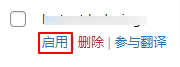
Find and click on "Plugins" > "Installed Plugins" in the left menu bar of the website background, find the plugin in the list of plugins, and click "Enable".
How to use Code Snippets Pro
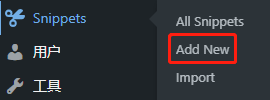
Click on "Add New".
Select the type of code you want to add and enter the code.

Select the location where the code is inserted (where it will take effect).

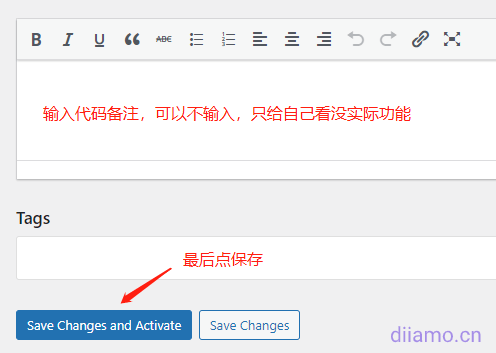
Enter a note point to save it to take effect.
Common problems and solutions.
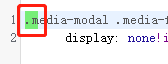
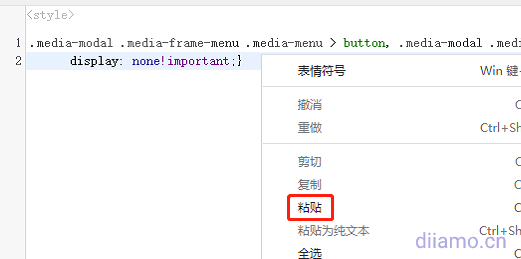
1- If you can't add/edit the code, it keeps showing the green flashing color block below. Click the right mouse button and click "Paste" to unprotect it (you don't really need to paste something into it).
2- Be careful after adding PHP code to, if you enter the wrong code to get the wrong format and so on may lead to errors can not enter the site.