LatestDownload Admin Columns Pro...Turn WordPress’s default, basic list pages—such as "Posts / Pages / Media / Users / Products"—into a "data management dashboard" that’s customizable, filterable, and editable right from the list view. You no longer need to click into each post to change the title, categories, or custom fields; everything can be done right from the list page.
This plugin offers a wide range of features and ways to use it. For more details, please visitOfficial WebsiteHere’s a brief introduction. Actually, this plugin is best suited for websites with a large number of products or articles and complex data; it doesn’t really show its strengths on simple websites.
🎯Main Functions
Add a column to any list:You can add posts, pages, custom post types, users, comments, media, and taxonomies. It comes with over 150 built-in column types, and custom fields (ACF / Meta Box / Pods / Toolset) can also be displayed directly as columns.
Edit directly on the list page:Inline edit: Just click to make changes; bulk edit: Make changes to hundreds of entries at once—you can even delete or edit all selected items on a page at once.
Smart Filtering + Sorting:Supports various operators such as equals, not equals, contains, and greater than; filter results can be saved and shared; any column (including custom fields) can be sorted with a single click.
CSV Export:Export the current view with a single click, based on your filters and sorting.
Multiple Views (Column Sets):A single table can store multiple column configurations, which can be switched based on the user—editors see one set, while authors see another.
✨ Key Advantages (How It Differs from Ordinary "JiaLei Plugins")
Deeply Integrated Ecosystem:ACF, WooCommerce, Yoast SEO, Meta Box, Toolset, Pods, and JetEngine are all fully integrated. For example, the WooCommerce product list allows you to directly view and edit SKUs, inventory, and prices; and you can view and edit ACF’s text, select, relationship, and repeater fields.
A Real Time-Saver:Elliot Condon (ACF founder) said—when they were restructuring the ACF documentation, they had to update the categories and meta tags for over 100 articles, but "it was done with just a few swipes," without having to open each one’s edit page individually.
The list offers a truly immersive experience:Horizontal scrolling (no crowding, no matter how many columns there are), sticky headers, conditional formatting (highlighting important data), and the ability to preview videos and images directly within the list.
Developer-friendly:Configuration settings can be exported to a PHP file instead of being stored in the database, allowing them to be deployed alongside the theme or plugin so that team members can share them without having to reconfigure them.
Works even on large sites:Lazy Loading + Pagination + Performance Optimization—Used by over 250,000 sites, with multisite support.
🎯 Who is it for?
WooCommerce Store Owners:Manage hundreds or thousands of products, adjust prices and inventory in bulk, and filter by attributes.
Editorial/Publishing Team:View post status, SEO score, and author assignment at a glance; batch edit publication dates and categories.
Developers and clients building websites with ACF:Custom fields can finally be "viewed, filtered, and edited" in the list.
What is GPL plugin
This plugin is a GPL licensed product and is safe and legal. Click to learn what isGPL AgreementClick to learnWordPress official website about GPL. Simply put using the GPL license plugin/theme source code open source sharing, can be legally free to change, use, distribution.
The company that owns the plugin/theme mentioned in the title of this item is not affiliated with us in any way, and the company has not licensed its products or brands to us. This product is a distribution of the plugin/theme mentioned in the title, created by a third party company/developer and redistributed by us under the terms of the General Public License (GPL).
We use the name of the plugin/theme for the sole purpose of clarifying the plugin/theme on which this GPL item is based, with the aim of helping users to better understand the functionality and possible application scenarios of this product of ours, and in no way intended to impersonate or mislead.
This item is sold following and respecting all terms of the GPL license agreement, ensuring that users understand that they are acquiring a plugin/theme distribution based on an open source license. They are allowed to view, modify and redistribute the software to promote its free use and development.
Verified by Security Antivirus
Directly from foreign formal channels to buy, do not modify the source code. All plug-ins we use to build their own sites, used in a number of sites, safe, stable and reliable.Are you worried that the plugin is not secure? Check this articel:"Are GPL-licensed WordPress plugins/themes (cracked versions) safe?".
- ByVirustotal Antivirus Verification;.
- ByWordfenceSource code review and comparison;
- No addition of malicious external links;
- BySucuriSecurity antivirus scan.

Changelog/ Update Method
Generally new version out within 24 hours of this site will be updated, then please visit this page directly to download the new version of the installation package upload updates, the product title will be written on the latest version number. Can only be updated by uploading the installation package, do not mind, if you want to update online can only go to the plug-in website to buy the original version.
Click to view the official update log for this plugin (Changelog)
Admin Columns Pro Download and Purchase Terms
This site plug-ins purchased from foreign sites, Diiamo buy back the price of4.99 USD/pcThe price of the product is lower than the purchase price. Diiamo selling price is lower than the purchase price, and spend a great deal of effort to produce the use of tutorials + provide manual Q&A service, absolutely value for money.
Plug-in for learning and research purposes only, virtual products are reproducible, once sold no refund, please move to the detailsTerms of Service. Please log in before purchasing, and refresh the page after purchase to get permission to download the plug-in.
Installation / Activation Method
On the plugin installation page, upload the purchased zip file, then install and activate it. Next, go to the “License” section of the plugin (as shown in the image below) and enter the activation code below to activate it.
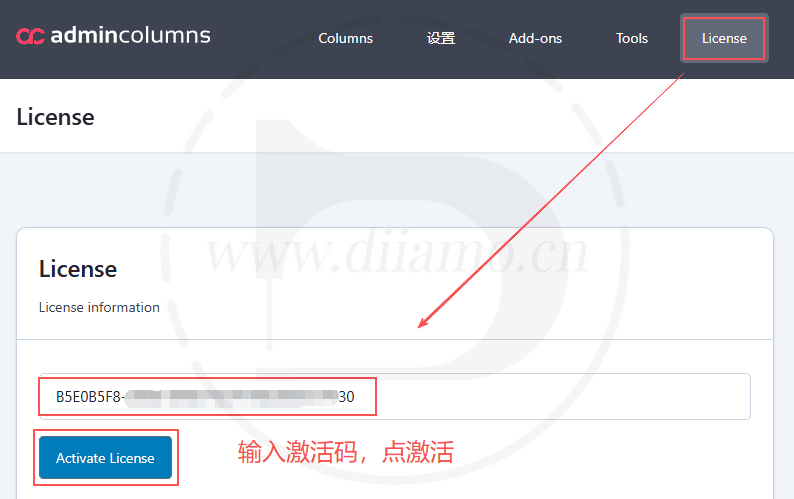
Activation successful↓.


Installation method 1: Upload and install
Find and click on "Plugin">"Install Plugin" in the left menu column of the website backend, click on "Upload Plugin" in the upper left corner, upload and download the zip installation package, click on "Install Now", and then click on it after installation "Enable Plugin" Complete the installation.

Installation method 2.FTP installation
Note: Pagoda paid version of the anti-tampering, system hardening and other features may automatically delete/block the php file inside, resulting in the plug-in can not be enabled or abnormal function, if abnormalities occur, please disable the corresponding function before uploading the plug-in.
Directly use FTP or enter the panel file management system, upload the purchased. zip compressed file directly to the plugins directory on the website (xxx. com/WP content/plugins), and extract it. Or firstUnzip the .zip archive by extracting the extracted oneFoldersUpload it to the plugins directory of the site.
Then go to the left menu column of the website backend, find and click to enter "Plugin">"Installed Plugin", find the plugin in the plugin list, and click "Enable".

Admin Columns Pro User Guide
For more information, please go toOfficial Documents.
We sell plug-ins do not make money, just to help others + hobby, the use of the method does not belong to the scope of the after-sales, please check the official documents yourself. If the plug-in function can not be used or there are bugs and so on and then contact WeChat customer service, thank you for your understanding.
We’ve dealt with many customers. Some are impatient and don’t like reading the tutorials—they ask Xiao Di about everything. But I also have to read the tutorials before I can answer you; it’s a hassle for you, and it’s a hassle for me too. On other websites that sell GPL resources, you can’t even get in touch with customer service, or they don’t respond at all. Xiao Di offers after-sales support via WeChat chat, with replies that come almost instantly—which is very rare. Please cherish this service.