Tip: foreign registered domain names can not be filed domestically, can not be bound to domestic servers to build a station, you need to transfer to the domestic Tencent cloud and other domain name registrars can be filed only after use. NonThis link.The suffixed domains in there are not filable under any circumstances.
Tip: If the web server is not in the mainland, but still want to realize the use of domestic CDN acceleration in the mainland or NotContinental areas go Cloudfalre CDN acceleration, domain name is recommended to register in the domestic platform, there is a smart resolution function + can be filed.
Where to register domain names to build a foreign trade website is better? Aliyun, Tencent cloud and so on to register a domain name is more convenient, but the need for real-name authentication is more troublesome. Do not support the registration/renewal of domain names with suffixes such as org, me, ai and so on.Free packages are not supportedDNSSECFunction. And linking to overseas servers is slower.
There is also a very serious problem: the link to overseas servers is not stable. I have a customer registered domain name in Vanco, modify DNS links to overseas servers to build a station appears occasionally inaccessible, change to overseas registered domain name problem disappears. The following counterparts have also reacted to similar problems. Aliyun and Tencent cloud is not found to have this problem.

2025.03.17 update, a group member feedback domain name analysis to the new server after the site can not open, but his colleagues and server customer service can open. Xiaodi used the tool to check the domain name resolution found that A resolution in some areas of detection failure, some areas show a different IP address (without the use of CDN), with the Aliyun domain name.
Aliyun background prompts "free version of DNS, no overseas resolution nodes, overseas access to the domain name DNS resolution speed is slow, high failure rate", cracked the case, this is the problem caused.

Using foreign servers to build websites, the DNS resolution speed of domestic registered domain names is slower than that of foreign registered domain names.Change NS resolution binding Cloudfalre to build foreign trade websites, sometimes unstable link failure, etc.The following is a list of the most important things to consider when building a foreign trade website. Building a foreign trade station is recommended to use foreign servers and register domain names on foreign platforms.
| DNS Service Provider | Overseas average parse time range (ms) |
| Cloudflare DNS (1.1.1.1) | 10 - 20 ms |
| Google DNS (8.8.8.8) | 20 - 30 ms |
| AWS Route53 (Amazon Cloud) | 20 - 40 ms |
| Hostinger DNS | 30 - 60 ms |
| Dynadot DNS | 60 - 120 ms |
| AliCloud Public DNS (223.5.5.5) | 30 - 100 ms |
| Tencent Cloud DNSPod/HTTPDNS (119.29.29.29) | 50 - 120 ms |
The more famous foreign domain name registration platforms are Namesilo, Cloudflare, Namecheap, GoDaddy, Name and so on. The prices and functions of the major domain name registration platforms vary, of which the most cost-effective, the most complete, the most humane is Namesilo and Namecheap(It doesn't support paypal and the function is complicated and not good to use).
Namesilo is recommended by many bloggers, including Sam, the god of material, and most of the domain names of Diiamo are purchased at its home, which supports Alipay.

Namesilo domain registration advantages.
- Large brand old factory, stable, safe and not afraid of sudden closure and so on.
- Affordable prices for purchasing and renewing domain names.
- Support for payment by Alipay.
- Permanent free WHOIS Privacy to protect/hide registrant information;
- Use DNSSEC for free to improve security;
- Easy back-office administration and full functionality.
Disadvantages of domain names given away by server merchants
There are a lot of shared servers that will give you a free domain name for 1 year, or a free domain name for the duration of the server. Shared hosting itself renews at several times the price, and in most cases people will choose to change servers when they expire.
Diiamo doesn't recommend using domain names gifted by server merchants to build websites and mailboxes because of the many drawbacks;
- Domain name renewals are more expensive, so it's better to have a separate domain name in theNameSiloBuy a bargain.
- The complimentary domain management has fewer features and more restrictions;
- It's a pain to change servers and migrate domains later;
- The average delay in domain name resolution is long, resulting in slower websites;
- Use the server merchant's mailbox system, later change the server mailbox can not continue to use. When the time comes to get the mailbox again, it is troublesome to relocate the mail;
Namesilo Domain Registration Tutorial
First, click the large button below to go to the domain registration page on the NameSilo website. If the CAPTCHA screen shown below appears, it means there’s a network issue—just click the red box.
Note: Be sure to open the URL in a standard web browser! Do not open the URL in WeChat’s built-in browser, as this will cause the Alipay payment to fail.
If you're still unable to pass verification, try using a VPN to switch to a different server, or close the VPN and refresh the page.
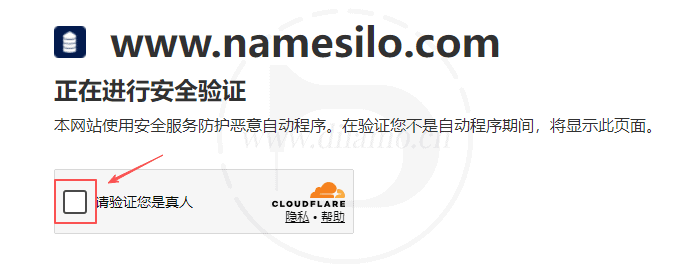
Caution:Namesilo often change the interface design of the registration process, the registration page may look a little different from the tutorial, look at the text of the tutorial operation on the line, the difference is not bad. If the difference is very large message or contact WeChat customer service to update the tutorial.
Retrieve whether a domain name can be registered
Enter the domain name you want to register in the domain name search screen, either with or without a .com or other suffix, and click the search button.
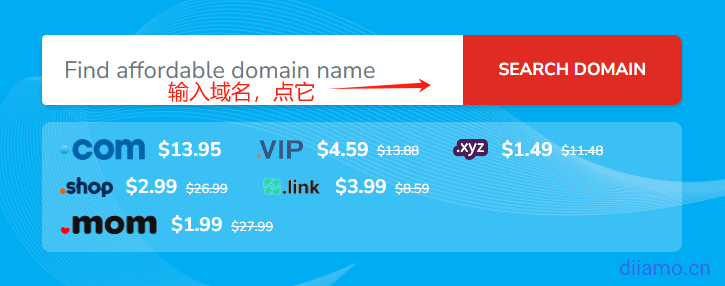
The default search only shows a few suffixes, if you want to register more suffixes, click "Show Advanced" in the picture below.Search".

Select the suffixes you want to register, select all of them by clicking "Select All TLDs" on the right side, and finally click "Apply".

After clicking search, domain names with different extensions will be listed below, if the domain name shows a yellow "Try To Buy" button, it means that the domain name has already been registered by someone else. If you want to buy a domain name, click on the shopping cart icon below the domain name, you can add more than one domain name to your shopping cart.

That price at the top of the cart is the purchase price for the first year, and the price below is the renewal price for the second year.
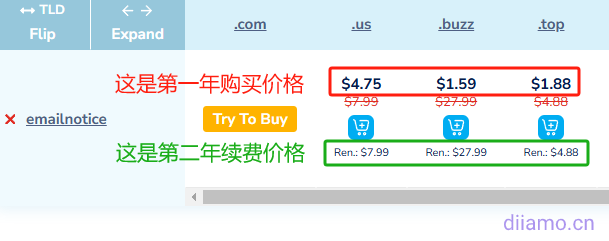
Find the domain name you want in the search results and click on the domain name/suffix attached to theblue icon, will add the domain name to the cart.
If the yellow "Try To Buy" button, it means the domain name is registered by someone else and cannot be registered, change the domain name.


Click on the button to display a "Checkout" button ↓, click on the button to pay for the purchase.

Login / Register Account
After clicking the "Checkout" button, you will enter the following screen ↓, prompting the need to log in first. If you don't have an account, click the number 1 "Sign Up" to create an account, fill in the information and click "Create Account" to create.
Fill in the form as shown in the image; the name must be at least 6 letters/characters long (the example below is just for illustrative purposes).
Note: Do not log in using Google, Facebook, or similar services! This will lead to a host of problems later on, so please be sure to register using your email address! Do not use a QQ email address, as it will be blocked by the authorities.
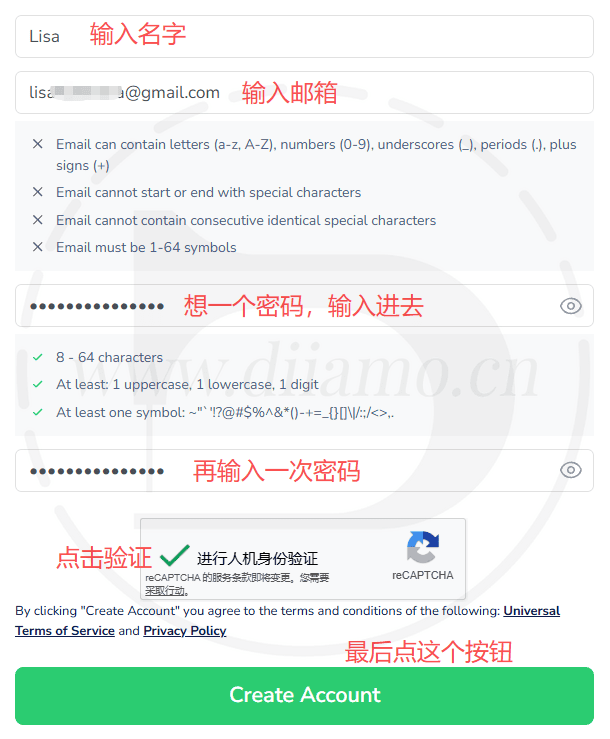
Sometimes may pop up the following input box ↓, enter the address information and click “Save” to save.

If prompted with the content below, just tap the green button. This is an advertisement ↓, ignore it.
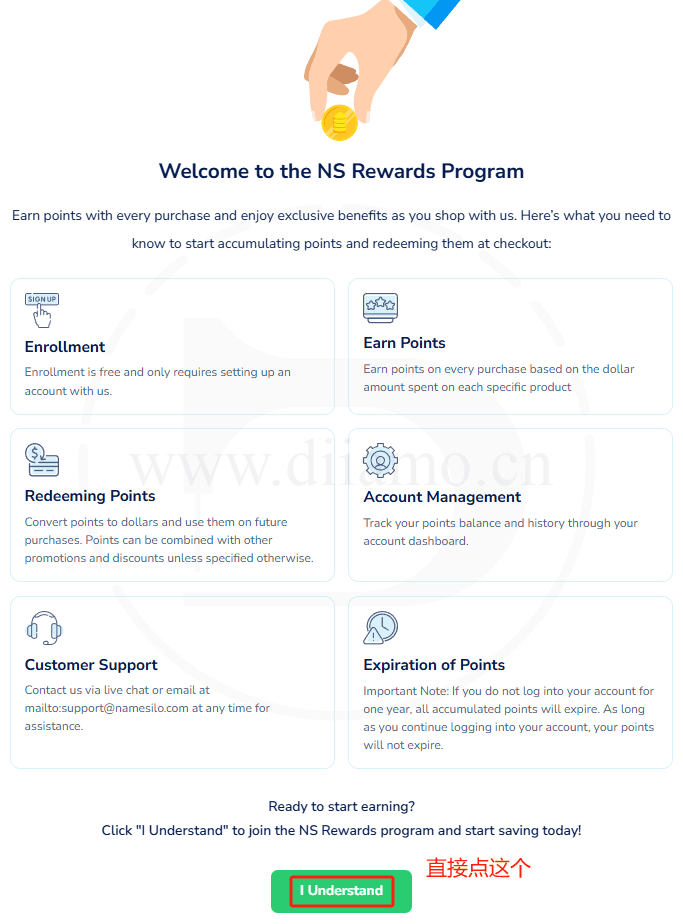
Sometimes you will be prompted to register successfully, sometimes not, just click the button if prompted and go to the following steps.
Verify order information
After successful registration, you will automatically enter the order page below, choose the time of purchase, and then tap the "CHECKOUT" button below to purchase. Ignore the rest of the content, don't click, don't select.

Sometimes the address fields shown in the image below will appear ↓, and sometimes they won't. Fill them out and click "Save."
I just made up the ZIP code and the address. You can make up the information, but it can’t look obviously fake—just make it look somewhat realistic.
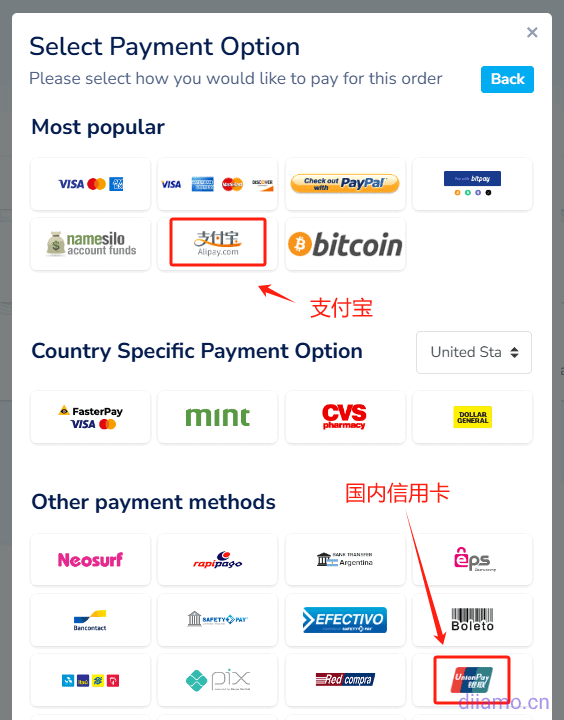
A window like the one shown below will pop up; select your payment method. If you want to pay via Alipay or credit card, click “See more”↓.
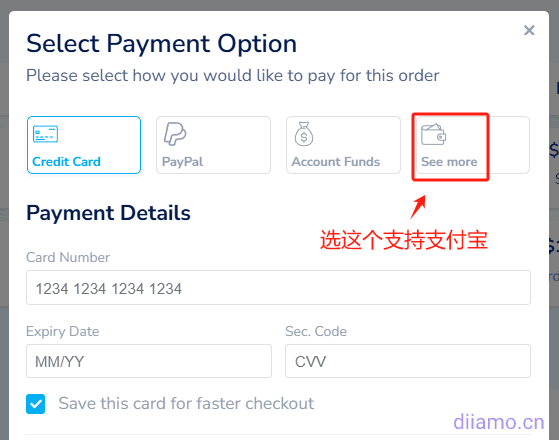
Click to select a payment method.
InOn the rightFind the section shown in the image below in the middle of the page, and enter the code in the “Have a Coupon or Promotion Code?” field. diiamoClick the button on the right to get $1 off.
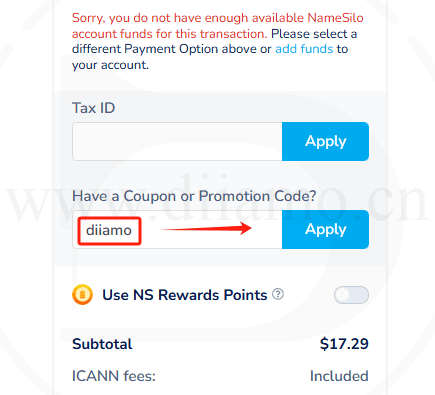
Click the button Payment ↓.
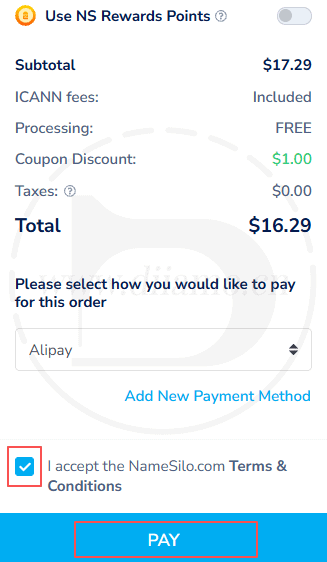
Payment
The following payment page will show the amount in RMB, open Alipay and scan the code to complete the payment. If you don't have Alipay app installed, click "Login Account Payment" on the right, or you can send a screenshot of the payment QR code to your friend to scan the code and pay for you.

Note: It is not possible to pay with a company Alipay account, only with a personal one. If you fail to pay with one Alipay account, you will be prompted "The order was created by another Alipay account..." when you pay with another Alipay account. Payment cannot be made. At this time, the browser to return to the page to select the payment method, re-select Alipay, and then follow the payment process again.
If you click on the "Login Account Payment" will enter the following interface, enter your Alipay account password and click on "Next" and follow the prompts.

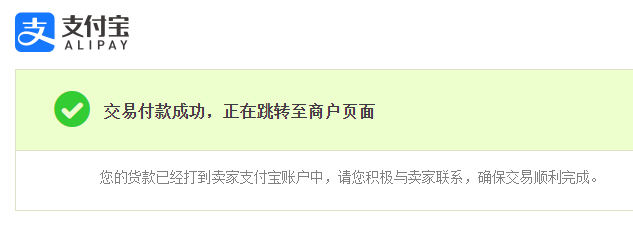
Payment is successful, do not close the page, it will automatically jump to the domain page.
Improve the information
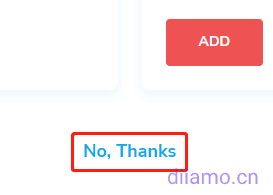
After a successful purchase sometimes you will be automatically taken to the promotional page below. Sometimes it doesn't show up it will automatically go to the personal center account below.

Scroll down to the bottom of the page and click on "No, Thanks" in the image below.
Normally after registering you will be automatically taken to the following imagePersonal Account PageIt is recommended to enter the "Account Settings" first, if prompted by the red box in the following figure, you need to improve the address information and other information ↓, in order to normalize the use of domain names.

Refresh the page, you may be prompted to verify your email address at the top, click "Verify now". Verify your email address before you can use the domain name.

After completing the information, click "Domain Manager" to enter the domain name management, you can modify the domain name resolution records, NS servers and so on.

Go to the image belowDomain management page.

This is the end of the Namesilo domain name registration tutorial, the following is the domain name related operation method.
Manage the use of domain names
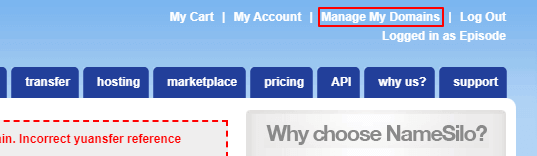
Here is how to resolve domain names, modify Nameservers (name servers), set DNSSEC and so on. Normally, you have to log into the domain name management backend and openhttps://www.namesilo.com/account_domains.php Enter the domain management interface, or click "Manage My Domains" in the upper right corner of the backend page.
Modify Nameservers name servers
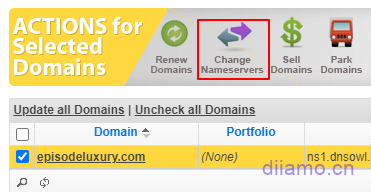
If the website uses Cloudflare for CDN acceleration, the domain name needs to be changed to Cloudflare's nameservers. How to modify: First check the domain name you want to modify, and then click the "Change Nameservers" button above.
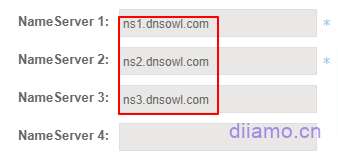
Go to the Nameserver management interface and delete the following three existing records.
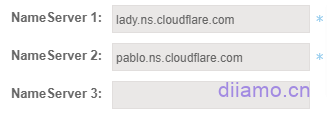
After adding a new site to Cloudflare, it will give you two nameserver records, fill them into the first and second columns respectively, and click "SUBMIT" to save.
After saving will automatically return to the domain name list page, refresh the page can see has been replaced with Cloudflare's NameServers.
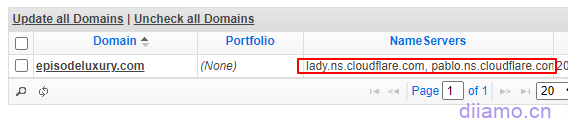
Modify domain name resolution records
Note: If the domain is connected to the CloudFlare CDN, the changes will only take effect after you add the domain records in CloudFlare. Adding or modifying domain records in the location below will not take effect.
If you are using Namesilo's own domain name resolution service, you need to add/modify a domain name resolution record. Click on the blue circle icon to the right of the domain name to enter the DNS management interface.
Note: A customer reported that the DNS records they added in Namesilo aren't taking effect. In this case, we recommend contacting customer service for assistance or switching to a third-party DNS service such as Cloudflare.
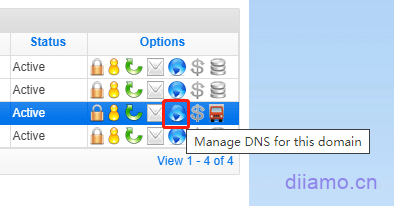
To add a parse, click on the appropriate type at the top.

For example, if you want to add TXT records, click "TXT" to bring up the content filling column, fill in the corresponding content and click "SUBMIT" on it.A customer can't add MX records of free NetEase enterprise mailbox with Namesilo's own DNS, please use Cloudflare and other third-party Nameservers name servers when you encounter this situation.

How to renew a domain name, auto-renewal
After logging in, go toDomain Management Interface↓.Checkcorresponding domain name, the top function bar icon will light up, click the corresponding icon to operate. You can renew the domain name, lock the domain name (can not transfer the domain name), set the automatic renewal and so on. It is recommended to bind a credit card to set up active renewal to avoid forgetting to renew the domain name expires.

To renew, click the green circular "Renew Domains" button to enter the ↓ renewal screen below. Select the number of years to renew and click "CHECKOUT".

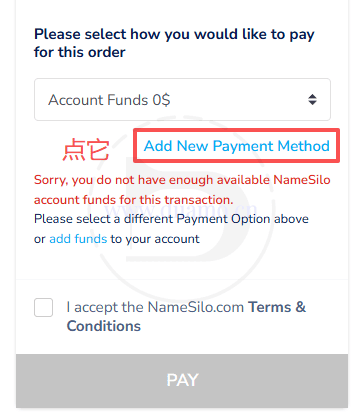
Next we will be asked to choose the payment method, click " Add New Payment Method " to choose the payment method.
Select the payment method, tap the red button “Select” to enter the payment interface, just like the above.Steps to pay for a domain nameSame, not to be repeated here.
Click to select the payment method, it is recommended to choose Alipay, convenient, directly according to the current exchange rate deduction of RMB.
After you select it, you will return to the following screen, tap "Select" button, it will automatically return to the purchase page.
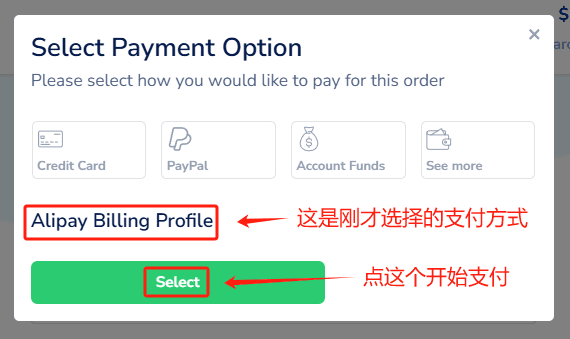
Just follow the rest of the steps.
Modify account information, e-mail address, etc.
InSetting interface↓, click "Account Settings" Go to your account settings and you can change your address, email address, secure login verification, etc. You can make up the information, but don't fake it at a glance! Try to be as authentic as possible and don't apply information such as celebrities or other people's company names.
Going in.https://www.namesilo.com/account/contacts/page, click on that icon under the Modify column to edit the contact information, fill out the Nickname* and other information, you can make it up, you can't start to fake it at a glance! You can make it up.must notEnter information such as Namesilo, otherwise the domain name may be deactivated.

Received an email that the domain name was deactivated
A user reported receiving the email shown below, which indicated that the domain had been suspended. Since he used his Google account to log in to or register for NameSilo, he was required to provide additional information, but he failed to do so, resulting in the domain being suspended.
Just follow the “Edit Account Information” tutorial above to update your contact information, and make sure to fill in all the required details, such as your address and phone number.
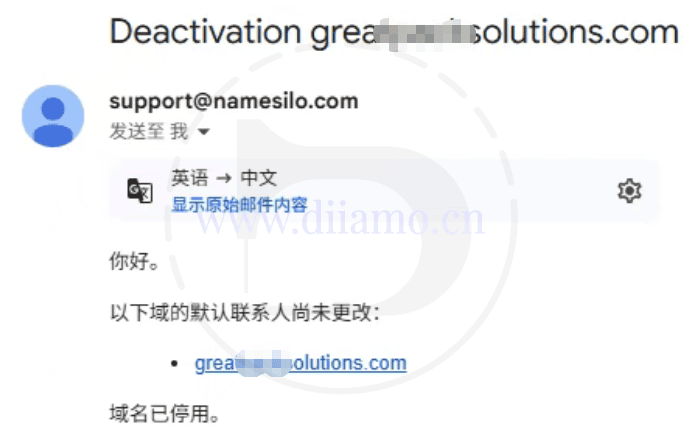
Deactivated (default contact values), domain deactivated
A customer forgot to renew their domain name. A few days after it expired, they successfully renewed it, but received a message stating that the domain had been deactivated, with the reason listed as “Deactivated (default contact values).” All they need to do is update the username and other details to match the actual information.
This issue may have arisen because the name or something similar was too similar to existing entries, or because it was deemed to be made up. The rules are strict now, so the information must be accurate and reflect reality.
Sudden failure of domain resolution and broken links with Cloudflare
A customer's domain suddenly lost its connection to CloudFlare, even though the NS record in the domain management dashboard was correct. After contacting NameSilo customer service, they explained that the "Nickname*" field in the account contact information had been filled with "NameSilo," which is not permitted (ICANN regulations stipulate that the registrant’s contact information cannot be replaced with the domain registrar’s contact information). As a result, the domain was suspended, and all DNS records became invalid.
Just modify theContact informationIf you want to change Nickname* to an English name, just make it up.
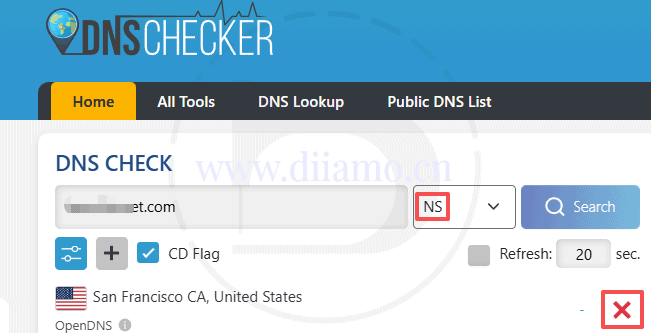
In the event of a sudden failure of domain name resolution in the future, use thehttps://dnschecker.orgIf the tool detects the resolution of the domain name, if it shows X in the picture below, it means it's not working. There is a high probability that there is a problem with the domain name provider. Contact the domain name customer service to deal with it!
There is a Contact Online Hosting Customer Service button at the bottom right corner of the page, tap it, select Live Chat and just enter your question directly. This online customer support is a bit slow and you need to wait 1~2 minutes for a reply. Once there is a reply, the problem is handled fairly quickly.

Download Domain Registration Certification
A domain certificate (not an SSL certificate) is an image/PDF that says who the domain belongs to.
This certificate is provided by the domain name registration platform, and is generally used to register some third-party platform accounts (e.g. XTransfer) to prove domain ownership and so on.
Namesilo also provides this certificate, log in to your Namesilo account and go to theDomain Manage, click on the domain name ↓.

Scroll down to the bottom of the page↓ and click the “Print Certificate” button to download the certificate. Some browsers have an online preview with a download button in the upper right corner.


Open Enterprise Email (Free & Paid)
If you want to open a business mailbox, it is recommended that you do not use NameSilo's mailbox, it is very bad, many subsequent problems.
FreeRecommended enterprise mailboxes☞ Advantages: 1-Sweep the code to log in, convenient and safe; 2-New email arrives WeChat reminders, timely reply; 3-Support human customer service, have problems solved in a timely manner.
Material God Sam Public shared an article about mail fraud cases. Mail theft occurs from time to time, Tencent enterprise mailbox does not set a password, you can only use WeChat scanning login is not afraid of being stolen. Free enterprise mailbox should only be used as a transitional stage of the enterprise start-up phase, it is best to use a paid enterprise mailbox if you have the conditions.
2025.02.17: Tencent paid enterprise mailbox is now very cost-effective, you can customize how many paid mailboxes to buy, a mailbox as long as more than 100 a year. For more details, please move to the official website of Tencent enterprise mailbox.
All domestic free enterprise mailbox development letter arrival rate is not high, because the country sends too much spam resulting in a lot of domestic ip is black, mail is easier to be intercepted. If you need to send a large number of development letters, it is recommended to register for the professional version (cover the costs) Tencent enterprise mailbox (using foreign IP, server to send mail), recommended☞ .
The advantages of professional version (paid) tencent enterprise mailbox is easy to use, binding weibo send and receive letters is also convenient, there are online artificial customer service have problems at any time to solve.ZOHO mailbox advantage is to receive and send letters to achieve a rate much higher than the domestic paid mailbox, especially the development of letters. Because of the time difference, language and other reasons, ZOHO mailbox customer service to deal with the problem is more slow and troublesome.
Sam, the material god of rice class, wrote in his blog that their company enterprise mailbox changed from NetEase to ZOHO because NetEase started to restrict sending development letters to the outside world. Google enterprise mailbox is the best, but it is too expensive, and the cheapest package is $72/year/user, so the tycoons can feel free.
Netease free enterprise mailbox is not recommended to use, the shortcomings are obvious
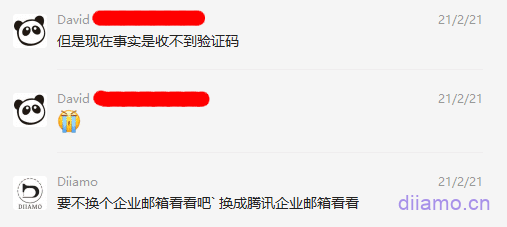
We have been using NetEase's paid enterprise mailbox for many years, and it is good in all aspects. However, we don't recommend you to sign up for its free enterprise mailbox, because we can't receive the verification code/activation code emails from some overseas platforms at all, and some of our website builders even reacted that they can't receive the emails from some customers. I set the sender's email to whitelist, and there is no solution when I contact the customer service.
There are already many customers who can't receive the verification code of Twitter, Facebook, Linode and so on for free enterprise mailbox, so they can't log in their accounts. It took me a long time to help them solve the login problem, who told me to open NetEase mailbox for them in the first place, and fill the pit by myself.
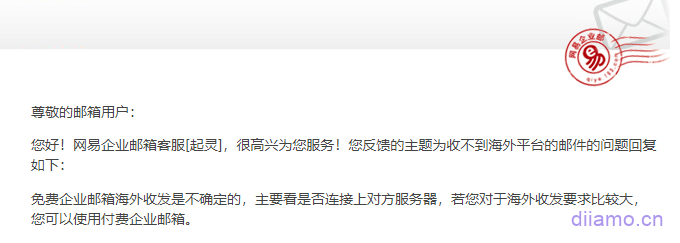
I specifically asked Netease customer service about the matter of not receiving overseas verification code emails. The reply I got was to upgrade to paid enterprise mailbox (the reply was as good as no reply). By the way, there is no manual customer service for free enterprise mailboxes of NetEase, and you can only submit work orders in the feedback platform. I have submitted several times, and it took me 2-3 days to reply the email.
I saw an article about Netease enterprise mailbox written by Sam the material god from his blog, to the effect that Netease now has strict control on sending mails, and if you use it to send development letters more than 20 mails, it is likely to be judged as sending spam and blocked. If you have the demand of sending development letters, it is not recommended to use Netease enterprise mailbox or even domestic mailbox, and it is better to use foreign mailbox. It is recommended to use enterprise mailboxes such as Zoho and Google Gsuit.
Update 2025.04.25: NetEase often sends marketing emails to its free enterprise mailbox users, recommending its own foreign trade tools and other products. Has been sent, sent a did not stop, sent for several years in a row! On the contrary, Tencent free enterprise mailbox does not have this situation, much better.
It is not recommended to use free email from hosting or domain merchants.
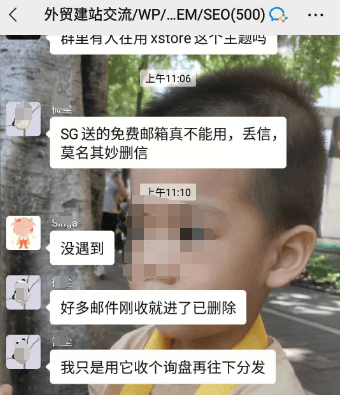
SiteGround, Hostinger, NameSilo and other web hosts will give free enterprise mailbox, but it is not recommended to use. One reason is that the quality of mailboxes is generally not good: the arrival rate of mail is low and the security is not enough;
Secondly, it is a lot of trouble to follow, once you change the server, you have to change the enterprise mailbox, and it is very troublesome to relocate the mail and so on. Thirdly, it is easy to affect each other by sharing storage with the website, which leads to the decline of website performance, and the security of mailbox and sending/receiving is affected.
If your domain name has been registered with other brand enterprise mailboxes before and you want to change it to ZOHO enterprise mailbox, just re-register it according to the following steps. When adding MX and other domain name resolution, you need to delete all relevant resolutions of previous mailboxes first, and then add ZOHO ones.
When you open a mailbox account, you can set the mailbox to be the same as the previous mailbox, so that old customers can receive emails smoothly when they send emails. You can also register different mailbox accounts and then add mailbox alias, set the alias to be the same as the previous mailbox, so that you can also receive emails from the previous mailbox.