
We atTheExcellent foreign trade hosting comparison recommendation》The article introduces the main servers suitable for foreign trade to build a website, which Vultr foreign servers are the first choice for building multiple websites and large/complex websites (Diamo is also used), cost-effective, strong performance and fast speed. This article will explain in detailVultr Purchase Tutorial.
Signing up for Vultr hosting is recommended because of its many advantages.
- High-frequency servers using NVMe hard drives, which are many times faster than SSD drives.
- CloudwaysAlso uses Vultr servers;
- Easy and inexpensive snapshot backup function.
- Customer service response was prompt and detailed;
- Support for refunds (return of machines) at any time throughAlipayPayments are only supported for refunds within 90 days;
- Good performance, speed, stability and a good reputation.
- Direct access speed without opening the ladder software mainland can be.
- SSL port 465 for outgoing mail is open by default.
- Easy one-click configuration upgrade, with separate upgrades for hard disk space and bandwidth.
- The Asian network is optimized and has good speeds, better than other non-CN2 line hosting networks;
The following Google test site is a client site that was speed optimized by us. Using Vultr service, Astra theme, Elementor editor. To borrow a phrase from MiClass Yan Sir: fast to the scalp.
Computer ↓:

Mobile ↓:


Also available for sale at Vultr OpenLiteSpeed WordPress hosting with faster than average hosting.CyberPanel is the official LiteSpeed free panel for OpenLiteSpeed and LiteSpeed systems.


Sign up for rebates, after sales through invitation links
When you buy a server through our invite link, we get a commission and in return we give it to you for free:
- Relocate a website for free;
- Choose any one on our website Theme or Plugin, free gift to your account;
- Within 30 days of purchase, usethis hostBuild a website encountered any problems, free one-on-one manual professional answers;
- Free pagoda panel installation for Vultr servers and optimized setup;
- Free speed audit to help you analyze what's slowing down your site and give you optimization advice;
- Provide after-sales protection, if the purchase of recommended servers have problems, within 1 month we help you to deal with/optimize for free;
Isn't it very conscientious! I dare say the whole network only we Diamo have such a large rebate activities, real feedback users. We provide these many services are actually to exercise, improve professional skills, while attracting traffic to promote, win-win.
Cooperative Extension:Send our invitation link (https://www.diiamo.cn/go/vultr) to a friend. If the other party makes a successful purchase, you can also get the above mentioned rebates and services for free. For more information, please contact our customer service (QR code in the footer).
Purchase successfully contact WeChat customer service, provide the purchase date and account e-mail address on the line, our background can see whether through our invitation link to buy successfully.
Vultr Purchase Tutorial
Through our Vultr Invitation Link RegistrationVultr coupon code will be applied automatically, and you will receive a $300 trial payment, valid for 30 days. You can open the server and other products to try, such as dissatisfaction within 30 days to apply for a full refund without having to bear the cost. Diamo for our customers to provide free registration services on behalf of our customers, with your email registration, ownership, control to you, if you need to contact WeChat customer service.
Create an account
Go to the Vultr purchase screen via the big yellow button above and fill in theCommonly usedthe e-mail address, andSettingsA password (is think of an account password, don't enter an email password). Click on Verify as well as check the box to agree to the terms and click on the button to register an account.
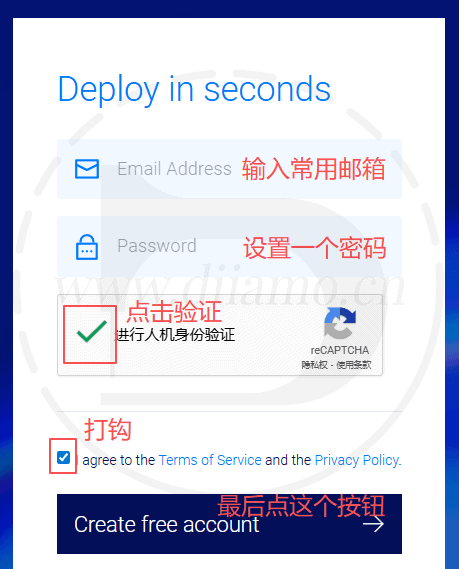
Try not to use QQ mailbox registration, may not be registered successfully, a foreign host customer service told me that QQ mailbox is often used to do bad things, so they will be especially controlled QQ mailbox account.
If you forget to renew your account, the merchant will delete the server and close your account! Be sure to use common mailbox to register! Email notifications will be sent for outstanding fees!
2025.03.31 Update: A user feedback using QQ mailbox to create an account is not successful, no response after the page jump. I used his QQ number to register indeed not work, open the ladder (global) + enterprise mailbox registration on the OK. if encountered this situation, change the mailbox to try.

Recharge Balance
After creating an account to enter the recharge interface, you need to first recharge the balance before you can start renting the server, if you choose to pay by credit card you can not recharge the balance, automatically deducted from the credit card every month.
Suitable payment methods for us are Credit Card (credit card), Paypal (PayPal), Alipay (Alipay), choose the right payment method according to your situation. I generally recommend binding a credit card to automatically debit each month, saving time and not afraid to forget to renew.Monthly deductionThe fee will be deducted after one month of use.
The free $100 is only valid for 14 days and can be used to offset the first 14 days of fees. If you are not satisfied within 14 days, you can apply for a full refund of the money you have already spent, and the cost incurred during these 14 days will be deducted from the free $100.

There are a few customers who forgot to renew their own subscription resulting in the server being deleted and their account being closed ↓. Be sure to recharge in time! It is best to bind a credit card! Bind commonly used e-mail.

1)Payment by Alipay (Alipay)
First click on Alipay and enter your information as shown below. Enter your information as shown, click on the address, then click on the blue word "Manually" in the pop-up content.

Enter the address as shown below and click "Save this address".

Follow the instructions below, and finally click "Pay with Alipay" to pay.

Open the Alipay app and scan the code to complete the payment. If you don't have Alipay installed, you can take a screenshot of the payment QR code and send it to your friend or click "Login Account Payment" on the right.

Enter your Alipay account password and click "Next" to follow the prompts.

Prompted payment is successful, it will automatically jump to the server page.

2)PaypalPayment
Note: One Paypal can only pay for one account, if you have previously paid for other Vultr accounts with Paypal you will not be able to pay for this account and the following error message will be displayed. Alipay does not have this restriction.

Click on Paypal first and the payment screen will appear as shown below. Enter your information as shown, select the amount of recharge and click "Pay with Paypal". Enter the information as shown in the picture, click on the address, find the pop-up content and click on the blue word "Manually".

Select the amount of recharge and click "Pay with Paypal" to enter the payment interface.

Select the payment method and click agree and proceed to complete the payment. If you don't have money in your balance, you can bind your credit card or debit card and fill it up, but it's a bit of a hassle and you might as well pay directly with Alipay.

3) Credit card payment
Note: The hosting is rented from the U.S. merchants in foreign countries, only credit cards with the Master logo can pay, without the Master logo credit card can not be used. Just fill in the steps as shown below. If you check the box to bind the credit card, you do not need to pre-fill, automatic monthly debit. Don't worry about security issues, we use credit cards in many foreign sites to spend a lot of times, there has been no theft of the phenomenon, foreign laws and regulations are stricter than the domestic.
You will receive an SMS alert after each chargeback (the name of the billing merchant starts with Vultr), so remember to re-tie your card if you lose it or get a new one.
Follow the steps below to top up ↓

Be sure to renew in a timely manner! If you don't renew your server for more than a certain period of time, it will be automatically deleted by the merchant! The website should be backed up regularly! It is better to bind credit card, pay attention to credit card expiration time.
Verify Email
After charging the amount jumped to the server rental page, the top will prompt to verify the email.Need to complete mailbox verification before you can rent a serverClick on "Click here to send a verification e-mail" to send a verification e-mail to your registered mailbox, open the e-mail and click on the link inside to complete the mailbox verification.
If you don't have it in your inbox, go to your spam folder and look for it. If you're sure you didn't receive the email, log in to the server and click on resend verification email, or contact customer service to handle it. Contact customer service is below.

Click Send Email to prompt the following.

Open the email and click on the red box link↓ to complete the email verification.

Prompt to complete email verification ↓.

If it's our website builder customer, just send us the server account password after verifying the email, and we'll do the rest by ourselves.
Selection of mainframe
After verifying your email if you are not automatically taken to the server rental page, click "Dashboard" > "Compute" on the left side to enter the server section.

Click on the upper right corner of the Deploy + button, in the popup option, click "Deploy New Server" to enter theServer Purchase Interface.

After entering the server purchase page ↓, follow the instructions in the text below.

1- Select the host type:Only "Shard CPU". The other types are less suitable for regular websites, either the quality is too poor or the price is several times higher.
2~3- Select the country/region where the server room is located and the specific location:According to your business situation, try to choose the closest server room to the customer. If you do the global market it is recommended to choose the United States room. If you want to access the mainland fast selection of Los Angeles room, the following has a detailed explanation ↓.
If the business scope is global selectionUnited States (America) Region. U.S. network construction is better, global access speed are fast suitable for foreign trade B2B sites, cross-border e-commerce sites. The business scope is specific to the country / region to choose the closest to the region's server room (for example, the British market to choose the London server room).
Los Angeles (USA) machine room to the mainland of the fastest link speed, many people will choose it to build a website in the country, especially to build ladder software. Because too many people pile up in this room will lead to many problems, such as SSH often can not connect, ip is blocked, and occasionally the network is very slow. Plus it is the only one that has failed several times before so it is not recommended to build foreign trade websites. We will generally choose the Silicon Valley server room, it is recommended that the first speed test to choose the most suitable for their own network server room.
Note: Often some servers (e.g. 2H2G) are sold out in some server rooms, so switch between several server rooms to find the right configuration.

Click Speed TestGo to the following page to test your network accessUnited StatesWhat is the ping value of the server room? The lower the ping value, the lower the latency and generally the faster the speed. Record the top 3 US regional server rooms for the test results, using the followingDownload Speed TestTest the actual speed.

Click to download speed testEnter the following interface, first select the server room you need to speed test, then click the red box at the bottom of "100MB" or "1GB" to download the file speed test.

In the download interface to see how much download speed, the following chart shows my download speed is 7.0M / s. Wait a few seconds after downloading to see what the maximum speed is, then click to cancel the download, otherwise the file will really download to the computer. The Ping value of the low several U.S. server room download speed are measured, choose the fastest server room to open the server.

If you are doingDomestic WebsitesThe main choice is still the Los Angeles server room, near the mainland domestic visitors to access faster, depending on the speed test.
It is not recommended to choose Japan / Singapore room, the daytime speed can be, but at night the packet loss is serious and very card. Tokyo / Singapore room is not directly connected, need to detour to the United States and then to Japan / Hong Kong and then to the mainland, the speed is not as fast as the Los Angeles room.

4- Select the CPU type:There are 2 types, High Frequency and High Performance, and the CPU can be selected from AMD and Intel brands.High Performance AMD hosts are recommended for the most stable and best performance.
High Frequency CPU frequency is higher, the hard disk and database read/write speed is faster, but the number of CPU cores/threads is less and the hard disk capacity is smaller; High Performance CPU frequency is a little bit lower, the hard disk and database read/write speed is a little bit slower, but the number of CPU cores/threads and the hard disk capacity is bigger.
If you only put 1-3 websites, it is recommended to go with High Frequency, which is more responsive in single-threaded tasks such as WordPress dynamic page generation, MySQL queries, etc., and is suitable for high concurrency but lightweight request processing.
If you put more than 3 sites, especially the station building company tall dozens of hundreds of sites, it is recommended to choose High Performance, multi-core/threading can better isolate the process of each site, to avoid the collapse of a single site plug-ins lead to global performance degradation, reduce lag.
What's crossed out above is just theory, Di (2025.08.13) has actually tested and used it for years and found that High Performance's CPU score performance is a bit higher than High Frequency's; High Frequency's hard disk writes about 1/5 faster, but reads a bit slower.
High Performance AMD hosts are recommended for the most stable and best performance.
2025.08.13:In order to compare High Frequency, High Performance host effect, Xiaodi I rented 2 new hosts to run points. Both are 2H2G configuration, New York server room, Debian 12 system, install the same version of Pagoda, in the absence of the installation of Nginx, etc. directly installed Pagoda score software to run points.
The score is not 100% accurate and can only be used as a reference. The same type, configuration, and server room host, the score results may also have a big difference.
First, the conclusion.High Performance - AMD(High Performance Server) has the best and most stable performance and is recommended for building websites.
High Performance - AMD 2H2G Pagoda score results↓

High Performance - Intel 2H2G Pagoda score results↓

High Frequency - Intel 2H2G Pagoda score results↓

Conclusion:High Performance - AMD has the highest scores and the best performance.
5- Selection of configuration:Choose according to your website and budget.
Remember to select the third CPU type "High Performance", select AMD for the CPU, and here are the configuration suggestions. No need to consider the bandwidth, the minimum 1T is very large. Although the hard disk capacity is generally enough, also pay attention to the next.
How many websites a server can run smoothly has to do with system optimization, website optimization, website visits, the website itself is light/heavy, and the number of websites, here is the average public situation given the suggestion.
Web site complex / large number of visits / budget enough to buy a high point configuration, it is best to find people to optimize the site and hosting, cost-effective as well as the best results; know how to optimize the technology / did not use heavy plug-ins / OpenLitespeed / not much access to multiple sites can choose a low point of the configuration, the later bottlenecks and then upgrade the configuration.
2B foreign trade independent site (Woocommerce) or blog class static site configuration recommendations ↓:
| Number of websites | Simple/lightweight website | know how to optimize | Recommended Configurations |
| 1 | ✓(Lightweight) | ✓ (Understood) | 1H1G |
| 1 | ✕(Heavy) | ✕ (White) | 1H2G ~ 2H4G |
| 2 | ✓ | ✓ | 1H2G ~ 2H2G |
| 2 | ✕ | ✕ | 2H4G ~ 4H8G |
| 3 | ✓ | ✓ | 2H2G ~ 2H4G |
| 3 | ✕ | ✕ | 4H8G ~ 4H12G |
| 4 ~ 7 | ✓ | ✓ | 2H4G ~ 4H8G |
| 4 ~ 7 | ✕ | ✕ | 4H8G ~ 8H16G |
| 8 ~ 15 | ✓ | ✓ | 4H8G ~ 8H16G |
| 8 ~ 15 | ✕ | ✕ | 8H16G ~12H24G |
2c cross-border e-commerce website (Woocommerce) Configuration Recommendations ↓:
| Number of websites | Simple/lightweight website | know how to optimize | Recommended Configurations |
| 1 | ✓(Lightweight) | ✓ (Understood) | 2H2G |
| 1 | ✕(Heavy) | ✕ (White) | 2H4G ~4H8G |
| 2 | ✓ | ✓ | 2H4G ~4H8G |
| 2 | ✕ | ✕ | 4H8G ~ 4H12G |
| 3 | ✓ | ✓ | 4H8G ~ 4H12G |
| 3 | ✕ | ✕ | 4H12G ~ 8H16G |
| 4 ~ 7 | ✓ | ✓ | 2H4G ~ 4H8G |
| 4 ~ 7 | ✕ | ✕ | 8H16G ~ 12H24G |
Note: Recommended for e-commerce sitesChemicloud HostingLiteSpeed system processing dynamic data faster, but also can afford more concurrent.Vultr to build cross-border e-commerce site, it is recommended to use the OpenLiteSpeed system, and to optimize it very well, white still choose Chemicloud put, cost-effective and much better.
Here are the different configurations of Vultr hosting ↓.

WordPress and plug-ins are updated frequently, the server performance is getting higher and higher, especially Woocommerce and Elementor plug-ins eat configuration. And visits up after the high server load will lead to the site becomes stuck or even inaccessible.
The following picture is a customer's website temporarily can not open feedback to us, after investigation found that the server card can not handle so many requests so the website temporarily can not be accessed. The server configuration is low to put 3 websites, really strain. Stable operation of the site is very important, do not save that little bit of money.

Below is the Auto Backup feature, it is added by default, just ignore it, the following steps will disable it. Its price increases with the configuration of the selected host.

6- Click the button to go to the next step.

7- Select the desired system:It is recommended to choose Debian 12↓. The system board is sometimes slow to load, wait a few seconds for it to show up. After selecting the systemrefrain fromTap the blue button in the lower right corner! The page scrolls down for other settings.

The system is recommended to choose Debian 12 ↓, the best performance, stability. Pagoda currently has the highest compatibility, the most recommended is also this system.CentOS official has given up updating, not recommended to choose.Ubuntu system and stability is not as good as Debian, which is mainly used to do the operating system, not a server system.
 | Debian (Minimal Installation) | Ubuntu Server (Minimal Installation) |
| Default memory usage | ≈ 40–60 MB | ≈ 70–100 MB |
| Disk usage | ≈ 300–500 MB | ≈ 800 MB – 1.2 GB |
| Default number of processes | Minimal (Basic Services Only) | More (cloud-init, snapd, etc.) |
| Does it contain Snap? | not have | Install snapd by default |
If you don't want to use Debian, and you are tech savvy and want to use OpenLiteSpeed, click "Marketplace Apps" and select "OpenLiteSpeed WordPress" or "CyberPanel" to install it.Don't use OpenLiteSpeed if you're new to it!, not well set up and prone to problems!

8- Server Settings and Server Hostname and Label can be ignored.
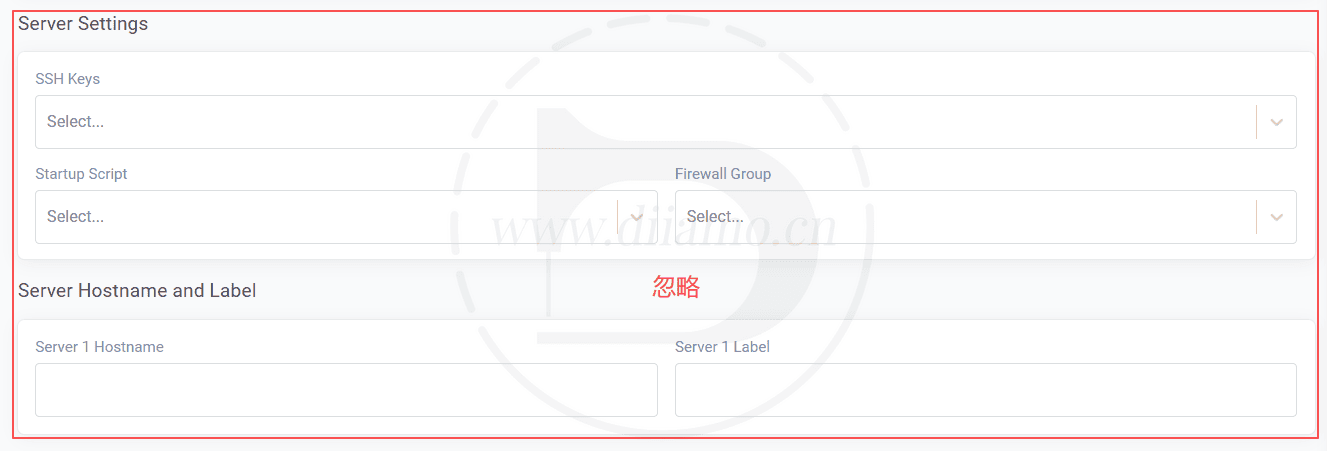
9- Instance Connectivity keeps “Instances” selected by default. Click “Automatic Backups”.
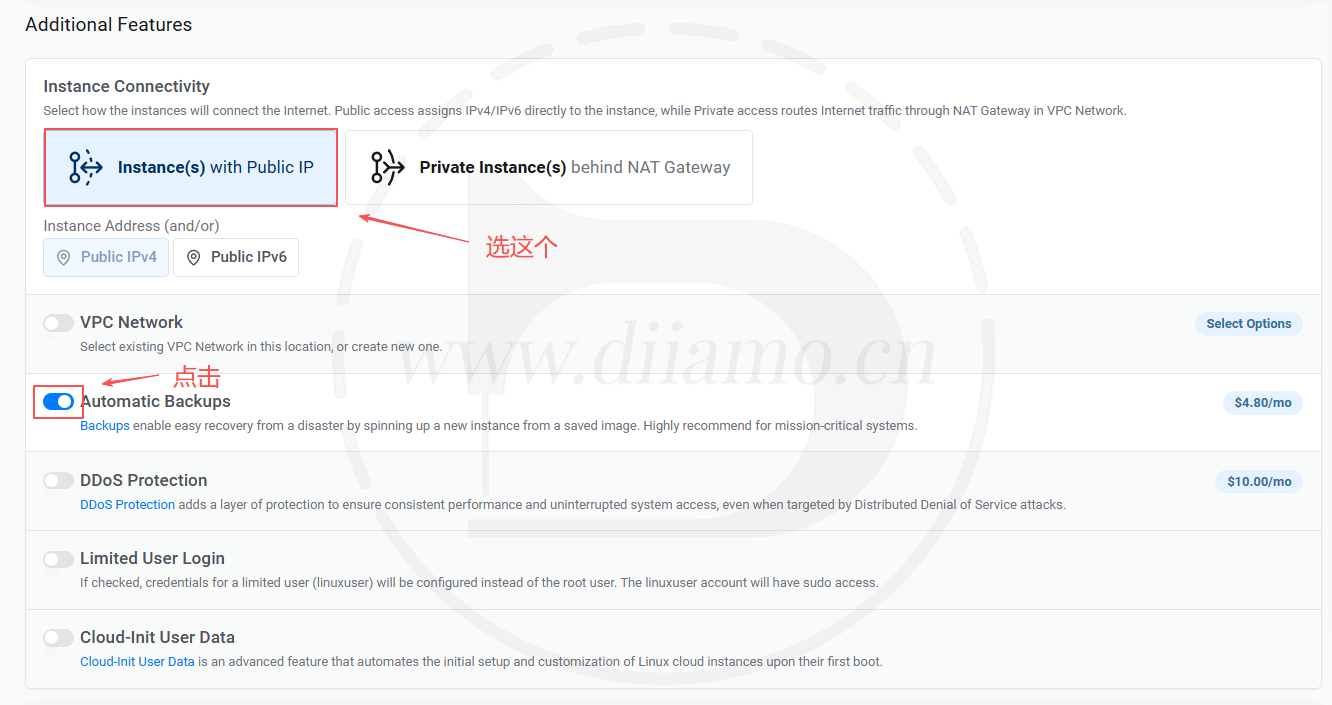
Click on “Automatic Backups” and the following pop-up window will appear ↓, check the YES box and click the red button to turn off the automatic backup feature. Automatic backups are expensive! You can always enable it later, and you can use the cheaper snapshot backup feature instead, so turn it off here.
The other additional options are left at default and untouched. Once the server is bought, then see if you want to add features based on demand/usage.

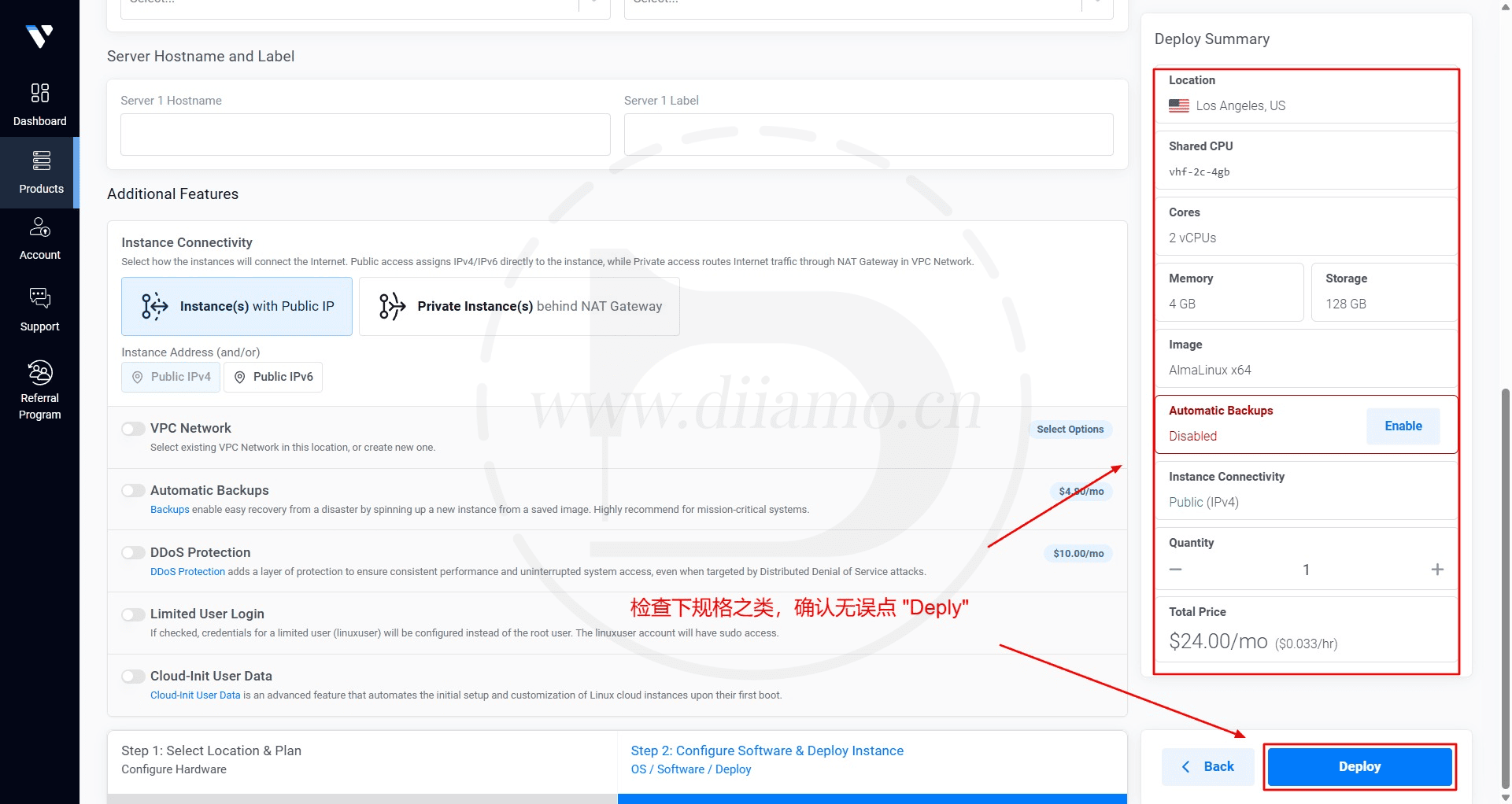
10- Final check of configuration ↓If there is no problem, click “Deploy” to open the server.
After opening go to the following pictureHosting Listings Page, will show the newly opened hosts.Wait 10 minutes after the machine opens.! Wait until the server is configured before installing the Pagoda panel, otherwise you may not be able to link to SSH.
Tips: 1) After turning on the machine for 10 minutes has not been able to connect to SSH, may be the IP address is blocked, check the following tutorial to deal with; 2) using SSH to install Pagoda need to close the ladder software, otherwise after installation may not be able to open/login Pagoda panel; 3) if the domain name is bound to CloudFlare, in Pagoda to add a website, you need to first install theSSL certificatein order to open the site properly.

Ping the IP address to see if it is intercepted by the mainland
If you want to check the ip address of the server to see if it is blocked domestically (Wait 10 minutes after the new server is configured before pinging it), follow the tutorial below.
Foreign inexpensive servers will be used by some people to take the ladder software, resulting in some servers ip address by the domestic Great Firewall (GFW) shield. We have a customer server ip address is blocked, resulting in not over the wall to log on, but also can not use some of the functions of the domestic plug-ins, change the ip after the return to normal. So it is necessary to ping the ip first, ping can not be rented a host (or change ip).
Existing serversrefrain fromDelete it first! Turn on the new server and test it before deleting it. Deleting first and then opening a new host will assign the same IP address you used before, for nothing.
Ping method: Right click the Windows logo in the lower left corner of your computer > click "Run" > type "cmd" and press "OK".

Enter the screen below and type ping+space+your server ip address (red box below) and press enter.

If the prompt is the same as the figure below, 0 is lost, and the round trip time is more than 100ms, it means that it can ping through and the ip is not blocked.

If you get the same message as below, "request timeout" or 100% is lost (must be 0 loss means no problem), there is a high probability that the ip is blocked, follow the above steps to rent a new server.

How to change IP address for Vultr hosting
If your server IP is walled, and you have already built a website or something you don't want to discard, you can use the IP replacement method to unblock and keep the data at the same time. The following is the official IP change method given by Vultr, and it is available for testing. The approximate method is 1- take a snapshot backup of the previously rented server (see the backup section below for specific methods), the serverrefrain fromDelete first;
2- Rent a new server and select Snapshot in the step of selecting system, it will show the snapshot backup that was done before, click to select it, other registration steps remain unchanged. After renting a new server, you will have all the content of the old server, including websites, pagoda panels and so on. As long as the domain name is resolved to the new server's IP, you can continue to use the previous URL/account to log into the website, pagoda panel and so on. After testing the new server, remember to turn off and delete the old server to avoid overcharging.

Vultr Tutorial
The following is the background use tutorial, if you can not read or website revision please comment message, we will update.
Familiar with the back office
"Compute" in the "Products" section is the server list and details. Click on the corresponding service name to enter the server settings interface, you can check the usage and modify the settings.

Shutdown, Quick Reboot, Format Host (Reinstall System), Delete Host, and Purchase New Server function buttons in the upper right corner of the server details.

Click on "Make a Payment" to enter the top up screen, you can choose the appropriate way to top up your balance. The green amount in the upper right corner is the account balance (if it shows a negative red number, you are in arrears), and the black amount on the left side is the server cost for the month so far (hourly rate).

Contact Customer Service
If you need to contact customer service, click on "Support"."Go to the support page and click Open Ticket in the upper right corner to create a work order.Vultr does not have an online customer service, so you can only contact the work order. If you can't log in to your account, you can send an email to support@vultr.com.

Select the type of question, server, fill in the subject and content and click "Open Ticket" to send a message to customer service.

After submitting a work order, you can see the submitted work order in Support. If it is fast, there will be a reply in a few minutes, if it is slow, it may take a few hours, but usually it will take less than 24 hours to recover, and an email will be sent to notify you of the reply.
Modification of data
If you want to modify your profile, click Account to enter the profile page, you can modify your cell phone, email address, etc.

Upgrade Server Configuration
First, click into the "Products" section, click on the corresponding server in the server list interface, and then go to "Setting" > "Change Plan", as shown in the figure below.green boxFor the host's current package configuration, select the target package configuration in the red box, and click the "Upgrade" button to upgrade the configuration.
If there are not enough hosts left in the server room with available packages, you will be prompted that you cannot upgrade. In this case, you need to copy the server to another server room with the package before upgrading. Method: Take a snapshot backup of the host first and then open the new host, select the snapshot backup of the old server in the operating system, select the server room with the target configuration package and then open the host. After the new host is opened, remember to resolve the website domain name above the host to the IP address of the new server.

data backup
Be sure to do data backups! It is recommended that both site backups (UpdraftPlus) and server backups be done. In-site backups are free and can restore specific data for a specific site alone, Snapshots backups can restore the entire server even if the server is deleted/damaged (forgotten to renew and deleted or hacked) and have the highest security. Kryptonian players are recommended to choose Backup backup for server backups, while civilian players choose Snapshots backup. Panel (pagoda) backup will take up hard disk space and is not recommended.
Server Backup (chargeable)
Vultr server backups are divided into Backup backups and Snapshoots snapshot backups, each with its own advantages and disadvantages.
Backup Backup
Backup is easy to understand, is to automatically backup the entire server on a regular basis, retain several copies of backup data, when you need to restore the server, click the corresponding time period of the backup data can be automatically restored, the advantage of automatic backup is very convenient, the disadvantage is the high price.
Backup price is approximately 20% of the monthly server price. 6 USD/month package server automatic backup price is about 1.2 USD/month, 120 USD/month server package automatic backup price is 24 USD/month. And so on.

Snapshots Snapshot Backup
Snapshots (hereinafter referred to as snapshot backups) are manual backups that require you to manually tap on the backup yourself in order for it to be backed up. It is billed according to the total size of the backup package, $0.05 per GB. The advantage is that it is cheap, but the disadvantage is that you need to backup manually. Click "Snapshots"Go to the backup screen below.Enter a random name in Label and click "Take Snapshot" to start the backup.

After backup, the backed up data is displayed at the bottom of the page. You can delete the backup and restore the data via backup. Be sure to back up regularly to avoid data loss. We are manually backing up at least once a week and keeping several backups to save money and be safe.

One of our servers only hosts 2 new sites, although there are no articles and products but the snapshot backup out of the data has 4.24GB, a month to pay $0.212. Usually a small to medium sized website should have 200~400M articles + product images.
2 normal sites should be backed up with about 5G of data and the snapshot backup cost is $0.25 per month. For the same server with Backup backup, the monthly backup cost is $2.40. Snapshot backups are much less expensive. It is recommended that you should always take snapshot backups regularly and remember to delete old backups to save money.
The advantages of server backup are the highest security and the most comprehensive backup. Even if the server is deleted, all data can be restored, including the operating system.
The disadvantage is the lack of flexibility, the recovery can only be done for the entire server, you can not select a specific site individually for recovery. If there are multiple sites on the server and one of them is corrupted, the data of the other sites will also be recovered through server recovery.
Admin Panel Backup (free)
If you have installed a server administration panel such as Pagoda, you can backup/restore your website directly in the administration panel. The panel backup is free and you can backup/restore a website or database individually. The disadvantage is that you may not be able to restore the data if the server is deleted or you cannot login to the admin panel, and the security is not as high as server backup.
How to backup Pagoda: Go to Scheduled Tasks > Select the website to backup and the backup content to fill in the task name and click Add Task to complete the automatic backup. Database and website content cannot be backed up at the same time, you need to create a new backup task to back up database separately.
Through the panel backup, the hard disk space will be exponentially consumed very quickly, if at this time and then back up in the server, the data is very large, repeat backup. So it is recommended to backup only in one place, if it is a panel backup, it is best to backup to a network disk or COS object storage, and the backup interface selects to delete the local backup.

Site backup (free)
We install all our clients' websitesUpdraftPlus The Backup plugin automatically backs up website data on a regular basis toOneDrive (5G free space), theGoogle Drive(15G free space) and other free web sites with one-click recovery. And you can backup/restore database, themes, plugins, etc. separately.
Microsoft OneDrive can Taobao to find someone to expand the capacity, about 5 yuan to 10G, 55 yuan to 1T.

The advantage of site backup is convenience, you can choose to backup/restore database, theme, plugins, uploaded files, etc. separately. And you can separately backup the database before upgrading the plug-in, and restore the site by restoring the database separately if the plug-in has bugs that cause problems with the site. Site backup can also store the backup data in a third-party network disk, security greatly improved.
Because of the Great Firewall, domestic websites can only connect to Microsoft OneDrive in the UpdraftPlus list, and the data transfer speed is slower but within acceptable limits.UpdraftPlus Premium DownloadYou can check it out if you need to.
Common problems and solutions
Vultr hosting process encountered any problems welcome the comments below, questions will be answered. Server lag, security firewall, database version switch, website operation and maintenance can be asked.
Error: Monthly Fee Limit Reached.
To avoid abuse, Vultr controls the number of hosts allowed to be created as well as the maximum monthly spend and does not allow too many/too expensive hosts to be purchased. So sometimes when you buy a new host, the following message will appear at the bottom left corner. Click on the red box "Request Limit Increase" to enter the request limit increase page, fill in the information and wait for approval.
Tip: Sometimes the new account balance is too low, and the alert will appear when you rent a hosting account with more than $20.00. More than 2 new hosting accounts in a 24-hour period may be restricted, and will be restored on the next day.

Fill out the application form as instructed in the chart below

The first Company Name in the picture below, remember to fill in, just fill in. Screenshot Xiaodi forgot to fill in.

Remember to fill out the form at the bottom, too.I forgot to fill in the screenshot. Fill in the form in English, why do you want to raise the limit, just write it down and say that because of the rise in business, you need more than one host to build different types of business websites....

Submitted successfully will prompt the following chart ↓, in fact, is to create a work order, wait for customer service to deal with on the line. Pay attention to the binding of the mailbox, there will be a reply to the e-mail notification.

Changed hosting site speed or not?
Server card, the site speed must be slow, but the server fast does not mean that the site speed must be fast, because the speed is affected by many factors, the host is only one of them. According towooden barrel effect (e.g. of oil)How much water a barrel can hold is determined by the shortest plank.
Vultr has made the hosting piece of planks very long, but if some of the planks such as resource size, CDN, delayed loading of images, useless resources, DOM size, etc. are very short, the barrel still can't hold much water. To have a qualitative leap in website speed.It needs to be fully optimized to make up for every shortcoming!

Suggest checking out what Diarmo wroteThe Ultimate WordPress Speed Optimization Tutorial, step by step comprehensive website speed optimization. Diamo has WordPress website speed optimization service and Google SEO optimization service, please contact our customer service.
server jam
Some people rent a low-configuration server, install the pagoda panel, install a small WordPress site, no visits often lagging, and then blame the pagoda panel card, blame the server does not work. In fact, do not know how to optimize, chaotic installation of plug-ins, and the server, pagoda has nothing to do.
Possible reasons for server lag:
- The panel is not set up properly, e.g., low profile high version, high profile low version, PHP extensions not enabled, PHP/MySQL parameters set incorrectly, etc;
- There is no firewall in place to block malicious access and crawlers;
- Messy installation of a large number of complex plug-ins, blind folding station, resulting in too many tasks in the background or stuck in a dead loop;
- Caching plugins, Woocommerce product filtering plugins, etc. are running and taking up great resources;

One of our customers use Vultr 1-core 2G RAM hosting, Astra + Elementor + Woocommerce build, more than 600 products, product list page and more than a dozen kinds of attribute filtering function. His site is not stuck, using Elementor to edit the page is not stuck.
For example, the Wp-Rocket plug-in preload function is very CPU-intensive, and a small configuration server will basically lead to a full CPU load as soon as this function is enabled, and the website will be very stuck, click to viewSolutionThis is the case when you disable the plugin and re-enable it. Sometimes after upgrading the plug-in will also lead to jamming, may be a problem when upgrading lead to a code dead loop and so on, in this case, disable the plug-in and then re-enable on the line.
So Diamo is inTheExcellent foreign trade hosting comparison recommendation》The article says: do simple static website, such as foreign trade sites, personal blogs, etc. with shared hosting is more appropriate, recommendedChemiCloud HostingThe performance of shared hosting is not as good as Vultr. Although the performance of shared hosting is not as good as Vultr, shared hosting has professionals to optimize the configuration and set up firewalls, so it is possible to run a simple static small website than Vultr.low configurationVPS hosting smooth.
Vultr is more suitable for use to do more websites or high performance requirements of large/complex sites, low configuration Vultr to build simple static small sites is fine, but to optimize the server configuration, do not mess with the installation of so many complex plug-ins.
A customer website using Vultr VPS, 2H2G, put 3 2B new website. The site had little traffic and few products, and it got stuck directly after installing Little Rocket. After adjusting the preload frequency, the situation improved, but still stuck, and the server returned to normal after adjusting and removing the unused CSS frequency.

If Elementor is the cause of the jam, it is likely that the page building process has encountered an error loop. In this case, set each page built with Elementor to draft status (equivalent to disabling the page) until the problem recovers.
You can also try Debug to see if the plugin/theme has errors that cause it to get stuck.
Installing the proper database/PHP version will also help alleviate lagging. PHP is currently recommended to be installed with version 8.3, and it is recommended to install a fallback to 8.1 if something goes wrong.
1G RAM is recommended to install database MySQL version 5.6, Extreme Installation. 2-4G RAM is recommended to install version 5.7, Extreme Installation. 8G or above is recommended to install version 8.0, Compile Installation.
Pagoda also need to be configured to play server performance, Swap must be set, MySQL and PHP should also be adjusted according to the operation of the parameters. There are a lot of tutorials in the Pagoda forum, go see more. Recommend the following 2 articles
MySQL Performance Tuning via Pagoda Panel
How to set up Liunx panel to make full use of server performance
Suddenly the website does not open
If the entire site, including the Pagoda backend, won't open, it's usually because the server was deleted by the merchant after being in arrears for too long (a month or so). Log in to the Vultr.com server background, go to Make a Payment or History under the Billing section to check your balance. If your account is closed when you log in or your billing balance shows "Owe", then you are in arrears and the site is having problems.


If you are in arrears, there will be weekly emails to remind you to pay, so watch out for the emails. Some people don't have the habit of reading the mail or the mail goes into the spam folder resulting in overdue payments.

Solution: If you can log in to your account, you can charge it right away. After a few hours (sometimes a little longer) the site will automatically resume.
If the account is closed and you can't log in, send an email from the email address of the registered server to support@vultr.comThe content of the email is simply to say that the server was deleted due to forgetting to renew the account. The content of the email as long as you say forget to renew the server was deleted, please help to activate the account we immediately charged in, customer service will be happy to help. Below is a sample email we wrote, you can copy and paste it directly and send it to us for reference only.
Dear Vultr,
My account (this email address) has been closed because I forgot to renew, can you please help activate it so I can pay the bill and restore my site.
Thanks in advance,
After the server is restored, an email notification will be sent (pay attention to check the email), immediately log in and fill the money in. Follow the tutorial above to reopen a server, select Snapshot in the step of selecting the system, it will show the snapshot backup completed before, click to select, other registration steps remain unchanged. After the new server is rented, it will have all the content of the old server, including websites, pagoda panels and so on. As long as the domain name is resolved to the new server IP, you can continue to use the previous URL to login/open the website, pagoda panel and so on.
If you have not made any backups on the server side before, the data will not be recovered. If you have backed up your data in the WordPress backend using a plugin like UpdraftPlus, directly open a brand new server, build a pagoda panel and a wordpress backend and then restore the data through a plugin like UpdraftPlus. Remember to resolve the domain name to the new server IP, the new server may be the same as the deleted server IP address.
Pagoda phpMyAdmin reports an error and cannot be used
This is a common problem, Pagoda phpMyAdmin is not compatible with PHP 8.x version (good sense of Pagoda -1), you need to install PHP 7.4 (PHP 8.x version do not have to uninstall), in phpMyAdmin inside the choice of PHP 7.4, restart the database and PHP on it.
PHP 7.4 and PHP 8.x can coexist, but for websites and the like, PHP 8.x performs better, and installing extensions is only possible with PHP 8.x.
Update 2025.11.05: The new version of phpMyAdmin seems to be compatible with PHP 8.x, try it.

After upgrading the Vultr server configuration, the frontend display is abnormal and the backend is very slow
There was a user feedback that after upgrading the configuration of Vultr server, some images in the frontend are not displayed. The background loading is very slow, it takes a few minutes to finish loading a page. Vultr troubleshooting can't find the reason. Just restart the server in the Vultr background.
Sometimes restarting the server can lead to errors, such as causing the Pagoda database to fail to start, etc. This is due to poor stability of the Pagoda itself, not the server. So make sure to take a snapshot backup before restarting the server, restart it after the backup, and restore the snapshot if there is any problem.
Sudden slowdown of all websites
A user who purchased using our invitation link gave us feedback that all sites on the server slowed down after a while.

I used Google Speed Test Test one of the site ↓, the speed is very fast, no problem. Everyone if you think the speed is slow, please use the speed test tool to test, which is the most objective, accurate, do not measure their own experience, because the domestic network environment is complex.

I'll let him. Ping IP addressTry it, he sends me back the image below, the request times out and the packets are all lost, it's the IP address that is walled off by the continent and can't be accessed, so it's slow. To Vultr HostingChange your IP address.Just do it.
As mentioned in the registration tutorial above, it is recommended to Ping the server IP address after registering the server for 10 minutes to see how the link speed is and whether the IP has been blackened by the mainland.










6 thoughts on “Vultr购买教程(2026), 含优惠码。超详细注册步骤+主机使用教程”
Buy vultr vps hosting, have free SSL?
Yes, there is, install the Pagoda panel to easily install free SSL certificates. You can also generate a free SSL certificate if you use Cloudflare.
Why don't you put a link to the vultr deal?
Yes, click on the yellow background "Vultr Official Website" in the tutorial, or use the https://www.diiamo.cn/go/vultr/ Register Now
Very detailed writing! Praise one.
Thanks 😀