
In this article, we will explain how to enable fastcgi_cache caching in Nginx via Pagoda Panel to improve the access speed of your WordPress website and reduce the burden on the server. First, we will briefly introduce the concept and role of fastcgi_cache cache. Then, we will give a detailed guide on how to configure Nginx to enable fastcgi_cache cache in Pagoda panel to set up the plugin.
Note: Since FastCGI_Cache caches PHP requests, it may cause site exceptions. For example, read count invalidation, caching of commenter information, caching of login screen, etc. Additional code needs to be added to exclude this. Therefore, it is not recommended for newbies to use FastCGI_Cache caching.FastCGI_Cache caching requires the use of a specialized caching plugin.
Caution:FastCGI_Cache on the server performance requirements are high, if it is 1H1G or other low configuration, and then how to optimize the effect is not obvious. If the website has more dynamic data, it is not recommended to use FastCGI_Cache cache;
Caution:With FastCGI_Cache caching enabled, there is no need to enable page caching, unless it is possible to link page caching with FastCGI_Cache caching (e.g., by using the Wp Rocket plugin to configure the FastCGI_Cache feature);
Caution:FastCGI_Cache caching is not recommended for highly dynamic content sites such as e-commerce sites, as it is difficult to achieve accurate caching to bypass dynamic content and is very error prone. FastCGI_Cache is never recommended for newbies;
What is fastcgi_cache cache?
fastcgi_cache is a caching mechanism provided by Nginx to improve the performance of dynamic content. It is particularly suited to applications that deal with the FastCGI protocol, such as PHP (Wordpress). fastcgi_cache is available from thesystem levelEnables static web pages, greatly reduces server load, concurrency, and provides increased site loading speed.
Kinsta hosts, for example, useFastCGI moduleProvides page caching, serving requests from cache without generating dynamic HTML, greatly reducing CPU load on the original server and increasing speed.
The regular use of Wp Rocket, W3 Total Cache and other caching plug-ins to achieve the page cache is the application-level cache, and fastcgi_cache cache is a different matter. 2 can be replaced by each other, the vast majority of cases only enable one on the line. You can also enable the two at the same time, but you need to configure, the technical threshold is very high.
What are the advantages of fastcgi_cache caching?
Many people will be curious, for Wordpress, fastcgi_cache cache and regular through Wp Rocket and other plug-ins to achieve caching what is the difference between fastcgi_cache cache isWeb server (Nginx)/system levelCache, generate cache need to rely on Nginx (PHP does not participate), so the resource consumption is much less, faster, can afford a lot of concurrency. The disadvantage is that cache control is not so flexible, less functionality, configuration threshold is high, so it is not as popular as page caching.
ByWp RocketThe caching implemented by plugins such asApplication/software levelThe cache, generate cache need to rely on PHP (Nginx does not participate), so it is slower and takes up more server resources. Advantage is that through the plug-in control cache can achieve fine-grained control, automatic refresh cache is also easy, accurate, very flexible, feature-rich, the most in line with the needs of the public.
Tip: the same task, running PHP consumes much more CPU and memory than running Nginx; when the cache has been generated and exists, regardless of which cache base to access the CPU and memory occupied by the difference; the main difference between the two types of caches is: the difference between the resource consumption of the cache generation, as well as the efficiency of the path to hit the difference in processing.
We deal with servers all the time, dealing with high concurrency and lagging issues. Most of the time memory is exhausted or CPU overload is due to running PHP processing tasks. fastcgi_cache cache generation does not need to run PHP, so it takes up much less resources, greatly reducing the burden on the server.
Also fastcgi_cache cache is handled by Nginx for faster response time. fastcgi_cache cache may be faster than Litespeed cache cache in some environments!
Comparison of average response times for various caches↓ (shorter is better).

Fastcgi_cache vs WP Rocket and other plugin caching
Nginx fastcgi_cache (web server level cache).
How it works: After receiving a request, if Nginx finds that the corresponding response exists in the cache (based on the configured cache_key), it will return the cached content directly without forwarding the request to PHP-FPM for processing, completely bypassing the execution process of PHP and WordPress execution process.
Pros.
Extremely fast (on cache hits): very short response path (Nginx local access).
Extremely low resource consumption (on cache hits): no additional PHP process overhead, which is its biggest advantage. Friendly to high concurrency scenarios.
Reduces PHP load and improves overall server stability.
Drawbacks.
Relatively low flexibility: Cache rule configuration is mainly done in Nginx (e.g., nginx.conf), handling complex cache invalidation logic (e.g., based on user state, complex URL parameters) is not as intuitive as plug-ins, and requires more familiarity with Nginx configuration.
Relatively basic features: usually does not provide lazy loading of images, file optimization (JS/CSS compression and merging), CDN integration and other one-stop optimization features (these can be handled separately by other Nginx modules or CDN).
Slightly higher administrative threshold: requires direct manipulation of server configuration files, which is not friendly to non-technical people.
Plugin caching such as WP Rocket (application level static file caching).
How it works.
Cache Generation: When a page is visited for the first time or after a page update, the plugin uses PHP to generate a static HTML file to be stored in a directory such as wp-content/cache. This process consumes PHP resources.
Cache hit: On subsequent visits, the web server (Nginx/Apache) detects the corresponding static HTML file and sends it directly to the user, usually without loading PHP or WordPress (special cases such as user login status, specific request parameters may lead to bypassing the cache).
Pros.
Highly usable: Intuitively configure all cache-related options in the WordPress backend, providing rich visualization settings.
Feature-rich: Integration of a variety of front-end optimization features, such as static HTML caching, page cache preloading, cache cleanup, database optimization, lazy loading, file compression and merging, CDN support, etc. (" One-stop solution").
Flexibility (compared to fastcgi_cache base functionality): The plugin provides finer-grained WordPress-level cache exclusion rule settings.
Cons (compare to fastcgi_cache).
Cache generation and maintenance consumes PHP: Background tasks (e.g., preloading, auto-cleaning the cache) as well as missed cache accesses require running PHP processes, which is one of the main sources of resource consumption monitored by the service provider This is one of the main sources of resource consumption monitored by the service provider (especially if the site is complex or updated frequently). Resource consumption on cache hits is very low.
Optimization is not as purely efficient as fastcgi_cache: even though cache hits are fast, they involve file IO and background tasks, which gives a slight disadvantage (non-deterministic) compared to fastcgi_cache in extreme optimization or very high PHP load scenarios.
Performance Supplement.
Key to Server Resource Consumption: To deal with high concurrency or lagging problems, it is often found that the bottleneck lies in the PHP process taking up the CPU or memory. fastcgi_cache can 100% avoid this process when hitting the cache, which is a significant reduction in the server load of the This is the core reason for greatly reducing the load on the server.
The nature of the speed difference: In the ideal case of a cache hit, the difference in response speed ("link") between the two is actually very small (at the core, the web server returns locally stored static content directly). The advantage of fastcgi_cache is more in the overall low resource consumption and ability to withstand high concurrency by bypassing PHP execution.
Pagoda how to enable fastcgi_cache caching
Now most people use Pagoda Panel to build websites, which is convenient and time-saving. Here is how to open FastCGI_Cache cache in Pagoda Panel.
The Pagoda panel is compiled with the Nginx ngx_cache_purge module by default, so you do not need to install it additionally.
Global Settings
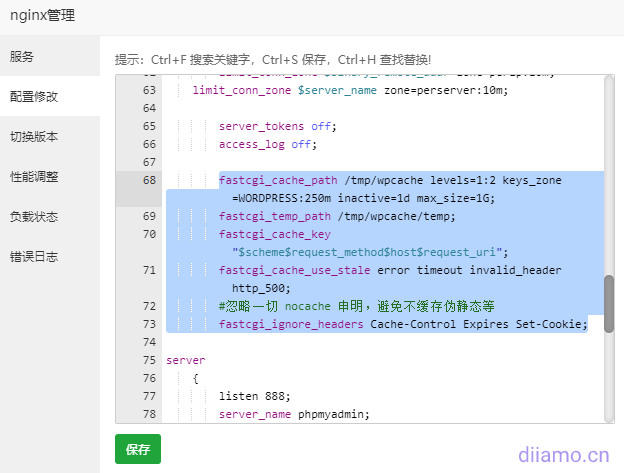
1 Log in to Pagoda background, find Nginx in the software store, click the Settings button, and add the following contents in the "Configuration Modification":
fastcgi_cache_path /tmp/wpcache levels=1:2 keys_zone=WORDPRESS:250m inactive=1d max_size=1G;
fastcgi_temp_path /tmp/wpcache/temp;
fastcgi_cache_key "$scheme$request_method$host$request_uri";
fastcgi_cache_use_stale error timeout invalid_header http_500;
#忽略一切 nocache 申明,避免不缓存伪静态等
fastcgi_ignore_headers Cache-Control Expires Set-Cookie;
The screenshot after adding is as follows.
Site Setup
Find the corresponding website in the list of websites in Pagoda background, click the "Settings" button, add the following code to the configuration file, and enter the IP (extranet) address of the web server in line 43.The code has to be adjusted as needed! It varies from site to site! Once again, I'm discouragedyoung white.
set $skip_cache 0;
#post 访问不缓存
if ($request_method = POST) {
	set $skip_cache 1;
}
#动态查询不缓存
if ($query_string != "") {
	set $skip_cache 1;
}
#后台等特定页面不缓存(其他需求请自行添加即可)
if ($request_uri ~* "/wp-admin/|/xmlrpc.php|wp-.*.php|/feed/|index.php|sitemap(_index)?.xml") {
	set $skip_cache 1;
}
#对登录用户、评论过的用户不展示缓存
if ($http_cookie ~* "comment_author|wordpress_[a-f0-9]+|wp-postpass|wordpress_no_cache|wordpress_logged_in") {
	set $skip_cache 1;
}
#这里请参考你网站之前的配置,特别是sock的路径,弄错会显示502!如果你的网站使用PHP7.4,就写-74.sock
location ~ [^/]\.php(/|$)
{
    try_files $uri =404;
    fastcgi_pass unix:/tmp/php-cgi-74.sock;
    fastcgi_index index.php;
    include fastcgi.conf;
    add_header Strict-Transport-Security "max-age=63072000; includeSubdomains; preload";
    #新增的缓存规则
    fastcgi_cache_bypass $skip_cache;
    fastcgi_no_cache $skip_cache;
    add_header X-Cache "$upstream_cache_status From $host";
    fastcgi_cache WORDPRESS;
    add_header Cache-Control  max-age=0;
    add_header Nginx-Cache "$upstream_cache_status";
    add_header Last-Modified $date_gmt;
    add_header X-Frame-Options SAMEORIGIN; # 只允许本站用 frame 来嵌套
    add_header X-Content-Type-Options nosniff; # 禁止嗅探文件类型
    add_header X-XSS-Protection "1; mode=block"; # XSS 保护
    etag  on;
    fastcgi_cache_valid 200 301 302 1d;
}
#缓存清理配置
location ~ /purge(/.*) {
	allow 127.0.0.1;
	allow "服务器外网IP"; # 引号要保留
	deny all;
	fastcgi_cache_purge WORDPRESS "$scheme$request_method$host$1";
}
The screenshot after adding is as follows.
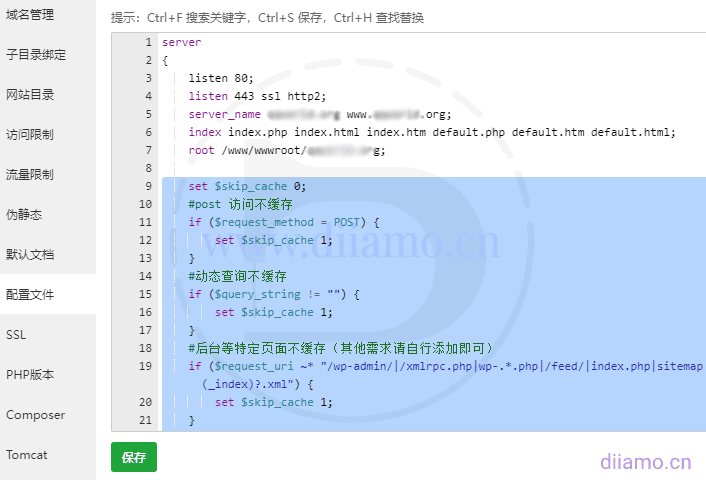
After adding and saving, restart Nginx on it. The next step is to install the Setup Cache plugin ↓.
Install the WordPress Clean Cache plugin
FastCGI_Cache cannot automatically clean up the site cache in a timely and accurate manner, so you need to install the supporting cache plugin to automatically control the refreshing cache. Backend search, installationNginx Helperplugin, this plugin is built specifically for fastcgi_cache caching.
The plugin settings are referenced in the image below (Image source. Zhang Ge Blog).

Choose Delete local server cache files for cleanup mode to delete cache files directly from the server and regenerate them.
My friend Nana built the site and found that the Nginx fastcgi_cache cache (404ms) is a little faster than the WP Super Cache + Memcached Object Cache cache (455ms).
Determining cache status
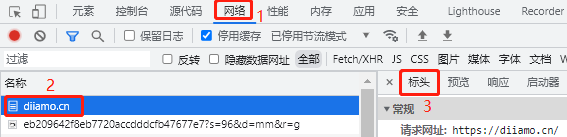
Open the frontend of the website in incognito mode of your browser (not logged in), press F12 to go to Developer Tools > Network > Tap on the URL > Tap on the "Header" to view the details.
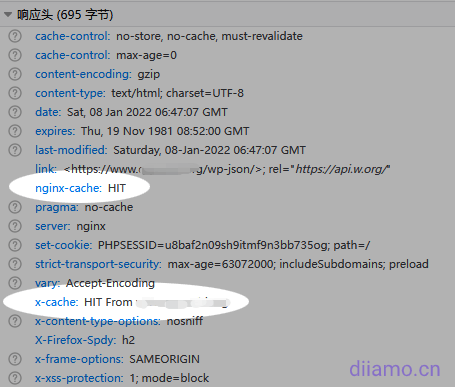
HIT: Cache Success
MISS: Cache failure, suggest refreshing the page 2 times to see if it has become HIT.
BYPASS: Skip Cache
EXPIRED: Cache expired
Advanced Tutorials
indeedThe fastcgi_cache cache can also be used with the Wp Rocket cache plugin. Using it together is more effective than using theWp Rocket is about 27% higher than the standaloneThe fastcgi_cache cache is not much different. Just install therocket-nginx, just configure it appropriately.This method has a high threshold for use, so don't use it if you don't know how.











10 thoughts on “宝塔面板Nginx如何启用fastcgi_cache缓存? WordPress提速”
Before optimization speed measurement 1.5-2s, after optimization about 0.5s, the effect is very big
Not using a caching plugin like wp rocket to optimize speed before?
Thanks for the tutorial! I followed the process once, and found that after turning it on successfully, visiting the homepage will automatically jump to: /wp-admin/setup-config.php Show: File
wp-config.phpalready exists. If you wish to reset any of the configuration items in this file, delete the file first. You can install it now. However, accessing the home page while the administrator is logged in will not jump.Is the wp-config.php file in the root directory (the folder whose name is the URL)? This problem is usually caused by the wrong location of the system files when you install wordpress. If the wp-config.php file is in the right place, try to clean up the cache and disable all the plug-ins to find out if there is a plug-in problem.
Confirmed it's not a browser cache thing, and I'm testing with a new site and all plugins turned off as well. I just tested on my side, as long as you delete the site's configuration file in the new code about fastcgi_cache cache, the home page is immediately accessible; add will jump to the tip
wp-config.phpIt already exists. I've searched in English for a long time as well and didn't find an answer. I'm cracking up ...... 😭Is the wp-config.php file in the root directory (the folder with the name url)? Make sure first. Maybe the configuration code was copied wrong? Check it.
I found the reason, nginx was not compiled and installed.
crying without tears...
Hello, after your successful configuration, the following error appears in the "Tools" - "Site Health" in the wordpress backend, may I ask how to solve it?REST API encountered unexpected results Performance REST API is a way for WordPress and other applications to communicate with the server. a way for WordPress and other applications to communicate with the server. For example, the Block Editor page relies on the REST API to display and save your pages and posts. When testing the REST API returned unanticipated results: REST API Endpoint: my site URL/index.php/wp-json/wp/v2/types/post?context=editREST API Response: (404) Not Found
Hello, there are a number of reasons for errors with the REST API, not necessarily because the Fastcgi_cache cache. We recommend disabling plugins one by one, switching to the default theme to see if the problem is solved. If you are sure it is Fastcgi_cache caching issues please reply to this comment.
Many times the REST API does not work, if it does not affect the functionality of the site and so on, it is recommended to properly ignore this error.